
Microsoft Azure Monitor Abused to Send Phishing Emails From Legitimate Addresses


 3 min. read
  Published on

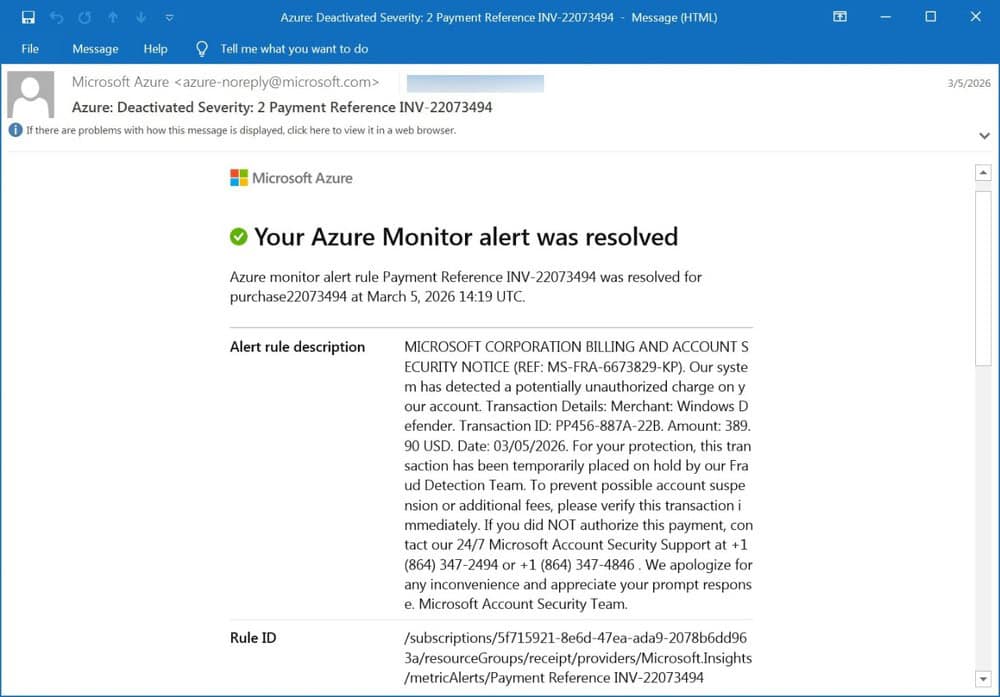
Microsoft Azure Monitor is being abused in a new phishing campaign that makes malicious emails appear fully legitimate. Attackers are leveraging the service to send callback phishing emails that look like official Microsoft security alerts.
Attackers impersonate Microsoft in a billing alert scam
According to BleepingComputer, threat actors are impersonating the Microsoft Security Team in fake billing notifications. These emails warn users about supposed unauthorized charges and push them to call a phone number to resolve the issue.
The approach relies on urgency, pushing victims to act quickly without verifying the message through official channels.
How the Azure Monitor phishing attack works
- Attackers create Azure Monitor alerts with custom malicious descriptions
- Alerts are triggered by common activities such as invoices, orders, or payments
- Emails are sent to attacker-controlled mailing lists, then forwarded to victims
- This preserves authentic Microsoft headers and trusted delivery paths
Because of this method, phishing emails are sent from a legitimate Microsoft address ([email protected]) and pass SPF, DKIM, and DMARC checks. This allows them to bypass many traditional email security filters.
Why is this attack especially dangerous?
This technique gives phishing emails a high level of credibility. Messages come from a trusted Microsoft domain, which increases the chances that users will believe them and follow the instructions.
Callback phishing adds another layer of risk. Victims may end up sharing credentials, authorizing fraudulent payments, or installing remote access tools during the call. In enterprise environments, this could lead to broader network compromise.
What to watch for
Users should treat unexpected billing alerts with caution, especially if they include a phone number or push immediate action. Messages that ask you to call instead of using official Microsoft support channels should raise suspicion.
Verifying alerts directly through official Microsoft portals remains the safest approach.
What users should do
Users should not rely on the sender address alone when evaluating emails. Even messages that pass authentication checks can be malicious if the underlying service is abused.
Always verify billing alerts through official Microsoft websites or account dashboards, and avoid calling numbers included in unsolicited emails.
This campaign highlights how attackers continue to abuse legitimate platforms to bypass security defenses. It also follows recent warnings about a critical SharePoint flaw under active exploitation.
At the same time, threat actors are reportedly selling a Windows Remote Desktop exploit, while Microsoft has released the KB5084597 emergency update to fix RRAS remote code execution vulnerabilities.

Read our disclosure page to find out how can you help Windows Report sustain the editorial team. Read more



Improve this guide


User forum
0 messages