
Xbox PC Remote Tools Launch in Public Preview to Speed Up Windows Game Development


 3 min. read
  Published on
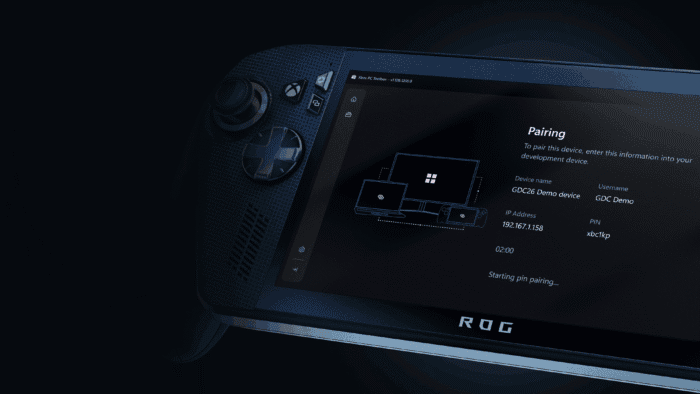
Microsoft is simplifying game development across Windows devices with its new Xbox PC Remote Tools. The company has now confirmed that these tools have entered Public Preview, offering developers a faster way to deploy, test, and debug games on remote Windows desktops and handhelds.
In the announcement blog post, Xbox Senior Technical Program Manager Meg Shea notes that the “Xbox PC Remote tools are designed to streamline your development for Windows games, regardless of which storefront you ship on, and do not have any required dependencies on the Microsoft Game Development Kit (GDK) or the Xbox PC App.”
The Xbox PC Remote Tools include the following:
- Xbox PC Toolbox: a user-friendly app to set up and pair remote Windows devices
- Xbox PC Remote Debugger: a Visual Studio extension for incremental deployment and debugging over a secure communication channel
- Xbox PC Remote Iteration Command Line Tools: for deploying and launching game builds via scripts or CI pipelines
- Xbox PC Remote Iteration APIs: for integrating remote workflows into your engine or tools (Note – the APIs are currently in preview, and we will share more details on them in the near future. Please reach out to your Microsoft representative if you want more details on the Xbox PC Remote Iteration APIs and their availability.)
Microsoft has shared a detailed breakdown for game developers looking to integrate the Xbox PC Remote Tools into their workflow:
| Workflow Step | Before | With Xbox PC Remote Tools |
|---|---|---|
| Device Setup & Pairing | Manual installs, firewall tweaks, inconsistent setup across devices | Secure provisioning and device pairing in minutes via the Xbox PC Toolbox |
| Deploying Builds | Full builds copied over network, slow and error-prone | Consistent incremental deployment sends only the changed files, dramatically speeding up iteration |
| Debugging on Remote Devices | Manual, multi-step download, installation, and configuration required. Secure connection not available in all scenarios | Easily acquire the Xbox PC Remote Debugger in the Visual Studio marketplace. Press F5 in Visual Studio to deploy, launch, and attach debugger |
| Managing and Iterating with Multiple Remote Devices | No centralized view, hard to track paired devices or manage connections | The Xbox PC Remote Tools provide an easy way to view and iterate on paired devices |
| Automation & CI/CD Integration | No consistent tooling or APIs for scripting remote workflows | Xbox PC Remote Iteration command-line tools and APIs enable integrations in your tool chains and engine workflows |
Here’s how to try it out. First, install and launch the Xbox PC Toolbox to configure your development PC and pair it with your target Windows devices. Once paired, add the Xbox PC Remote Debugger extension to Visual Studio 2022 or 2026, then press F5 to build your game, deploy it to the remote device, and start debugging.
Next, make changes on your dev PC and redeploy only the modified files to speed up iteration. You can also integrate remote workflows into your studio’s toolchain using the wdRemote and wdEndpoint command-line tools or the Visual Studio extension, all built on a public API available via NuGet. Moreover, Microsoft encourages developers to provide feedback through Feedback Hub or by contacting their representative to help refine the tools.

Read our disclosure page to find out how can you help Windows Report sustain the editorial team. Read more



Improve this guide



User forum
0 messages