
Google Chrome Finally Adds Vertical Tabs and a New Reading Mode


 2 min. read
  Published on
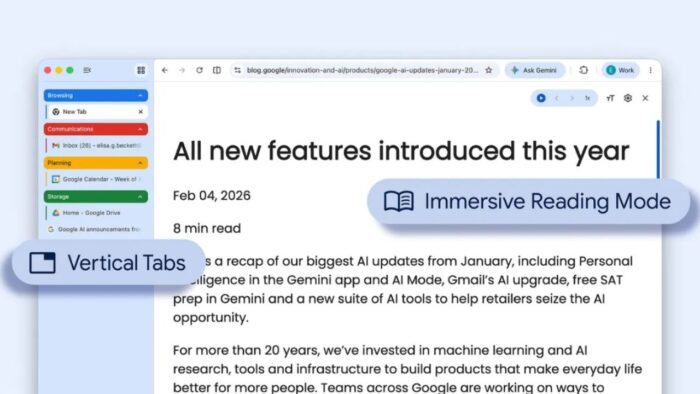
Google is bringing two highly requested features to its web browser this week. Chrome users can now organize their screen with vertical tabs and use a built in reading mode to block out digital clutter. These changes aim to make browsing the internet easier on your eyes and keep your workspace tidy.
If you normally keep dozens of pages open at once, these updates will help you manage the mess without installing extra extensions. The company keeps adding useful tools to the browser, including new AI features as Gemini rolls out in Google Chrome for Chromebook Plus users in the US.
Moving your tabs to the side of the screen for easier navigation
Microsoft Edge and other browsers offered side navigation for years, and now Chrome is catching up. Instead of squeezing tiny tabs across the top of your monitor, you can snap them to the left side of your window.
The side panel expands when you hover over it, letting you read the full title of every open page. This makes it much easier to find exactly what you need when you have multiple research pages or shopping sites open at the same time. You can also group related pages together and collapse them to save space.
Reading online articles without the extra digital distractions
The second major update is a dedicated reading environment. When you click the new book icon in the address bar, Chrome strips away sidebar menus, video popups, and giant banner ads. This feature pairs well with other background improvements, like how Google Chrome may add native lazy loading for video and audio to keep your browsing fast.
It leaves you with just the main text and important images. You can adjust the font size, change the background color to dark or sepia, and widen the text spacing. This is highly useful if you spend a lot of time reading long news stories or studying online documents. Both features are rolling out slowly, so check your settings soon.


Read our disclosure page to find out how can you help Windows Report sustain the editorial team. Read more



Improve this guide




User forum
0 messages