
Microsoft Teams Gets New Meeting AI Toggle for Copilot, Facilitator, and Recap


 3 min. read
  Published on
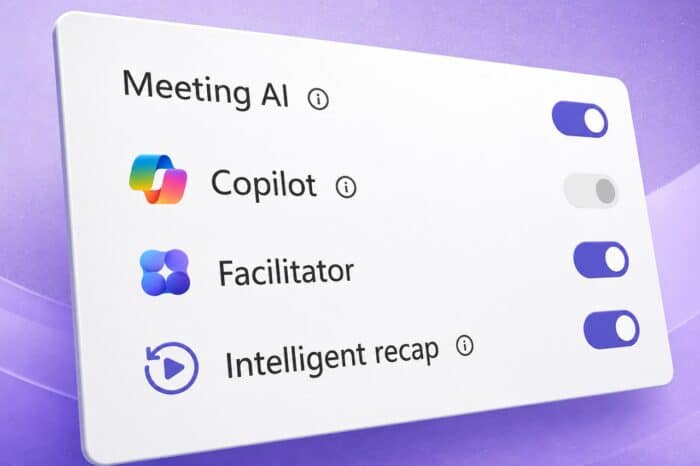
Microsoft Teams is getting a new in-meeting control called Meeting AI. The toggle will let licensed organizers and presenters turn AI features on or off during live meetings.
The feature covers Teams AI tools such as Copilot, Facilitator, and Recap. Microsoft says the rollout starts in early July 2026, with availability planned across Windows, macOS, mobile, and web.
Teams Meeting AI Control Gives Hosts More Flexibility
The new Meeting AI toggle gives organizers and presenters more direct control over when AI features run in a meeting.
AI tools can help with meeting summaries, transcription-based recaps, and in-meeting assistance. However, not every meeting needs AI, and some users may prefer to keep these features disabled for privacy, sensitivity, or compliance reasons.
Microsoft is responding by moving more control into the meeting itself. Instead of relying only on preconfigured settings, eligible users will be able to manage AI tools while the meeting is active.
How the Meeting AI Toggle Works
According to MC1319216, the Meeting AI toggle appears only when AI features are allowed by tenant policy.
If an organization disables Meeting AI through policy, users will not see the toggle in meetings. When the setting is available, licensed organizers and presenters can control which AI features are active during a new or current meeting.
The feature does not change existing compliance or licensing requirements. Admins still control whether Meeting AI is allowed at the organization level.
Admin Policies Still Set the Main Rules
The new control respects existing tenant-level policies.
That means organizers and presenters only get meeting-level control when the organization allows it. If an admin blocks Meeting AI, the in-meeting toggle will not override that decision.
The control also does not affect past meetings. It only applies to new or current meetings where the feature is available.
Transcription Can Automatically Enable Meeting AI
Microsoft says Meeting AI and transcription connect closely when used together.
Turning on Meeting AI automatically enables transcription and generates a recap. Starting transcription also automatically enables Meeting AI and recap.
This means organizers who want to avoid AI features entirely must keep both Meeting AI and transcription turned off. That detail matters for meetings with stricter privacy, legal, or compliance requirements.
Microsoft Teams Meeting AI Rollout Schedule
Microsoft plans to begin the Targeted Release rollout in early July 2026. That phase should finish by mid-July.
General Availability starts in mid-July, and Microsoft expects the full rollout to complete by the end of July 2026.
The Meeting AI toggle will be available on Microsoft Teams for Windows, macOS, mobile, and web.
For more features, there is also a recap of all features added to Teams in June 2026.
Via Windows Latest

Read our disclosure page to find out how can you help Windows Report sustain the editorial team. Read more



Improve this guide


User forum
0 messages