
Jalisco and OmegaLord Phishing Kits Target Microsoft 365 With MFA Bypass


 4 min. read
  Published on
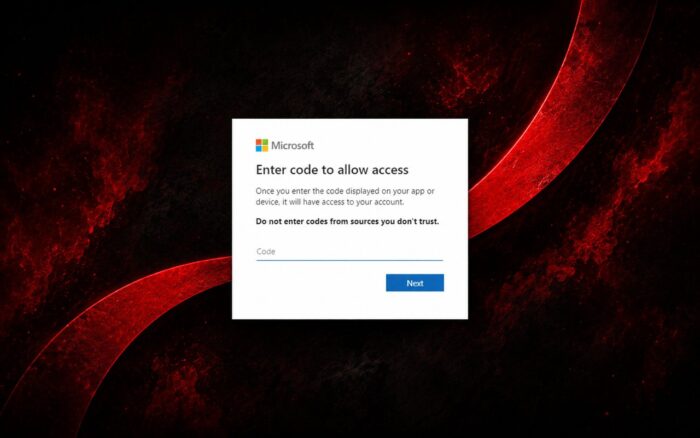
New Microsoft 365 phishing kits named Jalisco and OmegaLord are targeting cloud accounts with techniques designed to bypass or undermine multifactor authentication.
ReliaQuest analyzed both toolkits and found that attackers continue to develop device-code phishing and conventional credential theft methods. The campaigns can give threat actors access to Microsoft 365 accounts, registered devices, SharePoint files, and other cloud services.
Jalisco Abuses Microsoft Device-Code Authentication
Jalisco abuses the OAuth 2.0 Device Authorization Grant flow, which allows users to sign in to devices that have limited input capabilities.
The attacker starts a Microsoft sign-in request and generates a device authorization code. The phishing page then instructs the victim to visit Microsoft’s legitimate login page and enter that code.
Because the victim completes the authentication process on a real Microsoft page, the attack may appear more trustworthy than a conventional fake login form.
Entering the code authorizes a device controlled by the attacker. The threat actor can access the Microsoft 365 account without directly collecting the victim’s username or password.
Fresh OAuth Codes Generated in Real Time
Microsoft device codes normally expire after 15 minutes, limiting how long attackers can use them.
Jalisco works around this restriction by generating a fresh OAuth device code when a victim opens the phishing page. This gives the attacker a valid code at the moment the victim begins the sign-in process.
Attackers Register Rogue Devices
After compromising an account, attackers can register unauthorized devices through Microsoft Entra ID.
ReliaQuest observed compromised accounts with as many as five rogue devices. The devices sometimes used harmless-looking names containing words such as “Microsoft” or “Windows.”
These names can make the registrations appear legitimate during a quick review by users or administrators.
Registering multiple devices may also help attackers maintain access after security teams revoke an individual session or remove one suspicious device.
Stolen Microsoft 365 Accounts Used for Data Theft
Once attackers gain access, they can search SharePoint and other software-as-a-service platforms for sensitive information.
The targeted data may include:
- Employee and customer personal information
- Financial documents and payment records
- Internal emails and communications
- Business plans and confidential company files
- Authentication details stored in shared documents
Attackers may later demand payment from the affected organization and threaten to publish or sell the stolen information.
OmegaLord Uses a Fake PDF Reader Login Page
OmegaLord follows a more conventional phishing model but adapts it to target accounts protected by MFA.
The phishing kit displays a fake PDF reader login page that collects email addresses, passwords, and phone numbers.
Collecting phone numbers gives attackers additional options after stealing a victim’s login credentials. Threat actors could use the numbers to socially engineer users, intercept verification requests, redirect communications, or pressure victims into approving MFA prompts.
The campaign demonstrates how traditional credential-stealing pages now collect more information to help attackers work around additional authentication protections.
Organizations Should Restrict Device Registration
ReliaQuest recommends lowering the Microsoft Entra ID device-registration limit from 50 to one or two devices where possible. Administrators should also block device-code authentication when it is not needed and restrict the OAuth Device Authorization grant in Okta.
Additionally, administrators should review device and application registrations for suspicious entries and remove unnecessary ones.
Security teams should monitor for unusual device registrations, OAuth activity, SharePoint downloads, and access from unfamiliar locations.
They should also revoke suspicious sessions, remove rogue devices, reset credentials, and review cloud activity after a compromise.
OAuth Phishing Attacks Continue to Evolve
This is not the first time attackers have abused OAuth authentication flows in phishing campaigns.
Kaspersky previously warned that threat actors were misusing OAuth flows to compromise accounts. Entra passkeys have also been abused in similar attacks, while the Forg365 platform recently used code-based authentication to target Microsoft 365 users.
Other cloud services remain exposed after an account compromise. The Helix group has also used stolen access to collect data from SharePoint environments.
Via BleepingComputer

Read our disclosure page to find out how can you help Windows Report sustain the editorial team. Read more



Improve this guide


User forum
0 messages