
Chrome's floating AI Mode compose box now lets users attach files, images, and Drive documents
Start AI conversations from any webpage with file, image, and Drive attachments.


 2 min. read
  Published on
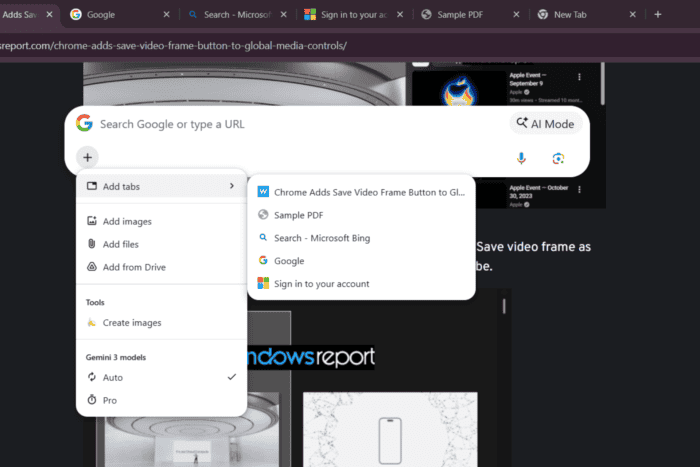
When we first reported on Chrome’s floating AI Mode compose box, the attachment options were visible but not functional. The latest Chrome Canary build changes that. Users can now upload files, images, and Google Drive documents directly from the compose box before AI Mode opens in a new tab.
Available from any webpage with the Ctrl + Shift + Space shortcut on Windows, the compose box lets users type a prompt, choose between Gemini’s Auto and Pro models, and attach files, images, or Google Drive documents before AI Mode opens in a new tab.
A new + button opens a menu with options to Add images, Add files, Add from Drive, and Create images. These features worked as expected in our testing.
After submitting a prompt, Chrome opens AI Mode in a new tab with the selected attachments already included.
Google has also added an “Add tabs” option that displays a list of open tabs. However, selecting a tab did not attach it to the prompt in our testing, which suggests that part of the feature is still under development.
The latest changes turn the floating AI Mode compose box into more than a shortcut to AI Mode. Instead of navigating to AI Mode first, users can start an AI conversation from virtually anywhere in Chrome, prepare a prompt with attachments, and continue the interaction once AI Mode opens in a new tab.
The feature remains experimental and is currently available only in Chrome Canary behind feature flags. Google has not announced when, or if, it will roll out to the stable version of Chrome.


Read our disclosure page to find out how can you help Windows Report sustain the editorial team. Read more



Improve this guide



User forum
0 messages