
Microsoft Teams Now Lets GitHub Copilot Turn Chats Into Code


 3 min. read
  Published on
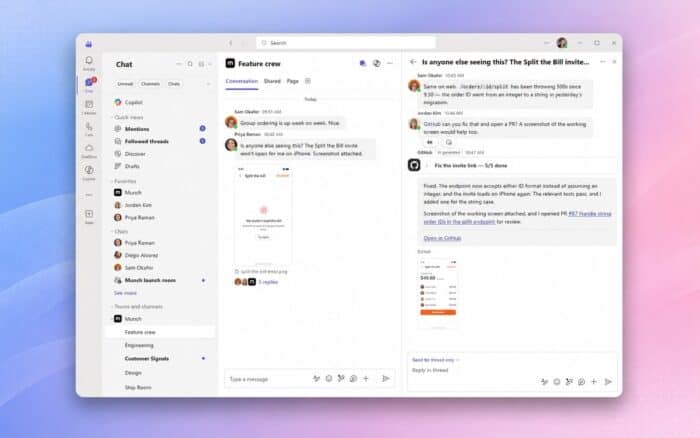
GitHub Copilot in Microsoft Teams can now use developer conversations as context, work on code, and create pull requests without requiring users to move discussions into a separate development environment.
Microsoft has launched the public preview of GitHub Copilot integration in Teams, bringing GitHub’s coding agent directly into chats and channels where development teams already discuss bugs, features, architecture, and deployments.
The integration aims to shorten the gap between discussing a change and actually implementing it.
GitHub Copilot can use Teams conversations as context
Developers can @mention GitHub Copilot inside a Teams conversation and ask it to work on something the team has discussed.
Copilot can use the conversation to understand the problem, requirements, and proposed solution. It can then connect that context with the relevant GitHub repository and begin working on the requested changes.
This means a discussion about a bug or new feature can move directly into implementation without developers manually copying requirements into another tool.
Once the work is ready, Copilot can create a pull request containing the proposed changes.
What GitHub Copilot can do inside Teams
During the public preview, GitHub Copilot can handle several common development tasks directly from Teams conversations.
It can build features based on requirements discussed by the team, implement bug fixes, expand test coverage, improve project documentation, and create or update pull requests.
The feature effectively brings a coding agent into the same collaboration environment developers already use to plan work and make technical decisions.
Copilot works across Teams chats and channels
Microsoft is making the integration available across several types of Teams conversations.
GitHub Copilot currently works in 1:1 chats, group chats, meeting chats, and Teams channels.
Users need to install the GitHub app for Microsoft Teams before they can access the Copilot integration.
The broader availability across Teams means developers do not need to move a conversation into a specific channel or workflow before asking Copilot to act on it.
Developers still need to review the code
GitHub Copilot will respect existing user and repository permissions, according to Microsoft.
The integration can automate parts of the implementation process, but developers still control what happens to the generated code.
Teams should continue reviewing proposed changes and approving pull requests before merging them into a repository. Copilot therefore handles more of the repetitive implementation work without removing human oversight from the development process.
That approach also means organizations can use their existing GitHub access controls rather than creating a separate permission model specifically for Copilot inside Teams.
Microsoft has not announced general availability
GitHub Copilot in Microsoft Teams remains in public preview, and Microsoft has not announced when it will reach general availability.
The integration brings three major Microsoft platforms closer together by connecting Teams conversations, GitHub repositories, and Copilot coding agents in one workflow.
For development teams, the biggest change is that technical discussions can now become actionable development tasks without requiring someone to manually recreate the context elsewhere.
In other Microsoft news, the company is retiring several CSS properties in Entra ID as part of changes affecting branded sign-in pages. Microsoft also recently fixed a major Entra ID security flaw.

Read our disclosure page to find out how can you help Windows Report sustain the editorial team. Read more



Improve this guide




User forum
0 messages