
Windows 11 KB5124006 Brings Major Taskbar, Start Menu, Search and File Explorer Changes


 2 min. read
  Published on
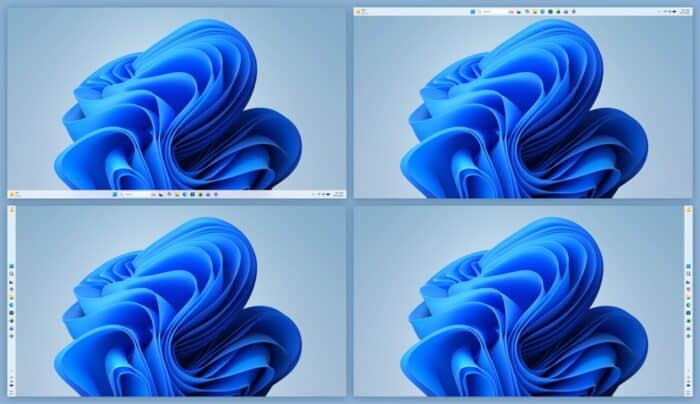
Microsoft has released a new Windows 11 26H1 preview update, KB5124006, which bumps the operating system to Build 28000.3086. Unlike the latest security update, this release comes with a much longer list of changes covering the taskbar, Start menu, Search, File Explorer, Windows Share, security, networking, AI workloads and more.
Windows 11 taskbar and Start menu get major changes
One of the biggest changes is the new taskbar position option. Users can now move the taskbar to the top, left, right or bottom of the screen from Taskbar settings. Microsoft also adds a Small taskbar option that reduces the icon size and taskbar height for devices where screen space matters.
Moving on, the Taskbar behaviors section is now expanded by default, while Microsoft has also improved the reliability of loading the system tray on non-touch PCs.
The Start menu gets its own set of changes. Users can choose between Small, Large and Automatic sizes, while the Recommended section is now called Recent. Microsoft also adds an option to hide the user’s name and profile picture and introduces separate controls for showing or hiding the Start menu’s Pinned, Recent and All sections.
Search, File Explorer and Windows Share also get upgrades
Windows Search is getting a cleaner home page, clearer labels showing whether results come from an app, setting, file, web or Store, and a new option to control web and Microsoft Store suggestions.
Windows 11 can also automatically index frequently used folders, while File Explorer Home should launch faster. Its Recommended section now supports touch scrolling.
Microsoft is also updating progress indicators across startup, sign-in, restart, shutdown and update installation. Windows Share gets a new option allowing work and school users to discover and install relevant apps directly from the Share window.

Read our disclosure page to find out how can you help Windows Report sustain the editorial team. Read more



Improve this guide



User forum
0 messages