
Microsoft Expands Windows 11 Phone Integration With Access to Messages, Apps, Files, and Cross-Device Resume


 2 min. read
  Published on
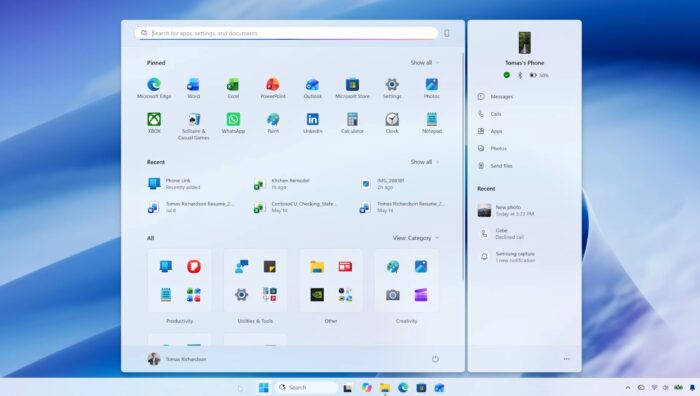
Windows 11 is getting better at keeping your phone within reach while you work on your PC. Microsoft is expanding its connected-phone experience with easier access to messages, notifications, applications, and files.
Your phone is becoming part of the Windows desktop
Microsoft says users can preview messages and notifications from compatible Android phones and iPhones through Start. When a conversation needs a reply, users can open it in a dedicated window and respond without leaving their current workflow.
Quick Settings also provides phone controls, including options to ring or silence a misplaced device. Supported Android phones get additional features.
Users can open phone applications in separate, resizable desktop windows and browse phone files through File Explorer. When a new photo is captured, a notification can help users open it on their PC with one click.
Resume helps you pick up where you left off
Microsoft is also highlighting Resume, which lets users continue supported activities when moving between devices. The goal is to reduce the need to find the same file, application, or task again.
However, availability depends on the phone platform and device compatibility. Microsoft has not claimed that every feature works identically across Android and iPhone. The company is beginning to roll out these connected experiences as part of its broader Windows 11 improvements, including new Photos app, Search improvements, and more.

Read our disclosure page to find out how can you help Windows Report sustain the editorial team. Read more



Improve this guide


User forum
0 messages