
Windows 11 Beta Build Adds Customizable File Explorer Menu


 2 min. read
  Published on
Microsoft has released Windows 11 Insider Preview Build 26220.9757 to the Beta Channel, introducing a redesigned File Explorer context menu with a cleaner layout and new customization options.
The update also improves the performance of the Windows 11 Settings app, particularly when loading its home page.
File Explorer gets a cleaner, customizable right-click menu
Microsoft is making changes to the File Explorer right-click menu to reduce clutter and make frequently used commands easier to access.
The redesigned context menu reduces the number of options at the top level while keeping common actions readily available.
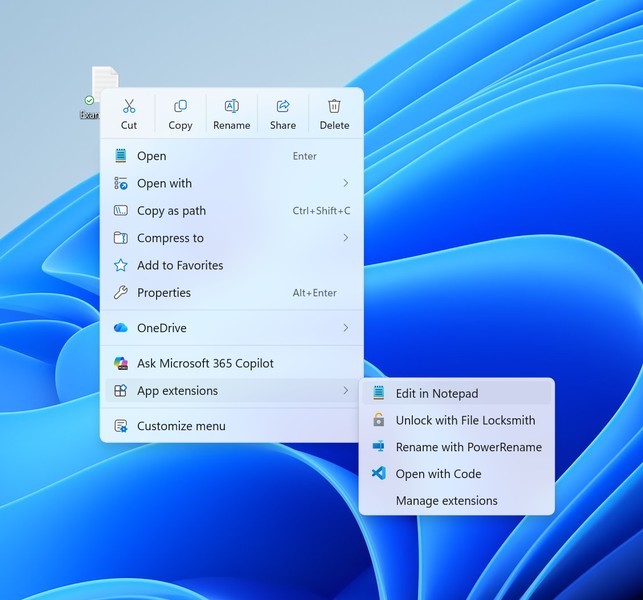
Microsoft is also introducing a new Settings experience that lets users customize which options appear in the context menu. This gives users more control over the right-click interface rather than forcing everyone to use the same layout.
The changes aim to improve usability and make everyday File Explorer interactions faster and more predictable.
Microsoft is gradually rolling out the redesigned menu to Windows Insiders in the Beta Channel and will use feedback to refine the experience.
Windows 11 Settings gets performance improvements
Build 26220.9757 also includes performance optimizations for the Settings app.
According to Microsoft, the changes reduce loading times on the Settings home page in certain scenarios, helping the app respond faster.
The company has not shared specific performance figures or detailed benchmarks.
For now, both improvements remain part of the Beta Channel release, with no confirmed date for their arrival in the stable version of Windows 11.
Separately, Microsoft has recently ended its Garage innovation program and closed 15 workspaces. The company is also making changes to its identity services, with Microsoft Entra ID introducing telephony providers ahead of the 2027 SMS retirement.

Read our disclosure page to find out how can you help Windows Report sustain the editorial team. Read more



Improve this guide



User forum
0 messages