
Windows 11 Finally Lets You Enter Your PIN Without Waiting for Windows Hello


 2 min. read
 Published on
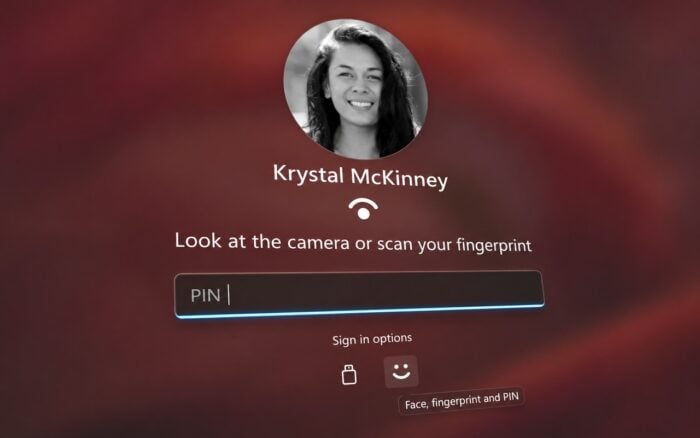
Microsoft is making Windows Hello less frustrating in Windows 11 by allowing users to enter their PIN immediately instead of waiting for facial recognition or fingerprint authentication to fail.
The improvement is rolling out with Windows 11 Experimental Build 26340.9882, although Microsoft is introducing it gradually to Windows Insiders.
Windows Hello gets faster PIN access
Currently, Windows 11 users may have to wait for Windows Hello to finish an unsuccessful facial recognition or fingerprint scan before they can enter their PIN.
This can be frustrating when the camera fails to recognize their face or the fingerprint reader doesn’t work properly.
With the new change, users can enter their PIN immediately without waiting for biometric authentication to fail. This makes signing in faster, particularly for users who frequently encounter Windows Hello recognition issues.
However, Windows Hello will still require PIN authentication by default in certain situations, including after restarting the computer.
When will the Windows Hello improvement be available?
Microsoft is gradually rolling out the improvement to Windows 11 Insiders running Experimental Build 26340.9882, so not everyone will see it immediately.
The company hasn’t announced when the feature will reach all Windows 11 users.
While this is a relatively small change, it removes an unnecessary delay from the sign-in process and makes Windows Hello more convenient to use.
In other news, Microsoft Copilot can now create, update, and delete data across connected apps.
Microsoft has also added USB streaming to Mixed Reality Link for Meta Quest 3 and 3S.
Via Neowin

Read our disclosure page to find out how can you help Windows Report sustain the editorial team. Read more


Improve this guide



User forum
0 messages