
Anthropic Lets Claude Users Turn Artifacts Into Windows and Mac Apps


 3 min. read
 Published on
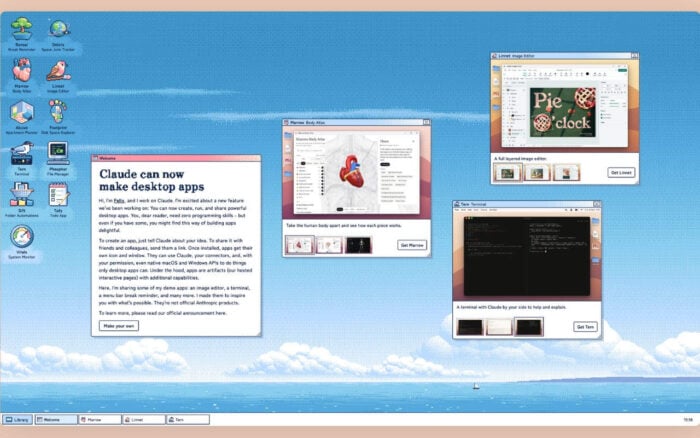
Anthropic has introduced a new feature that allows Claude users to turn artifacts into standalone desktop applications for Windows and macOS. Users can install their creations directly from Claude without manually packaging or signing them.
According to Anthropic’s announcement, the new Install as app option gives artifacts their own desktop icons and lets them run in separate windows, rather than inside a browser.
Users can also share these applications with other Claude users, making it easier to distribute custom tools built with AI.
Claude artifacts now support native desktop features
Unlike regular browser-based artifacts, installed Claude apps can access several desktop capabilities.
These include desktop notifications, global keyboard shortcuts, Windows system tray integration, and macOS menu bar support. Apps can also display always-on-top windows, access local files, and launch other programs when users grant the necessary permissions.
Installed applications automatically receive updates whenever their creators modify the underlying artifacts. However, users must approve permissions again.
The feature allows Claude users to build simple desktop utilities and productivity tools without going through traditional application development and distribution processes.
Anthropic introduces three permission levels for desktop apps
Anthropic has introduced three permission levels to control what installed artifact apps can do.
- Default: Apps can use standard browser capabilities but cannot access advanced desktop features.
- App permissions: Apps can access desktop-specific functionality, including notifications, shortcuts, and other system integrations.
- Full computer access: Apps can run programs and read, modify, or delete local files without requesting approval for every action.
The company warns that it does not review artifact apps before users install them, making permissions particularly important.
To limit potential security risks, Anthropic only allows full computer access for apps users create themselves or those developed within their Team or Enterprise organization.
Claude desktop app installation rolls out in beta
Anthropic is rolling out the feature in beta for Windows and macOS users across all Claude plans.
Team users have access by default, while Enterprise administrators must manually enable the feature for their organizations.
However, Claude Docs, Slides, and Sheets do not currently support installation as standalone desktop apps.
The update comes as AI companies expand their tools beyond chat interfaces and traditional development environments.
Microsoft CEO Satya Nadella recently acknowledged the impact of Claude Code on the future of VS Code. Microsoft also expects AI agents to become the primary users of many software applications.
Meanwhile, OpenAI upgraded ChatGPT with GPT-6.2, with access initially limited to paying subscribers.

Read our disclosure page to find out how can you help Windows Report sustain the editorial team. Read more


Improve this guide
User forum
0 messages