
X finally gets Parental Controls; here's everything you should know


 2 min. read
 Published on

X is rolling out a more structured way for parents and guardians to manage teenagers’ accounts, covering screen time, recommendations, followers, messaging, and privacy. The new Parental Controls feature gives parents a set of supervision tools, but it doesn’t let them read teens’ private messages or take over their accounts.
How do X’s Parental Controls work?
The system relies on both sides agreeing to link their accounts, with teens able to see what their parents manage and request an end to supervision. Parents and guardians can link their accounts with teens aged 13 to 17, while supervisors must be at least 18. Both sides must approve the connection, which starts with a QR code or invitation link. Teens can review the request and accept or decline it, while invitations expire after 72 hours.
Once linked, parents can see how much time teens spend on X during the past seven days and set daily limits. They can also restrict recommendations, disable sensitive media, approve new followers, add restricted words, and control who can message their teens.
Privacy settings also include account protection, photo tagging, discoverability through phone numbers or email addresses, and location visibility on posts. Parents can see which accounts teens chat with one-to-one, but can’t open those conversations.
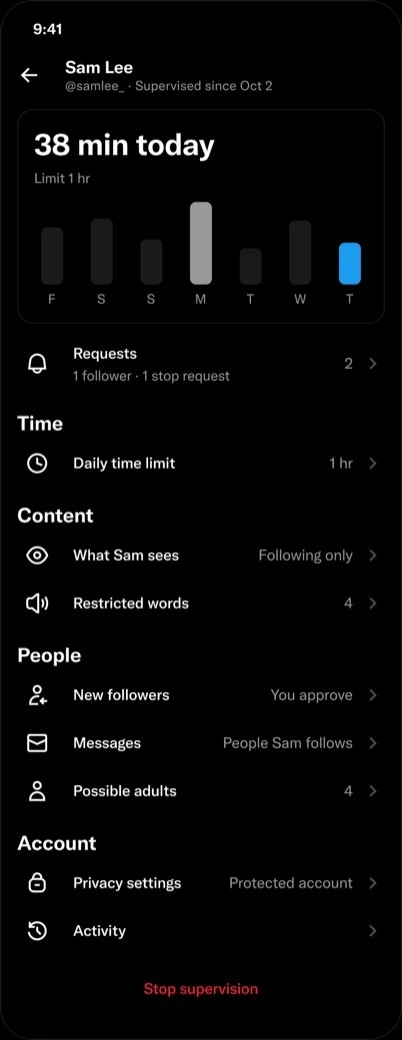
Teens can see supervision and request changes
X keeps supervision visible rather than hiding it in the background. Teens can check who supervises them, view managed settings, review activity records, and see their screen-time limits. Locked settings can’t be changed by teens while supervision remains active.
Daily limits can be set in 15-minute increments and reset at midnight in the teen’s local time. When the limit is reached, X locks access until the next reset, unless the parent changes or removes it. Teens can also request to end supervision, although the parent or guardian must approve that request.
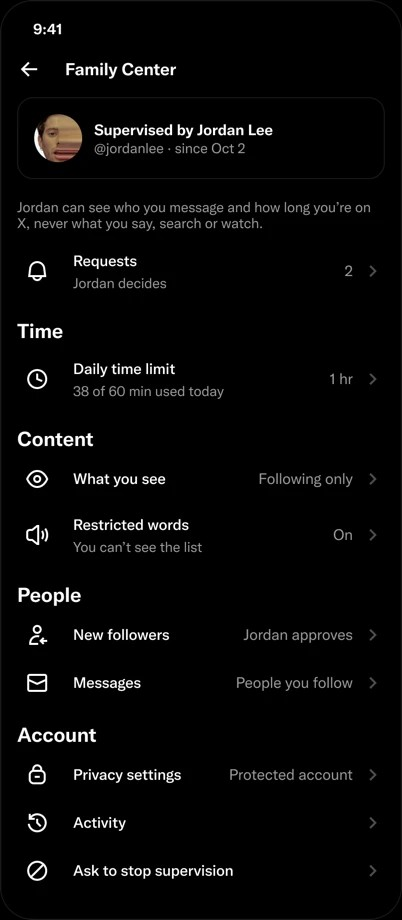
What parents can’t access?
Despite the additional controls, X doesn’t give parents access to everything their teens do. They can’t read private messages, view search history, see which posts or videos teens watch, or post and interact on their behalf.
Parents can end supervision at any time, while teens can request it. Once supervision ends, managed settings become unlocked, but existing settings remain until teens change them.

Read our disclosure page to find out how can you help Windows Report sustain the editorial team. Read more


Improve this guide




User forum
0 messages