How to Restart Windows Without Restarting the Computer

https://support.microsoft.com/kb/143272

NOTE: This article contains information about using Windows in a configuration that has not been tested and is not supported by Microsoft. If the steps described in this article do not function properly, do not use this method.

To restart Windows without restarting your computer, follow these steps:
1) Click Start, and then click Shut Down.
2) Press and hold down the SHIFT key while you click Restart The Computer, and then click Yes.
3) As soon as the screen clears, release the SHIFT key.
NOTE: If you hold the SHIFT key too long, Windows restarts in Safe mode.

lol. I saw this and laughed. Microsoft put this out back in 2006. Anyone remember this?

Microsoft: Kinect now more accurate than at launch

According to Microsoft’s Xbox Senior Product Manager, David Dennis, the Kinect motion gaming and entertainment device is now more accurate than ever compared to when it was first launched. This is all thanks to the software updates the device has received since launch.

Microsoft is boasting that the Kinect is more accurate than ever all thanks to software updates. Microsoft continues on a quest to further improve its Kinect motion gaming device. Reports indicate that Microsoft was working on increasing the amount of data the Kinect’s camera could transmit to the console. Other reports indicate that Microsoft wanted to quadruple the resolution to capture finger movement.

“I think like we showed at E3, like Kudo [Kudo Tsunoda, Creative Director for Kinect] showed with Kinect Fun Labs–a lot of that tech is the advancements we’ve made in the accuracy, the tracking…being able to show finger tracking in the Sparkles demo he did,” Dennis stated during an interview.

Kinect has proven to be a popular item for gamer and entertainment lovers, regardless of its accuracy. Microsoft estimated a sale of 5 million Kinect units last year, but instead, achieved a sale of 8 million units in 2010. Microsoft announced in March of 2011 that the company had sold 10 million Kinect units overall since launch.

Not that long ago, we learned of a new advertising format that utalizes the Kinect on Windows Phone. Users will be able to use voice commands or gestures to naturally engage with advertising and extend the interaction from the living room. “Simply put, NUads break down the barriers between consumers and content on the TV screen. NUads make traditional linear content— like a 30 second TV spot— irresistibly interactive,” said Microsoft Advertising General Manager Mark Kroese.

Microsoft has promised to continue working on the Kinect and issue out more improvements. The company is “working on things for next year and the year after.”

How to save customized themes in Windows 7

Windows theme packs are a fun way to customize your Windows desktop. Theme packs save your wallpaper, window color, default system sounds and screensaver in a single file. Here’s how to save your customizations so you can save them for later use or to share them with others.

1) Go to Start –> Control Panel –> Appearance and Personalization –> Personalization to view and customize your themes.

2) After you’ve customized your theme by selecting your wallpaper, window color, default sounds and screensaver, locate your “Unsaved Theme” in the “My Themes” section.

3) Right-click on the unsaved theme and select Save Theme and name your theme. Right-click on your theme again and select Save theme for sharing. Name the theme and save the resulting theme pack on your computer.

Save theme for sharing

To install the theme pack you just created, all you have to do is double-click on the theme pack and Windows will automatically apply it and add it to your theme list. The theme pack will have a .themepack extension.

Source: cnet

To install Windows 7 using the Upgrade option

  1. Turn on your computer so that Windows starts normally. (To perform an upgrade, you can’t start, or boot, your computer from the Windows 7 installation media.)

  2. After Windows has started, do one of the following:

    • If you downloaded Windows 7, browse to the installation file you downloaded, and then double-click it.

    • If you have a Windows 7 installation disc, insert the disc into your computer. Setup should start automatically. If it doesn’t, click the Start button Picture of the Start button, clickComputer, double-click your DVD drive to open the Windows 7 installation disc, and then double-click setup.exe.

    • If you’ve downloaded Windows 7 installation files onto a USB flash drive, insert the drive into your computer. Setup should start automatically. If it doesn’t, click the Start button Picture of the Start button, click Computer, double-click the drive, and then double-click setup.exe.

  3. On the Install Windows page, click Install now.

  4. On the Get important updates for installation page, we recommend getting the latest updates to help ensure a successful installation and to help protect your computer against security threats. You need an Internet connection to get installation updates.

  5. On the Please read the license terms page, if you accept the license terms, clickI accept the license terms, and then click Next.

  6. On the Which type of installation do you want? page, click Upgrade to begin the upgrade. You might see a compatibility report. Picture of the Which type of installation do you want? page

  7. Follow the instructions to finish installing Windows 7.

Credit: Microsoft

Quiz: Think you’re a Windows expert? Try this!

The guys over at ZDNet have put together a pretty cool quiz to determine how knowledgeable you are when it comes to Microsoft. The quiz asks some random Microsoft questions that make you scratch your head while trying to remember. Give it a shot and see how you do!

So, you think you’re the ultimate Microsoft/Windows fan, huh? Well, it’s time to dust off the ol’ memory bank and really test your knowledge! Only the most astute Microsoft/Windows enthusiast will stand a chance to defeat this quiz, but I know there are plenty of you out there! And who knows? You may even learn a thing or three.

Quiz Instructions: Write down your answers and then check the answer page to see your results. Post about how you did in the comments section below.

1. What was the code name of Windows 95?

  • A. Memphis
  • B. Daytona
  • C. Chicago
  • D. Whistler
  • E. Blackcomb

2. What year was Microsoft established and in which city and state?

  • A. 1975 in Redmond, Washington
  • B. 1976 in Seattle, Washington
  • C. 1976 in Wilmington, Deleware
  • D. 1975 in Albuquerque, New Mexico

3. What is the name of the book written in 1994 by G. Pascal Zachary, who was given unprecedented access behind closed doors to chronicle the development of Windows NT?

  • A. Show-Stopper
  • B. The Windows NT Chronicles
  • C. Inside Windows NT: The Windows Revolution
  • D. Bug-Smashers

4. What is the code name for Windows 8?

  • 1. Windows 8
  • 2. Windows Next Rev
  • 3. Windows Awesomeness
  • 4. Windows UX

5. In the 3D text screen saver in Windows NT, what words can you type to find an easter egg?

  • A. Volcano
  • B. Not Evil
  • C. I Love NT
  • D. Rock
  • E. Beer

6. Bits from Neptune and Odyssey came together to eventually form which RTM OS?

  • A. Windows 95
  • B. Windows ME
  • C. Windows XP
  • D. Windows Vista

7. What year did Microsoft invest $150 million in Apple?

  • A. 1990
  • B. 1993
  • C. 1997
  • D. 2001

8. What is the name of the file that contains Windows’s installation files in Vista and Windows 7?

  • A. install.cab
  • B. winsys.zip
  • C. install.wim
  • D. windows_install.bin
  • E. install.win

9. How many times has Bill Gates been hit in the face with a pie (in public)?

  • A. 0
  • B. 1
  • C. 2
  • D. Windows ME
  • E. 3

10. Name the musician who composed the Windows 95 start-up sound.

  • A. Moby
  • B. Brian Eno
  • C. Trent Reznor
  • D. Robert Fripp
  • E. Scott Davidson

11. What was the code name for the planned successor of Windows Longhorn?

  • A. Excalibur
  • B. Sun Valley
  • C. Triton
  • D. Cairo
  • E. Blackcomb

12. Mary Jo Foley got into hot water after she quoted a Microsoft memo which said Windows 2000 shipped with how many defects?

  • A. 6
  • B. 52
  • C. 118
  • D. 416
  • E. 63,000

13. Which version of Windows did Bill Gates receive a BSOD during a public demo?

  • A. Windows 3.1
  • B. Windows 95
  • C. Windows 98
  • D. Windows ME
  • E. Windows Vista

14. What is the name of the blogger who was hired to evangelize Windows Longhorn?

  • A. Mary Jo Foley
  • B. Paul Thurrott
  • C. Ed Bott
  • D. Robert Scoble
  • E. Ina Fried

15. What was the actual version number of the first retail release of Windows?

  • A. 1
  • B. 1.0
  • C. 1.00
  • D. 1.01
  • E. 1.1

16. I say “Omega 13,” you say…

  • A. Bailing Apple out
  • B. Windows 99
  • C. Longhorn Reboot
  • D. Whistler
  • E. Windows 98

17. One leaked build of Whistler contained a theme that no other build contained. Which build was it, and what’s the name of the theme?

  • A. 2202, Whistling Dixie
  • B. 2366, Whistler Advanced
  • C. 2410, Chartreuse Mongoose
  • D. 2442, Jade
  • E. 2499, Yellow Luna

18. Who at Microsoft is referred to by many as “the father of the NT kernel?”

  • A. David Cutler
  • B. Brian Kernighan
  • C. Douglas McIlroy
  • D. Joe Ossanna
  • E. Ken Thompson

19. “Developers, developers, developers.” Steve Ballmer forever immortalized these words, but at which conference did he say, “Web developers, Web developers, Web developers?”

  • A. MIX 06
  • B. MIX 07
  • C. MIX 08
  • D. MIX 09
  • E. MIX 10

20. Which Windows system file did this image come from?

  • E. winbrand.dll
  • D. boot.bin
  • C. explorer.exe
  • B. system32.dll
  • A. banimres.sys

Visit the answer page over at ZDNet for the results. Post how you did in the comments below!

Kill Frozen Programs in Windows With a Shortcut

You can easily create a desktop shortcut that will automatically terminate any “Not Responding” applications. Here’s how:

  • Right click while on your desktop and select “create a new shortcut.”
  • Enter the following as the location (include the quotes): taskkill.exe /f /fi “status eq not responding”

Now, when you launch the shortcut, your computer will automatically identify and terminate any programs that the computer deems “Not Responding.”

Windows 7 Family pack & Anytime Upgrade…

Hey all, got a quick question for you guys (and the mythical gal).

So when Windows 7 launched I picked up a copy of Windows 7 Family pack, I’ve used the 3 included licences to install on my MacBook, Desktop and a Netbook. Now I’m wanting to upgrade the desktop to Windows 7 Ultimate through Anytime Upgrade but I was wondering how that would work under the family pack?

Is it pretty much meant that I loose one licence for Home Premium (even though it’s the same key…) and I get one Ultimate or does it over rule all 3 licences?

How to remove IE8 from Windows 7

How to remove Internet Explorer 8 from your Windows 7 system:

  • Open the Windows Control Panel. You can do that with a click on the start orb in the lower left corner, and the selection of Control Panel in the start menu window.
  • Locate Uninstall a Program in the Control Panel listing and click on the entry.
  • This populates a list of third party programs that are installed on your computer. Locate Turn Windows features on or off on the right sidebar.
  • This spawns a new window with a listing of all available Windows features. Features with a checkmark are installed, those without are not.
  • Locate Internet Explorer 8 in the program listing and remove the checkmark next to the Internet browser’s listing.
  • This displays a notification: Turning off Internet Explorer 8 might affect other Windows features and programs installed on your computer, including default settings. Do you want to continue?. Select Yes if you are sure and then ok.
  • You need to restart the computer to complete the removal of Internet Explorer from the system.

This guide is courtesy of ghacks.net. This guide is great for those who want to get rid of Internet Explorer and plan on using an alternative browser. If you still run IE8, you should consider upgrading to IE9. You can download Internet Explorer 9 here.

Windows 7 overtakes Windows XP in the US

For years, we’ve been waiting for an OS to dethrone Windows XP as the most widely used desktop OS. Now, in April, Windows 7 has finally taken over the top position from Windows XP in the US.

As reported by Royal Pingdom, the latest data from StatCounter for the first seven days of April shows Windows 7 with a 31.71% share compared to 31.56% for Windows XP. StatCounter bases its data on visitor stats from over three million websites. In comparison, Windows Vista was never able to overthrow XP.

When looking at worldwide market share, XP continues to dominate with a 46.87% share compared to 31.17% for Windows 7. The gap however continues to narrow and Windows 7 has already overtaken XP in a number of other countries including:

  • United Kingdom
  • Canada
  • Australia
  • France
  • Germany
  • Belgium
  • Denmark
  • Finland
  • Netherlands
  • Norway
  • Sweden

Image Credit: Royal Pingdom

Microsoft releases Windows Thin PC public test build

For those interested, Microsoft has made available to the public the first Windows Thin PC Community Technology Preview (CTP) build.

What exactly is Windows Thin PC? As Microsoft explains, Windows Thin PC is a “locked down version of Windows 7 designed to help repurpose existing PCs as thin clients extending the life of existing hardware.” In a nutshell, Microsoft is pushing Windows Thin PC as a way for IT users to watch their wallets by converting older PCs as thin clients.

This CTP build of Windows Thin PC includes some new features such as RemoteFX support which allows remote workers to enjoy the same rich user experience over a network as with a local environment. The CTP build also has support for System Center Configuration Manager which helps deploy and manage Windows Thin PC images. The CTP build also has a write filter support to help repvent user and application writes to disk. This helps improve security at the end point.

This build is available to the public and ready for evaluation. Download Windows Thin PC CTP at Microsoft Connect.

How to configure IE9 tracking protection

One of the new features of the newly released browser from Microsoft, Internet Explorer 9, is the ability to use a tracking ad blocker. Unlike Firefox, this feature is built in and you don’t need a third party add-on.

As cNet reports, many websites have ads that track your online behavior by utilizing a cookie. It may not be the biggest deal to some, but it sure is annoying. Internet Explorer 9 has a built in ad tracking blocker that will help you solve this problem. Follow the video tutorial below, courtesy of cNet, and you should be protected from now on!

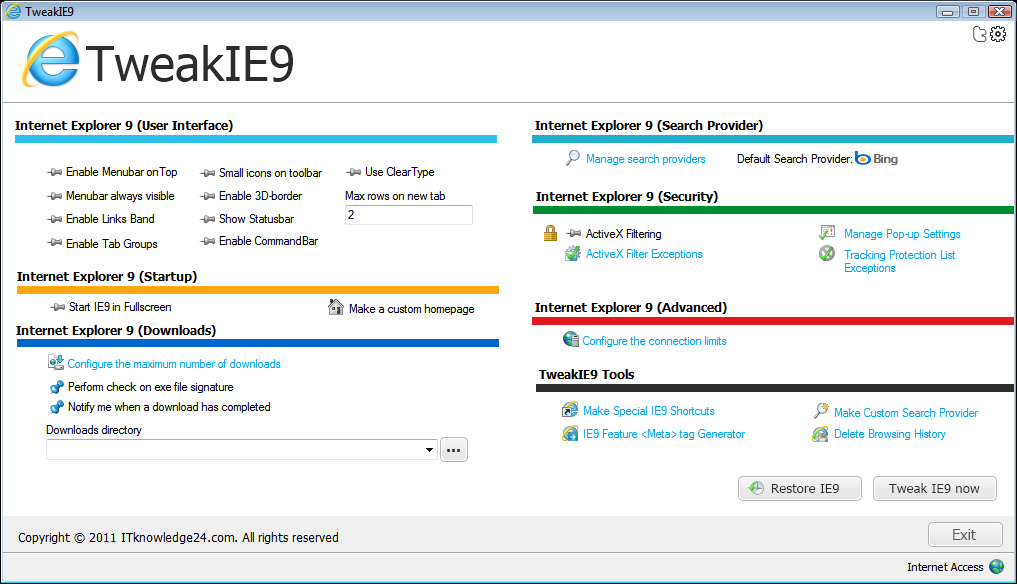
Take control of Internet Explorer 9 with TweakIE9

Internet Explorer 9 may have only just been released by Microsoft, but already there is a tool available that can be used to tweak the browser to your liking. TweakIE9 is a free tweaking tool that can customize Microsoft’s web browser in a number of ways, helping to iron out annoyances and make the program easier to use.

Read more@ https://www.betanews.com/article/Take-control-of-Internet-Explorer-9-with-TweakIE9/1300148016

Download @ https://www.downloadcrew.com/article/20740-tweakie9

Microsoft offers free Azure trial

Recalling all those AOL disks promising hundreds of hours of free usage (minus the disks), Microsoft is offering up to 750 free hours of use on its Azure service as an enticement for developers to try cloud computing, the company announced Tuesday.

“This extended free trial will allow developers to try out the Windows Azure platform without the need for up-front investment costs,” a Microsoft blog entry explained…

Flexera Software Delivers Continual Application Readiness While Slashing Windows 7 Migration, Virtualisation and Day-to-Day Appl

Flexera Software, the leading provider of strategic Application Usage Management solutions for application producers and their customers, today announced the launch of AdminStudio Suite 10. The new release, optimally priced for enterprises of all sizes, is the industry’s first comprehensive Application Readiness solution enabling organisations to strategically manage application packaging and remediation across their entire software estate, mitigating Windows 7 and application virtualisation migration risks.

“The evolution – from application packaging as a means to better manage costs in a static technology world, to application management as a means to better manage quality and compatibility in a dynamic technology world – is a game changer” said Chris Jackson, a principal consultant at Microsoft .“It allows organisations to see beyond their current state and regain their technology agility.”

AdminStudio 10
With as many as 35% of an enterprise’s applications requiring updates in any given year, coupled with the explosive growth in Windows 7 migrations and virtualisation initiatives, compatibility assessment, remediation and packaging processes are now of strategic importance to IT organisations. AdminStudio delivers application packaging efficiencies as much as nine times greater compared to manual efforts.

AdminStudio 10 now lets users centrally manage and report on the virtual and traditional application portfolio for an overall view of the application estate’s readiness for each format.
A new, unified “application-centric” application catalog manages all deployment types for an application, enabling all packages, including virtual packages, to be handled with the same process and tools as those used for MSIs, eliminating the cost and complexity of having multiple solutions and repositories.
Moreover, AdminStudio 10 is now powered by the latest version of the world’s leading MSI authoring and editing tool, InstallShield® 2011, giving users complete flexibility in editing packages using the same installation preparation tool relied on by more than 71,000 ISVs worldwide.
“Most organisations do not have adequate visibility into their application portfolio to reliably understand the time, cost and resources required to successfully migrate their applications,” said Maureen Polte, senior director of product management at Flexera Software. “AdminStudio 10 delivers continual readiness via a repeatable, reliable process to prepare and package MSI and virtual applications for Windows 7 migrations or day-to-day upgrades, drastically reducing the cost, labor and risk associated with application migrations.”

AdminStudio Application Compatibility Pack
Now available as part of AdminStudio Suite is the new AdminStudio Application Compatibility Pack.

AdminStudio Application Compatibility Pack automatically assesses all applications to accurately calculate the effort and cost of the migration project.
It also pinpoints and fixes application compatibility issues for desktop, server and web-based applications. As a result, packagers can test applications in minutes instead of weeks and obtain an overall view of the compatibility of all applications, including which ones require fixing for deployment on Windows 7 or Internet Explorer 8.
Moreover, for applications that do require remediation, AdminStudio Application Compatibility Pack generates a standard MSI transform, automatically fixing in a matter of minutes 98% of installation package-related Windows 7 compatibility issues. This drastically reduces overall costs by removing the need for skilled packaging and support resources and manual efforts.
Significantly, like all products in AdminStudio Suite, AdminStudio Application Compatibility Pack utilises a perpetual, per administrator license, making it optimally priced and packaged for all enterprises, including small and midsized businesses.

“The biggest challenge with Windows 7 migrations is the applications. Organisations have had trouble cost-justifying commercial application compatibility products priced on a per-application basis, and most large organisations have hundreds or thousands of applications (the rule of thumb is one application for every 10 users)”, said Terry Cosgrove, Principal Research Analyst at Gartner.

“Seamlessly integrated application compatibility testing and remediation should be part of the DNA of any robust Application Readiness process,” says Polte. “Unlike point solutions priced on the number of applications, which are often prohibitively expensive and discourage use as part of a continual Application Readiness strategy, AdminStudio Application Compatibility Pack is unique in its integration into a comprehensive, affordable suite and in its predictable cost, encouraging unlimited use and adoption of industry best practices.”

AdminStudio Virtualisation Pack
Today’s launch also includes enhancements to AdminStudio Virtualisation Pack, which prepares reliable virtual applications for deployment with a complete set of suitability testing, automated conversion, validation, editing and management reporting capabilities.

Enhanced validation and conflict testing of Microsoft® App-V packages supports packagers in managing both MSI and App-V with the same tool and processes to ensure a consistent, unified approach.
Packagers can also directly edit App-V packages, saving significant time and effort by eliminating the need to re-convert from an MSI when a change to an App-V package is required.
AdminStudio Virtualisation Pack’s enhancements also include robust suitability testing – removing the trial and error approach to determining if applications can be virtualised. This along with customisable reports and dashboards provides essential decision support for choosing the appropriate delivery/deployment technology via continuous reporting on the application estate’s readiness for each format.
“AdminStudio is a life saver for us. It gets the job done,” said Brandon Farmer, systems engineer at United States Marine Corps Intelligence Activity. “We’re constantly juggling multiple packaging projects on very limited resources, such as our recent migration from Windows XP to Windows 7 – and we don’t have time to waste doing things manually, or trying to cobble together a patchwork of freeware and tactical tools that don’t hit the mark. We just virtualised Microsoft Word 2003 using AdminStudio, and it took me a half hour – compared to the days it would have otherwise taken.”

“Flexera Software continues to deliver solutions that help automate our customers’ adoption of Windows 7 and App-V,” said Karri Alexion-Tiernan, director of product management at Microsoft Corp. “AdminStudio 10 provides benefits beyond one-time conversion, allowing customers the flexibility to create and manage both App-V and MSI packages.”


Microsoft’s Multitouch Mouse Takes Windows 7 to the Next Level

Today at the 2011 International Consumer Electronics Show in Las Vegas, Microsoft Corp. unveiled the Touch Mouse, a new multitouch device designed for Windows 7 that lets people click, flick, scroll and swipe, making it easy and fun to interact with their PCs. Born from the Mouse 2.0 project conducted by Microsoft Research and the Applied Sciences Group, the Touch Mouse combines the virtues of a mouse with the rich natural language of gesture that lets people interact with Windows 7 in a more intuitive way…

Microsoft Announces Support of System on a Chip Architectures From Intel, AMD, and ARM for Next Version of Windows

Further information is available in a Q&A with Steven Sinofsky.

Microsoft Corp. today announced at 2011 International CES that the next version of Windows will support System on a Chip (SoC) architectures, including ARM-based systems from partners NVIDIA Corp., Qualcomm Inc. and Texas Instruments Inc. On the x86 architecture, Intel Corporation and AMD continue their work on low-power SoC designs that fully support Windows, including support for native x86 applications. SoC architectures will fuel significant innovation across the hardware spectrum when coupled with the depth and breadth of the Windows platform…

Windows 7 breaks 20% share barrier

Windows 7 cracked the 20% share mark last month, a milestone the problem-plagued Vista never reached, a Web measurement vendor said over the weekend.

Statistics provided by Net Applications on Saturday put Windows 7’s online usage share at 20.9% in December, up 1.2 percentage points from the month before.

How long will Microsoft support XP, Vista, and Windows 7?

Are you interested in finding out just how long your favorite version of Windows is going to be supported by its maker, Microsoft?

Ed Bott’s Microsoft Report has an in depth look at just how long Microsoft plans on supporting Windows XP, Windows Vista, and/or Windows 7.

From what is reported, Microsoft will cease support for Windows Vista Service Pack 2 on April 10th of 2012. Windows 7 will no longer be supported on January 13, 2015.

But wait a minute, how does Microsoft define the word “support”?

Generally, the minimum bar for something to be considered supported is that we provide at least one type of assisted support option and no-charge security updates. This means that, at a minimum, the customer will have some avenue to contact Microsoft for assistance and Microsoft will continue to provide security updates through channels like Windows Update and the Download Center.

On an interesting note, Windows 7 will have extended support until the year 2020. This gives businesses an ease of mind knowing that migrating to Windows 7 wont be a waste of time or money. We will probably be at Windows 11 by then.

Linux and Windows iron power Q3 server revenues

The server market got a first opinion about its health from Gartner earlier this week, and now, IDC dons the white coat and snaps on the rubber gloves to give the third quarter server racket a full checkup and a second opinion.

By IDC’s count, server peddlers moved $11.81bn in machinery in the third quarter, a 13.2 per cent increase over the year-ago period. IDC did not provide an overall shipment number for the server space in Q3 (as it never does), but did say that shipments rose by 13.1 per cent…

Microsoft turns Windows Azure into cloud-based supercomputer

Windows HPC Server customers will soon be able to run high-performance computing workloads on Windows Azure, Microsoft is announcing at this week’s SC10 supercomputing conference in New Orleans.

The first service pack for Windows HPC Server 2008 R2, due before the end of this year, will let customers connect their on-premises high performance computing systems to Windows Azure, giving them “on-demand scale and capacity for high performance computing applications,” Microsoft said…

How To Enable Macbook-Style Two Finger Scrolling on Windows Laptops

How-To Geek: After using my new Macbook Air for the last week, it’s almost painful to switch back to my PC laptop—using two finger scrolling has become second nature. Here’s how to get the same feature on (most) Windows laptops.

This technique only works for laptops using Synaptics trackpads—if your laptop is using an Alps or something else, you’re probably out of luck, since we’ve not been able to find a solution for those…

Sagem Wireless Launches Ultra-Light eReader

Pocket-sized Binder eReader combines full wireless connectivity with award winning design

Paris, 28 October 2010 – Sagem Wireless, the leader in the design and development of customised connected devices and services, today announced the launch and commercial availability of Binder – an ultra-light eReader. Delivered to customers as a white-labelled product, the eReader can be ordered today from FNAC, the leading French retailer, as the “FnacBook” and in November through Telecom Italia as part of its digital publishing and eBook project.

The Binder measures just 152mm x 123mm x 10.7mm, making it smaller than an average paperback book – but with memory capable of storing over 12,000 non-illustrated books. It combines e-paper technology together with embedded 3G and WiFi connectivity to create an eReader that delivers a true “library in your pocket” user experience.

The Binder marries award winning ergonomic design with a capacitive touch screen to deliver a crisp display and contrast in an easy to grip form factor. The full 3G and WiFi connectivity enables the user to receive on-demand the latest magazines and newspapers direct to the device. Supporting all the major text, image and music file formats and Adobe DRM protection, the Binder enables the user to easily switch between their home screen, books, news and other content using the tab-based shortcut buttons.

“The eReader market has developed quickly but until now has been plagued by a simple trade-off – do you want a smaller form factor and less features, or a fully connected experience but with a device that is no longer pocket-sized?” said Jérôme Nadel, EVP Marketing & User Experience, Sagem Wireless. “By focusing on the user experience and using the latest technology, we have developed a device that solves this conundrum. The Binder product combines 3G and WiFi with a feature-rich experience to deliver a true connected lifestyle device.”

In contrast to other lightweight eReader devices, the pocket-sized Binder supports eBook and MP3 formats, full note taking capabilities using the virtual keyboard, up to 16GB of memory, and a long battery life equivalent to over 8000 page turns. The Binder’s sleek and usable design has been recognised by the Observeur du Design, an annual exhibition organised by the Agency for the Promotion of Industrial Creation, as one of the 150 most outstanding product designs of 2010.

FNAC is retailing the FnacBook at €199 complete with WiFi and free 3G from mobile operator SFR. For more information on the FnacBook, visit https://www.fnac.com/Guides/High-Tech/fnacbook/. For more information on Telecom Italia’s eBook project, visit https://ebook.telecomitalia.com/.

Managing Windows in the Cloud

Managing infrastructure on the Cloud, or anywhere for that matter, is a tough proposition. Windows infrastructure is no exception. Rackspace has focused on making the provisioning process straightforward so it was a natural step to help the management and monitoring. Getting alerts upon failures, spotting hot-spots with your data, graphing any metric you want and supporting Windows/Linux hardware side by side with cloud, dedicated and fully managed…

Windows XP Preloading No Longer Allowed

If you remember a while back, Microsoft announced that October 22 2010 would be the last day OEMs would be able to pre-install Windows XP Home on new netbook PCs. Well, that time has come.

Windows XP, the successor to both Windows 2000 and Windows Me, was the first consumer-oriented operating system produced by Microsoft to be built on the Windows NT kernel and architecture.

When the deadline was announced, Microsoft’s Windows Team Blog had supported the idea by emphasizing that a majority of their customers would not notice much change. Many PC makers have already been actively manufacturing and selling a variety of Windows 7 netbooks since Windows 7 was released in October of 2009.

Coincidently, today also marks the one-year anniversary of the launch of Windows 7. As we all know, Windows 7 is the primary version of Windows which Microsoft is encouraging PC makers to preload on new PCs. And lets not forget the new slate devices that are coming out with Windows 7 preloaded.

With Microsoft selling more than 240 million licenses of Windows 7, it was only a matter of time before Windows XP became a fragment of our past imagination. Windows XP SP2 hit its end of life this past July. We still have until April of 2014 before Windows XP SP3 is no longer supported.

Don’t forget: Microsoft is (supposedly) working on a Windows app store, too

Mary Jo Foley: I’m seeing some Windows users ridicule (and a few quietly pining for) Microsoft to do what Apple announced today: Create an Apple-like App Store for Windows.

Supposedly, that’s in the works, as some may recall from Windows 8 slides that leaked earlier this year. Remember those early-concept Windows 8 slides — the ones everyone believes Microsoft shared with its hardware partners (even though Microsoft still has not confirmed their veracity)?

Microsoft and Alibaba launch Chinese search site

Microsoft and Chinese e-commerce company Alibaba Group are testing a new search service that could offer Chinese users an alternative to major player Baidu and struggling Google, according to the Associated Press.

A beta of the new Etao search site came online this past weekend teaming up Alibaba’s e-commerce search engine with a Chinese-language edition of Microsoft’s Bing search engine. The new site joins the search engines on Alibaba’s current e-commerce sites Taobao.com and Alibaba.com and has been set up to drive people to the Alibaba.com online retail store, according to The Wall Street Journal…