How to configure IE9 tracking protection

Protect against trackers in Microsoft Edge

Internet Explorer 9 used Tracking Protection Lists. If you are following this guide on a current Windows PC, open Edge, select the three-dot menu and go to Settings > Privacy, search, and services > Tracking prevention. Turn it on and choose a level.

Microsoft recommends Balanced, which blocks trackers from sites you have not visited and potentially harmful trackers. Strict blocks more trackers and can interfere with embedded videos or sign-in. Microsoft’s tracking prevention guide explains how to make an exception for an individual site.

One of the new features of the newly released browser from Microsoft, Internet Explorer 9, is the ability to use a tracking ad blocker. Unlike Firefox, this feature is built in and you don’t need a third party add-on.

As cNet reports, many websites have ads that track your online behavior by utilizing a cookie. It may not be the biggest deal to some, but it sure is annoying. Internet Explorer 9 has a built in ad tracking blocker that will help you solve this problem. The original CNET tutorial covered Internet Explorer 9’s list-based controls.

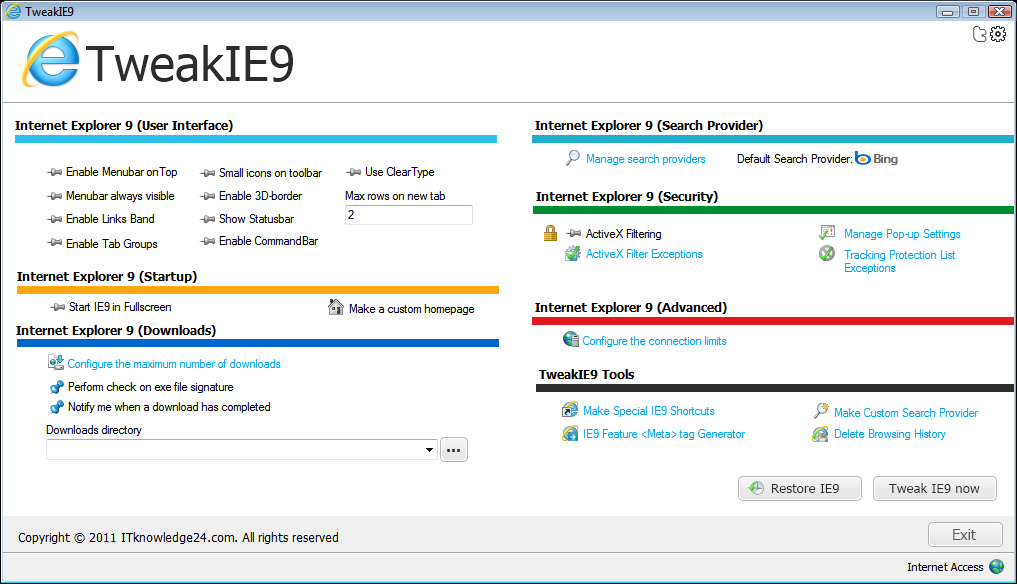
Take control of Internet Explorer 9 with TweakIE9

Customizing a browser on Windows today

TweakIE9 was designed for Internet Explorer 9. Its settings are specific to that browser. In Microsoft Edge, you can customize the new tab page directly: open a new tab, select the settings icon, and choose the layout or content you want. Microsoft’s Edge guide also covers startup pages and favorites.

Internet Explorer 9 may have only just been released by Microsoft, but already there is a tool available that can be used to tweak the browser to your liking. TweakIE9 is a free tweaking tool that can customize Microsoft’s web browser in a number of ways, helping to iron out annoyances and make the program easier to use.

Read more@ https://www.betanews.com/article/Take-control-of-Internet-Explorer-9-with-TweakIE9/1300148016

Download @ https://www.downloadcrew.com/article/20740-tweakie9

Should you install Windows 7 Service Pack 1?

What SP1 means for a Windows 7 PC today

Service Pack 1 became the baseline for later Windows 7 updates, including Microsoft’s convenience rollup. On an older installation, open Start, right-click Computer and choose Properties. Look under Windows edition for “Service Pack 1” before attempting to reinstall it.

SP1 remains relevant when restoring an older computer or reproducing a software problem. It no longer gives the computer current security coverage. Microsoft records the end of regular support and the later extended-security-update period in its Windows 7 lifecycle table.

Ed Bott: Last week, Microsoft released Service Pack 1 for Windows 7 and Windows Server 2008 R2. I’ve been monitoring the release in online forums and via individual reports since then. I’ve also talked, unofficially, with some people who have access to Microsoft’s customer support database…

Google launches Web-based Microsoft SharePoint alternative: Cloud Connect

What happened to Google Cloud Connect?

Google retired Cloud Connect on April 30, 2013. It was a Windows plug-in that synchronized Office documents with Google’s servers. The launch coverage below describes that original product.

Today, upload a Word, Excel or PowerPoint file to Google Drive and open it with Docs, Sheets or Slides. Collaborators can edit the shared file in its Office format. Google explains which features require conversion in its guide to working with Office files.

Google thinks the modern business world needs a better way to collaborate on Microsoft Office documents — and it ain’t SharePoint. Today, the Internet giant is launching Google Cloud Connect, an addition to Google Apps that lets multiple people write and edit Office documents in near real time over the Web…

Quick fix for Windows 7 SP1 installation errors

Why this error appears on a dual-boot PC

On a Windows 7 machine that also boots Linux, error 0x800F0A12 can mean that Service Pack 1 setup cannot access the system partition containing the Windows boot files. The message does not, by itself, mean that the Windows installation is damaged.

Before changing the partition layout, make a full backup and confirm which disk and partition the machine actually boots from. Marking an arbitrary partition active can leave both installations unbootable. The archived Microsoft support discussion documents how boot layouts differed among people who saw this error.

Ed Bott: If you run Windows 7 and Linux on the same PC, you might run into an odd error when you try to install Windows 7 Service Pack 1. I’ve already had three readers contact me with reports that they ran into error 0×800f0a12 during the installation process. It’s a non-fatal error, but still baffling…

Microsoft offers free Azure trial

Recalling all those AOL disks promising hundreds of hours of free usage (minus the disks), Microsoft is offering up to 750 free hours of use on its Azure service as an enticement for developers to try cloud computing, the company announced Tuesday.

“This extended free trial will allow developers to try out the Windows Azure platform without the need for up-front investment costs,” a Microsoft blog entry explained…

Flexera Software Delivers Continual Application Readiness While Slashing Windows 7 Migration, Virtualisation and Day-to-Day Appl

Flexera Software, the leading provider of strategic Application Usage Management solutions for application producers and their customers, today announced the launch of AdminStudio Suite 10. The new release, optimally priced for enterprises of all sizes, is the industry’s first comprehensive Application Readiness solution enabling organisations to strategically manage application packaging and remediation across their entire software estate, mitigating Windows 7 and application virtualisation migration risks.

“The evolution – from application packaging as a means to better manage costs in a static technology world, to application management as a means to better manage quality and compatibility in a dynamic technology world – is a game changer” said Chris Jackson, a principal consultant at Microsoft .“It allows organisations to see beyond their current state and regain their technology agility.”

AdminStudio 10
With as many as 35% of an enterprise’s applications requiring updates in any given year, coupled with the explosive growth in Windows 7 migrations and virtualisation initiatives, compatibility assessment, remediation and packaging processes are now of strategic importance to IT organisations. AdminStudio delivers application packaging efficiencies as much as nine times greater compared to manual efforts.

AdminStudio 10 now lets users centrally manage and report on the virtual and traditional application portfolio for an overall view of the application estate’s readiness for each format.
A new, unified “application-centric” application catalog manages all deployment types for an application, enabling all packages, including virtual packages, to be handled with the same process and tools as those used for MSIs, eliminating the cost and complexity of having multiple solutions and repositories.
Moreover, AdminStudio 10 is now powered by the latest version of the world’s leading MSI authoring and editing tool, InstallShield® 2011, giving users complete flexibility in editing packages using the same installation preparation tool relied on by more than 71,000 ISVs worldwide.
“Most organisations do not have adequate visibility into their application portfolio to reliably understand the time, cost and resources required to successfully migrate their applications,” said Maureen Polte, senior director of product management at Flexera Software. “AdminStudio 10 delivers continual readiness via a repeatable, reliable process to prepare and package MSI and virtual applications for Windows 7 migrations or day-to-day upgrades, drastically reducing the cost, labor and risk associated with application migrations.”

AdminStudio Application Compatibility Pack
Now available as part of AdminStudio Suite is the new AdminStudio Application Compatibility Pack.

AdminStudio Application Compatibility Pack automatically assesses all applications to accurately calculate the effort and cost of the migration project.
It also pinpoints and fixes application compatibility issues for desktop, server and web-based applications. As a result, packagers can test applications in minutes instead of weeks and obtain an overall view of the compatibility of all applications, including which ones require fixing for deployment on Windows 7 or Internet Explorer 8.
Moreover, for applications that do require remediation, AdminStudio Application Compatibility Pack generates a standard MSI transform, automatically fixing in a matter of minutes 98% of installation package-related Windows 7 compatibility issues. This drastically reduces overall costs by removing the need for skilled packaging and support resources and manual efforts.
Significantly, like all products in AdminStudio Suite, AdminStudio Application Compatibility Pack utilises a perpetual, per administrator license, making it optimally priced and packaged for all enterprises, including small and midsized businesses.

“The biggest challenge with Windows 7 migrations is the applications. Organisations have had trouble cost-justifying commercial application compatibility products priced on a per-application basis, and most large organisations have hundreds or thousands of applications (the rule of thumb is one application for every 10 users)”, said Terry Cosgrove, Principal Research Analyst at Gartner.

“Seamlessly integrated application compatibility testing and remediation should be part of the DNA of any robust Application Readiness process,” says Polte. “Unlike point solutions priced on the number of applications, which are often prohibitively expensive and discourage use as part of a continual Application Readiness strategy, AdminStudio Application Compatibility Pack is unique in its integration into a comprehensive, affordable suite and in its predictable cost, encouraging unlimited use and adoption of industry best practices.”

AdminStudio Virtualisation Pack
Today’s launch also includes enhancements to AdminStudio Virtualisation Pack, which prepares reliable virtual applications for deployment with a complete set of suitability testing, automated conversion, validation, editing and management reporting capabilities.

Enhanced validation and conflict testing of Microsoft® App-V packages supports packagers in managing both MSI and App-V with the same tool and processes to ensure a consistent, unified approach.
Packagers can also directly edit App-V packages, saving significant time and effort by eliminating the need to re-convert from an MSI when a change to an App-V package is required.
AdminStudio Virtualisation Pack’s enhancements also include robust suitability testing – removing the trial and error approach to determining if applications can be virtualised. This along with customisable reports and dashboards provides essential decision support for choosing the appropriate delivery/deployment technology via continuous reporting on the application estate’s readiness for each format.
“AdminStudio is a life saver for us. It gets the job done,” said Brandon Farmer, systems engineer at United States Marine Corps Intelligence Activity. “We’re constantly juggling multiple packaging projects on very limited resources, such as our recent migration from Windows XP to Windows 7 – and we don’t have time to waste doing things manually, or trying to cobble together a patchwork of freeware and tactical tools that don’t hit the mark. We just virtualised Microsoft Word 2003 using AdminStudio, and it took me a half hour – compared to the days it would have otherwise taken.”

“Flexera Software continues to deliver solutions that help automate our customers’ adoption of Windows 7 and App-V,” said Karri Alexion-Tiernan, director of product management at Microsoft Corp. “AdminStudio 10 provides benefits beyond one-time conversion, allowing customers the flexibility to create and manage both App-V and MSI packages.”


Microsoft’s Multitouch Mouse Takes Windows 7 to the Next Level

Today at the 2011 International Consumer Electronics Show in Las Vegas, Microsoft Corp. unveiled the Touch Mouse, a new multitouch device designed for Windows 7 that lets people click, flick, scroll and swipe, making it easy and fun to interact with their PCs. Born from the Mouse 2.0 project conducted by Microsoft Research and the Applied Sciences Group, the Touch Mouse combines the virtues of a mouse with the rich natural language of gesture that lets people interact with Windows 7 in a more intuitive way…

Microsoft Announces Support of System on a Chip Architectures From Intel, AMD, and ARM for Next Version of Windows

Further information is available in a Q&A with Steven Sinofsky.

Microsoft Corp. today announced at 2011 International CES that the next version of Windows will support System on a Chip (SoC) architectures, including ARM-based systems from partners NVIDIA Corp., Qualcomm Inc. and Texas Instruments Inc. On the x86 architecture, Intel Corporation and AMD continue their work on low-power SoC designs that fully support Windows, including support for native x86 applications. SoC architectures will fuel significant innovation across the hardware spectrum when coupled with the depth and breadth of the Windows platform…

Windows 7 breaks 20% share barrier

Windows 7 cracked the 20% share mark last month, a milestone the problem-plagued Vista never reached, a Web measurement vendor said over the weekend.

Statistics provided by Net Applications on Saturday put Windows 7’s online usage share at 20.9% in December, up 1.2 percentage points from the month before.

How long will Microsoft support XP, Vista, and Windows 7?

Are you interested in finding out just how long your favorite version of Windows is going to be supported by its maker, Microsoft?

Ed Bott’s Microsoft Report has an in depth look at just how long Microsoft plans on supporting Windows XP, Windows Vista, and/or Windows 7.

From what is reported, Microsoft will cease support for Windows Vista Service Pack 2 on April 10th of 2012. Windows 7 will no longer be supported on January 13, 2015.

But wait a minute, how does Microsoft define the word “support”?

Generally, the minimum bar for something to be considered supported is that we provide at least one type of assisted support option and no-charge security updates. This means that, at a minimum, the customer will have some avenue to contact Microsoft for assistance and Microsoft will continue to provide security updates through channels like Windows Update and the Download Center.

On an interesting note, Windows 7 will have extended support until the year 2020. This gives businesses an ease of mind knowing that migrating to Windows 7 wont be a waste of time or money. We will probably be at Windows 11 by then.

Linux and Windows iron power Q3 server revenues

The server market got a first opinion about its health from Gartner earlier this week, and now, IDC dons the white coat and snaps on the rubber gloves to give the third quarter server racket a full checkup and a second opinion.

By IDC’s count, server peddlers moved $11.81bn in machinery in the third quarter, a 13.2 per cent increase over the year-ago period. IDC did not provide an overall shipment number for the server space in Q3 (as it never does), but did say that shipments rose by 13.1 per cent…

Microsoft turns Windows Azure into cloud-based supercomputer

Windows HPC Server customers will soon be able to run high-performance computing workloads on Windows Azure, Microsoft is announcing at this week’s SC10 supercomputing conference in New Orleans.

The first service pack for Windows HPC Server 2008 R2, due before the end of this year, will let customers connect their on-premises high performance computing systems to Windows Azure, giving them “on-demand scale and capacity for high performance computing applications,” Microsoft said…

How To Enable Macbook-Style Two Finger Scrolling on Windows Laptops

How-To Geek: After using my new Macbook Air for the last week, it’s almost painful to switch back to my PC laptop—using two finger scrolling has become second nature. Here’s how to get the same feature on (most) Windows laptops.

This technique only works for laptops using Synaptics trackpads—if your laptop is using an Alps or something else, you’re probably out of luck, since we’ve not been able to find a solution for those…

Sagem Wireless Launches Ultra-Light eReader

Pocket-sized Binder eReader combines full wireless connectivity with award winning design

Paris, 28 October 2010 – Sagem Wireless, the leader in the design and development of customised connected devices and services, today announced the launch and commercial availability of Binder – an ultra-light eReader. Delivered to customers as a white-labelled product, the eReader can be ordered today from FNAC, the leading French retailer, as the “FnacBook” and in November through Telecom Italia as part of its digital publishing and eBook project.

The Binder measures just 152mm x 123mm x 10.7mm, making it smaller than an average paperback book – but with memory capable of storing over 12,000 non-illustrated books. It combines e-paper technology together with embedded 3G and WiFi connectivity to create an eReader that delivers a true “library in your pocket” user experience.

The Binder marries award winning ergonomic design with a capacitive touch screen to deliver a crisp display and contrast in an easy to grip form factor. The full 3G and WiFi connectivity enables the user to receive on-demand the latest magazines and newspapers direct to the device. Supporting all the major text, image and music file formats and Adobe DRM protection, the Binder enables the user to easily switch between their home screen, books, news and other content using the tab-based shortcut buttons.

“The eReader market has developed quickly but until now has been plagued by a simple trade-off – do you want a smaller form factor and less features, or a fully connected experience but with a device that is no longer pocket-sized?” said Jérôme Nadel, EVP Marketing & User Experience, Sagem Wireless. “By focusing on the user experience and using the latest technology, we have developed a device that solves this conundrum. The Binder product combines 3G and WiFi with a feature-rich experience to deliver a true connected lifestyle device.”

In contrast to other lightweight eReader devices, the pocket-sized Binder supports eBook and MP3 formats, full note taking capabilities using the virtual keyboard, up to 16GB of memory, and a long battery life equivalent to over 8000 page turns. The Binder’s sleek and usable design has been recognised by the Observeur du Design, an annual exhibition organised by the Agency for the Promotion of Industrial Creation, as one of the 150 most outstanding product designs of 2010.

FNAC is retailing the FnacBook at €199 complete with WiFi and free 3G from mobile operator SFR. For more information on the FnacBook, visit https://www.fnac.com/Guides/High-Tech/fnacbook/. For more information on Telecom Italia’s eBook project, visit https://ebook.telecomitalia.com/.

Managing Windows in the Cloud

Managing infrastructure on the Cloud, or anywhere for that matter, is a tough proposition. Windows infrastructure is no exception. Rackspace has focused on making the provisioning process straightforward so it was a natural step to help the management and monitoring. Getting alerts upon failures, spotting hot-spots with your data, graphing any metric you want and supporting Windows/Linux hardware side by side with cloud, dedicated and fully managed…

Windows XP Preloading No Longer Allowed

If you remember a while back, Microsoft announced that October 22 2010 would be the last day OEMs would be able to pre-install Windows XP Home on new netbook PCs. Well, that time has come.

Windows XP, the successor to both Windows 2000 and Windows Me, was the first consumer-oriented operating system produced by Microsoft to be built on the Windows NT kernel and architecture.

When the deadline was announced, Microsoft’s Windows Team Blog had supported the idea by emphasizing that a majority of their customers would not notice much change. Many PC makers have already been actively manufacturing and selling a variety of Windows 7 netbooks since Windows 7 was released in October of 2009.

Coincidently, today also marks the one-year anniversary of the launch of Windows 7. As we all know, Windows 7 is the primary version of Windows which Microsoft is encouraging PC makers to preload on new PCs. And lets not forget the new slate devices that are coming out with Windows 7 preloaded.

With Microsoft selling more than 240 million licenses of Windows 7, it was only a matter of time before Windows XP became a fragment of our past imagination. Windows XP SP2 hit its end of life this past July. We still have until April of 2014 before Windows XP SP3 is no longer supported.

Don’t forget: Microsoft is (supposedly) working on a Windows app store, too

Mary Jo Foley: I’m seeing some Windows users ridicule (and a few quietly pining for) Microsoft to do what Apple announced today: Create an Apple-like App Store for Windows.

Supposedly, that’s in the works, as some may recall from Windows 8 slides that leaked earlier this year. Remember those early-concept Windows 8 slides — the ones everyone believes Microsoft shared with its hardware partners (even though Microsoft still has not confirmed their veracity)?

What shipped. Two years after the leaked slides prompted this report, Microsoft launched Windows 8 and the Windows Store on October 26, 2012. PC owners could browse the Store and install apps built for the new Windows 8 interface. That launch confirmed the store itself, regardless of the provenance of the earlier slides.

What Makes Internet Explorer 9 Beta Fast?

James Pratt: Over the next few weeks, we’re going to have several series that cover our point of view on some of the biggest investments we made in Internet Explorer 9 Beta and how partners are already taking advantage of them in the beta phase. This week, we’ll be talking about the concept that a browser should be “all around fast”…

What changed in IE9. Microsoft took two different bottlenecks out of the browser’s rendering path. Its new JavaScript engine accelerated scripts, while hardware acceleration let the PC’s graphics processor handle work such as drawing text and images. A script benchmark and a graphics demo therefore measured different parts of the browser. IE9 reached general availability on March 14, 2011.

Microsoft and Alibaba launch Chinese search site

Microsoft and Chinese e-commerce company Alibaba Group are testing a new search service that could offer Chinese users an alternative to major player Baidu and struggling Google, according to the Associated Press.

A beta of the new Etao search site came online this past weekend teaming up Alibaba’s e-commerce search engine with a Chinese-language edition of Microsoft’s Bing search engine. The new site joins the search engines on Alibaba’s current e-commerce sites Taobao.com and Alibaba.com and has been set up to drive people to the Alibaba.com online retail store, according to The Wall Street Journal…

How eTao worked. A shopping search and a general web search shared the same front door. Taobao supplied the product listings, and Microsoft’s Bing supplied the broader web results. In June 2011 Alibaba split Taobao into three businesses, making eTao a separate shopping-search operation alongside Taobao Marketplace and Taobao Mall. See the contemporary account of the Bing partnership and the subsequent Taobao reorganization.