
Windows 11 KB5083726 (Dev) & KB5083728 (Beta) Improve Settings, File Explorer & More


 1 min. read
  Published on

Microsoft is wrapping this week with bunch of new Windows 11 builds. Speaking of which, the company is rolling out KB5083726 and KB5083728 for Dev and Beta channel Insiders, which bumps systems to Build 26300.8276 and Build 26220.8271, respectively. Notably, both Dev and Beta channel Insiders get similar changes and improvements.
Starting with Settings, Microsoft is making location controls easier to understand. If Location services are turned off, related options like Default location and Allow location override will now appear greyed out, making it clear they are inactive.
The company has also improved the reliability when navigating to Installed apps. Meanwhile, File Explorer is getting a small visual tweak. Microsoft has adjusted the search box icon placement to keep things consistent across different PCs.
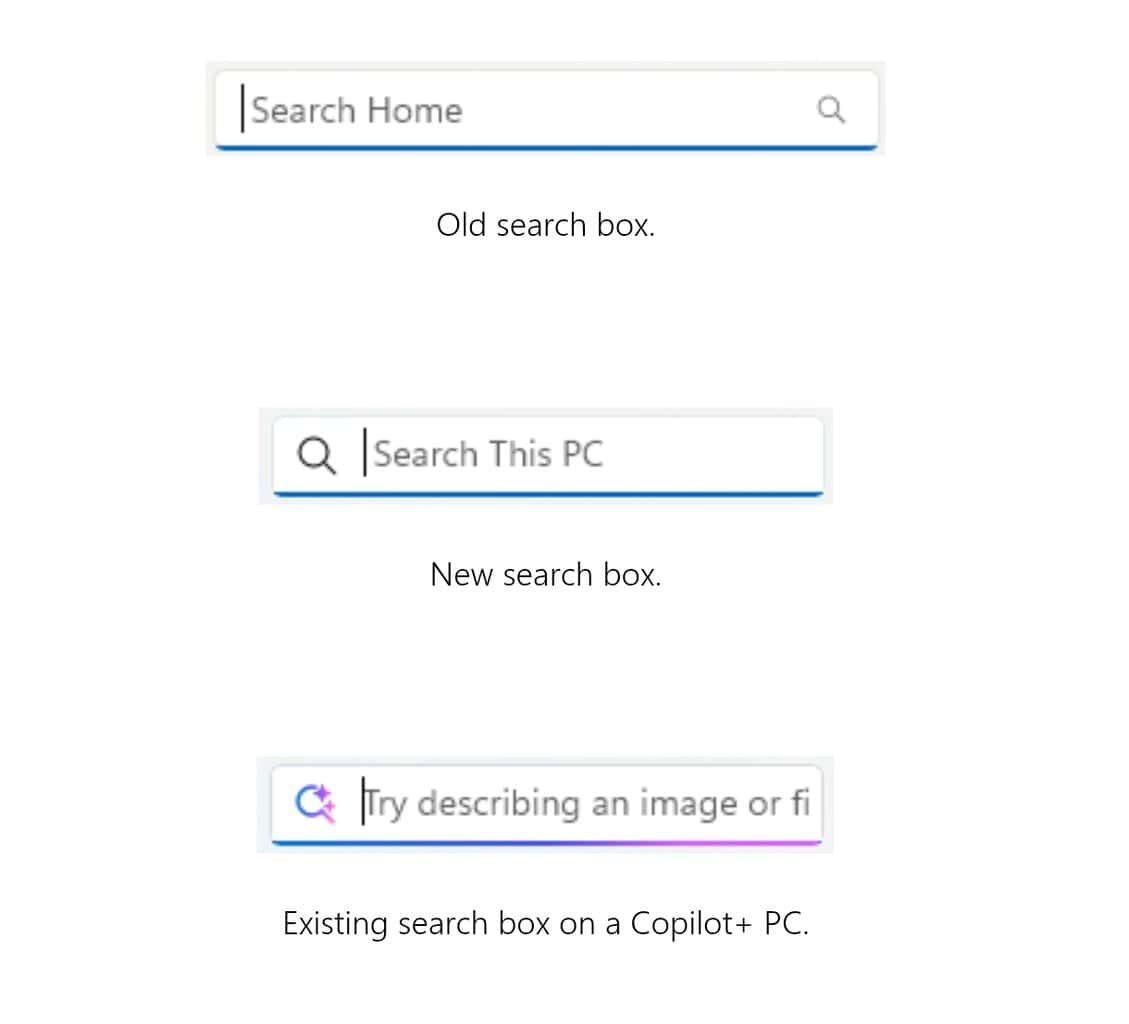
Besides that, overall File Explorer reliability has been improved, and Voice Access users should find the navigation pane easier to use.
Moving on, Windows Hello fingerprint performance has been improved, especially after waking the device from sleep. Clipboard history should now open faster, and there are also font updates, including improvements to the Leelawadee UI family for Thai, Lao, Khmer, and Lontara scripts to enhance rendering and readability.

Read our disclosure page to find out how can you help Windows Report sustain the editorial team. Read more



Improve this guide


User forum
0 messages