
Windows 11 KB5094126 Users Report BSODs, Freezes, and OneDrive Issues


 3 min. read
  Published on
Microsoft released Windows 11 KB5094126 and KB5093998 last week as part of the June 2026 Patch Tuesday rollout. While the company has not acknowledged any widespread issues with either update, users across several forums and social media platforms have reported a range of problems after installation.
The reports include blue screen errors, system freezes, BitLocker recovery lockouts, and issues affecting cloud storage services such as OneDrive and Dropbox. At this time, Microsoft has not confirmed any of these problems, making it difficult to determine how widespread they are.
HP Systems Appear Most Affected
The most commonly reported issue appears to involve HP devices running Windows 11 after installing KB5094126.
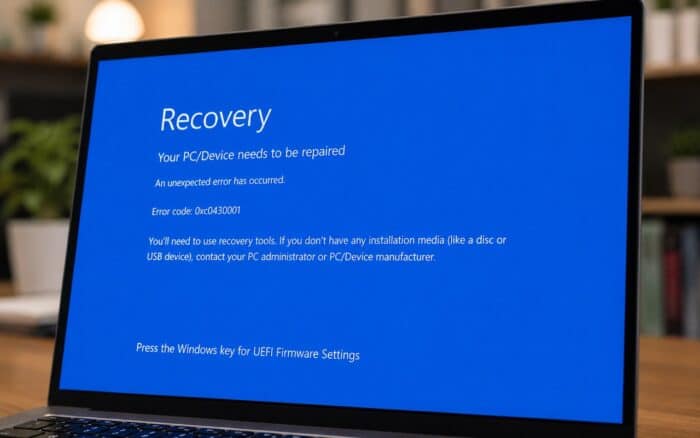
Several users say their systems began displaying a 0xc0430001 blue screen error following the update. The problem may be connected to an earlier Secure Boot certificate issue that affected some HP hardware.
According to reports, affected devices may fail to boot correctly if the required boot.stl file is missing from the installation media. The file plays an important role in Secure Boot by verifying that Windows boot files are trusted before startup.
If the file is not present, systems may display the 0xc0430001 error and refuse to boot from installation media.
Microsoft Recommends Updating WinPE Images
Microsoft previously provided guidance for administrators dealing with Secure Boot certificate updates.
The company recommends using the Update WinPE script, which automatically updates deployment images and includes the necessary Secure Boot files.
Users can also manually copy the boot.stl file from the following location on a working Windows installation:
Windows\Boot\EFIThe file must then be placed in the corresponding folder on the installation media. Microsoft notes that the file must match both the Windows version and system architecture being deployed.
Users Report Freezing Problems on Lenovo PCs
Beyond HP-related boot issues, some users are also reporting system freezes after installing the June Patch Tuesday updates.
Several reports mention Lenovo systems becoming unresponsive after the update process. The exact cause remains unclear, and there is currently no official workaround from Microsoft.
Because these reports are still limited, it is not yet known whether the problem affects specific Lenovo models or a broader range of devices.
OneDrive and Dropbox Integration Problems
Another issue reported by users involves OneDrive and Dropbox integration within File Explorer.
One user claimed that cloud storage folders stopped functioning correctly after disabling User Account Control (UAC) while using a local administrator account. According to the report, both OneDrive and Dropbox began working normally again after UAC was re-enabled.
This suggests the issue may be related to Windows security settings rather than the update itself, although additional reports would be needed to confirm the connection.
Microsoft Has Yet to Confirm the Reports
At the time of writing, Microsoft has not added any known issues related to KB5094126 or KB5093998 to its official documentation.
As a result, affected users may need to wait for further investigation, updated guidance, or a future patch if Microsoft confirms the reported problems.
For now, users experiencing boot failures, freezes, or cloud storage issues should document any error messages, check Microsoft’s support channels for updates, and consider delaying deployment on additional systems until more information becomes available.
Via Neowin

Read our disclosure page to find out how can you help Windows Report sustain the editorial team. Read more



Improve this guide



User forum
1 messages