
Microsoft Brings Redesigned Windows 11 Start Menu to Organizations


 3 min. read
  Published on
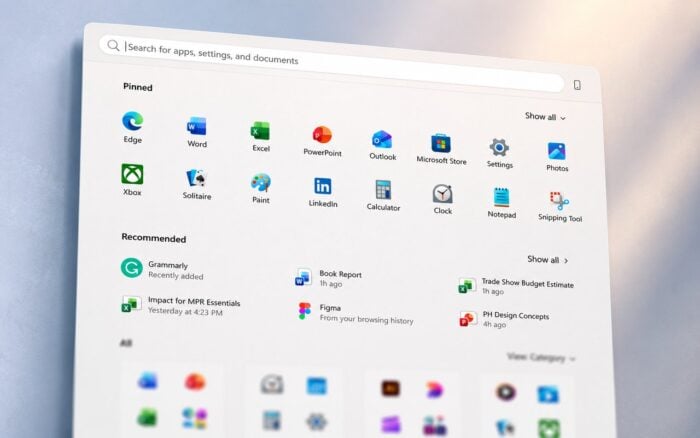
Microsoft has started rolling out the redesigned Windows 11 Start menu to enterprises and organizations, giving IT admins new controls to manage how the updated interface works on company devices.
The company has also published the related administrative policies and settings, covering both Group Policy and mobile device management deployments. These controls are designed to help organizations test, customize, and enforce the new Start menu experience across managed Windows 11 PCs.
Windows 11 Start Menu Redesign Reaches Organizations
Microsoft began testing the redesigned Start menu last year, with several features recently appearing in the Experimental channel under build 26300.8553.
The updated Start menu focuses on modularity, resizing, and more customization. For businesses, the key change is not only the visual redesign but also the expanded management options now available to IT departments.
With the new policies, organizations can control how the Start menu appears, which sections users can access, and how much freedom employees have to change the layout.
Microsoft Publishes New Start Menu Admin Policies
Microsoft has now published the full set of administrative policies for the redesigned Windows 11 Start menu.
The documentation covers traditional Group Policy settings and MDM-based deployments. For MDM environments, admins can manage the experience through the Start Policy CSP.
The available settings cover Start menu layout, app lists, recommendations, account options, pinned folders, and power controls. This gives organizations a more structured way to standardize the Start menu across different departments, user groups, or device types.
What IT Admins Can Control
IT admins can enforce custom pinned app layouts using JSON, making it easier to deploy a consistent Start menu across managed devices.
They can also prevent users from modifying the Start menu, which may help organizations that need a locked-down or simplified Windows experience.
Other available controls include options to hide the Recommended section, disable category view, and manage the visibility of recently added apps. Admins can also control whether most-used apps appear in the Start menu.
Microsoft is also allowing organizations to force a specific Start menu size across managed devices. This gives admins another way to create a predictable desktop experience for employees.
Windows 11 Is Getting More Interface Improvements
The Start menu rollout is part of a broader set of Windows 11 interface improvements.
Microsoft is also working on movable Taskbar support and other Start menu changes. The company has also outlined plans to make the Windows context menu faster and more customizable.
These changes suggest Microsoft is continuing to refine Windows 11’s core desktop experience, especially in areas that users and organizations interact with every day.

Read our disclosure page to find out how can you help Windows Report sustain the editorial team. Read more



Improve this guide

User forum
0 messages