
Windows 11 Experimental Build Adds Smaller Start Menu and Better Search


 3 min. read
  Published on
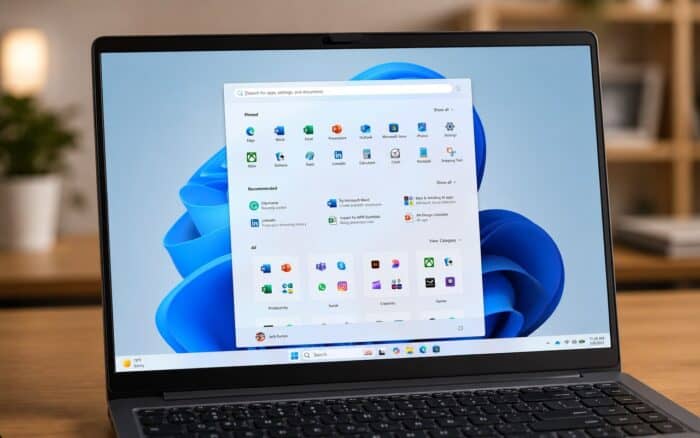
Microsoft has released Windows 11 Insider Experimental Preview Build 26300.8553 with major Start menu customization improvements, better Windows Search behavior, and taskbar fixes for alternate positions.
The update focuses heavily on personalization. Users can now resize the Start menu, hide specific sections, and remove profile information from the interface. Microsoft also continues improving Windows Search with better substring matching for files and content.
The company says users looking for a more stable release can also try Windows 11 Beta Build 26220.8544.
Windows 11 Start menu gets more customization
One of the biggest changes in Build 26300.8553 is the redesigned Start menu experience.
Microsoft has renamed the Recommended section to Recent. The same naming change now appears inside the Start settings page.
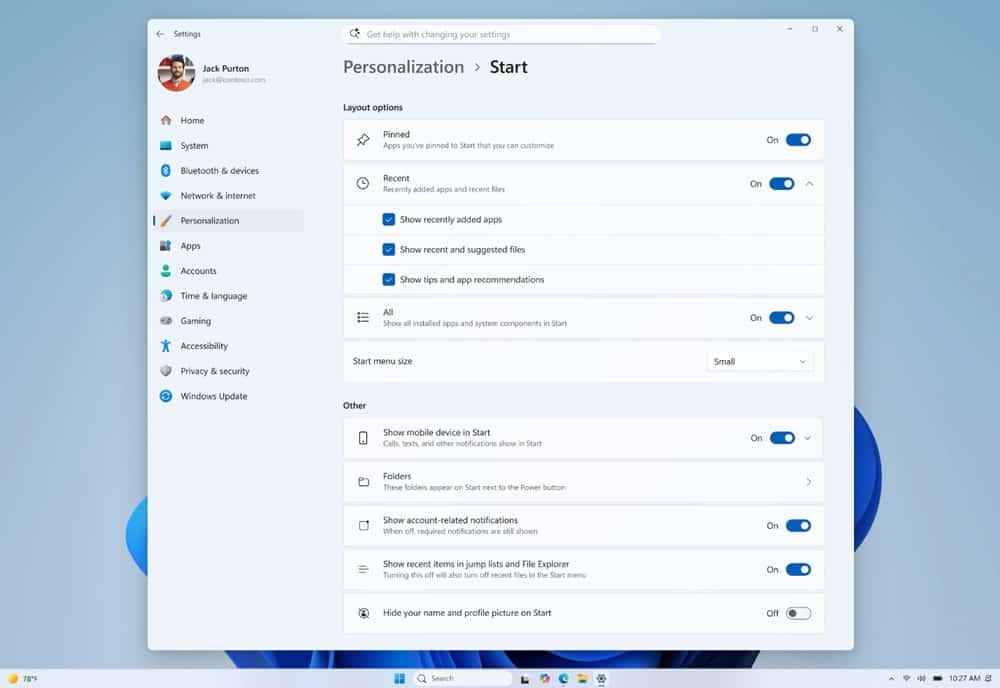
Users can now independently enable or disable major Start menu sections, including Pinned, Recent, and All apps.
This gives users more control over how crowded or minimal the Start menu looks.
Microsoft is also adding Start menu size controls for the first time in this experimental branch. Users can now choose between small, large, or automatic sizing options.
Automatic remains the default setting and adjusts dynamically based on layout behavior.
Profile visibility controls added
Build 26300.8553 also introduces a privacy-focused option that lets users hide their name and profile picture from Start.
The option should make it easier to keep personal account information out of screenshots, screen recordings, and other captured content.
Start settings page redesigned
To support the growing number of customization controls, Microsoft redesigned the Start settings page.
The new layout better organizes section toggles, visibility controls, and Start menu size options in a single interface.
Microsoft continues pushing toward a more modular Start menu experience after years of criticism around limited customization in Windows 11.
Windows Search now finds compound file names more easily
Microsoft is also improving Windows Search behavior in this build.
Search now supports better substring matching for files with compound names or combined words.
For example, typing “april” can now find files such as MeetingNotesApril.
This improvement applies to both file names and searchable content.
The feature should help reduce failed searches caused by exact-match limitations.
Taskbar fixes for alternate positions
The build also fixes several issues affecting taskbars placed in alternate positions.
Microsoft says users can now use touch swipe gestures to open the taskbar properly when it is not positioned at the bottom of the screen.
The company also fixed smaller visual glitches related to alternate taskbar placement.
Reset this PC issue fixed
Microsoft fixed an issue where Reset this PC could become stuck during the reset process.
The company says affected users should use cloud download instead of local reinstall when resetting Windows to complete the process successfully.
The fix arrives as Microsoft continues testing broader Start menu and shell changes across Insider channels.

Read our disclosure page to find out how can you help Windows Report sustain the editorial team. Read more



Improve this guide




User forum
0 messages