
Microsoft Intelligent Terminal Gets Vertical Tabs, AI Agent Management, and Global Search


 2 min. read
 Published on
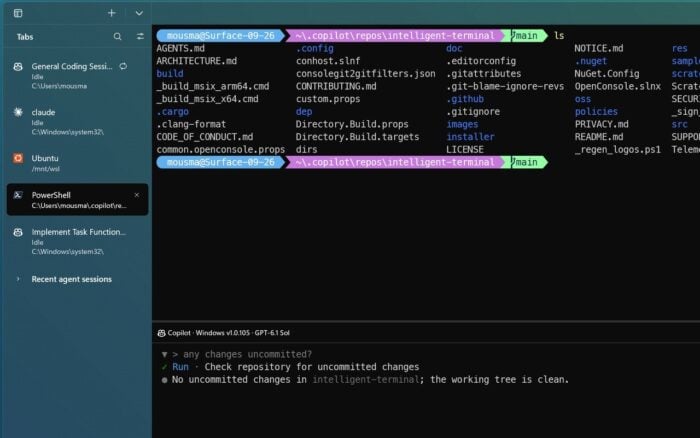
Microsoft has released Intelligent Terminal 0.3, bringing a major update to its experimental terminal application with vertical tabs, improved AI agent management, and global search.
According to the official announcement, the update introduces a redesigned sidebar that helps users manage terminal tabs, monitor AI agents, and access previous agent sessions from one place.
Intelligent Terminal 0.3 introduces vertical tabs and agent management
The biggest change in Intelligent Terminal 0.3 is the new sidebar, which replaces the traditional horizontal tab layout with vertical tabs. Microsoft enables the sidebar by default, although users can switch back to the conventional layout.
Users can select, close, reorder, and pin tabs directly from the sidebar, making it easier to navigate between multiple shells and AI agent sessions.
The update also adds live agent status indicators that show what each AI agent is doing and when it needs user attention. A new headless mode allows terminal tabs and processes to keep running even after users close the terminal window, while nested split panes make it easier to organize and monitor multiple sessions simultaneously.
Microsoft has also introduced global search, allowing users to find content across open tabs and recent agent sessions. Users can filter the sidebar to display only AI agent sessions and quickly access previous sessions, including agents running in other terminal windows.
These changes make Intelligent Terminal more useful for developers who work with several command-line environments and AI coding agents simultaneously.
Microsoft Intelligent Terminal 0.3 is available now
Microsoft has made Intelligent Terminal 0.3 available through the Microsoft Store. Users can also download the update directly from the project’s GitHub releases page.
Intelligent Terminal remains an experimental project separate from the standard Windows Terminal application.
The release comes as Microsoft continues improving its developer tools and software. The company recently introduced VS Code 1.145 with support for running multiple AIs in the same agent session.
Meanwhile, other recent Microsoft developments include Canada’s time zone changes causing Microsoft 365 login failures and Microsoft reissuing KB5002934 after Excel’s copy-and-paste bug returned.

Read our disclosure page to find out how can you help Windows Report sustain the editorial team. Read more


Improve this guide


User forum
0 messages