
Regions Bank Login: How to Access Your Account Online


 3 min. read
 Published on

Regions Bank login allows customers to access their checking, savings, credit card, and loan accounts online. You can sign in through the Regions website or mobile app to check balances, transfer money, and pay bills.
How to log in to Regions Bank online?
1. Use the official website
Follow these steps to access your Regions Bank account from a computer.
- Visit the official Regions Bank website.
- Click Log In under Online Banking.
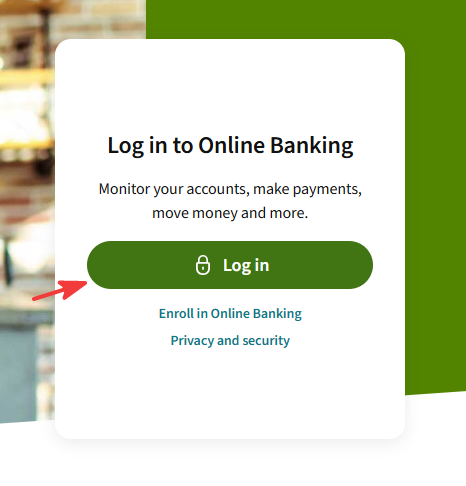
- Enter your Username and Password.
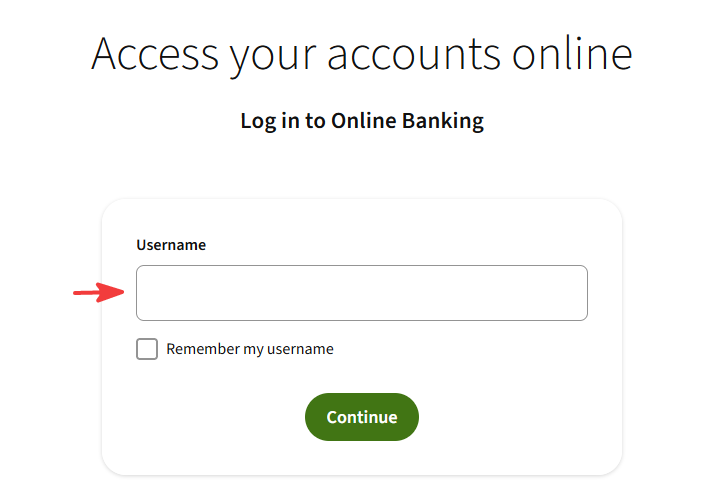
- Click Log In to access your account.
- Complete any additional security verification if prompted.
You can also use the direct Regions Bank login page to access Online Banking.
2. Use the Regions Mobile app
You can access your Regions Bank account on Android and iPhone.
- Download the official Regions Mobile app from the Regions mobile banking page.
- Open the app on your smartphone.
- Enter your Username and Password.
- Tap Log In.
- Use fingerprint or facial recognition for future logins if your device supports these features and you enable them.
The app lets you check balances, deposit checks, transfer funds, and manage payments.
How to fix Regions Bank login problems
If you cannot access your account, try these solutions.
- Check your credentials – Make sure you entered the correct username and password.
- Reset your password – Use the password recovery option if your credentials don’t work.
- Clear browser data – Delete your browser’s cache and cookies, then try again.
- Try another browser – Use an updated version of Chrome, Firefox, or Edge.
- Update the mobile app – Install the latest Regions Mobile app version.
- Complete security verification – Check your registered contact methods for a verification code.
- Contact customer support – Call Regions Bank if you still cannot sign in.
For additional assistance, visit the Regions Bank login support page.
You can complete the Regions Bank login through the official website or mobile app using your account credentials. If you experience problems accessing your account on your phone, follow these Regions Mobile app troubleshooting steps to resolve common issues.
If you use other banking services, you can also check our Bank of America login guide or learn about the different ways to log in to Capital One.
FAQs
Can I log in to Regions Bank without the mobile app?
Yes. Visit the official Regions Bank website and sign in through Online Banking using your username and password.
Can I access my Regions Bank account 24/7?
Yes. Regions Online Banking and its mobile app generally provide account access around the clock, although maintenance or technical issues may temporarily interrupt service.
Why does Regions Bank ask for a verification code?
Regions uses additional identity verification to protect customer accounts, including when it detects a new device or unusual login activity. Follow the verification instructions to continue.
Is Regions Bank Online Banking free?
Regions generally offers Online Banking enrollment and standard access without an additional enrollment fee. Certain transactions or account services may carry fees.

Read our disclosure page to find out how can you help Windows Report sustain the editorial team. Read more


Improve this guide



User forum
0 messages