
Windows 11 Experimental Build 26340.10032 Adds Improved Bluetooth LE Audio Support & More


 3 min. read
 Published on
In addition to releasing builds for the Windows 11 Beta and Beta 26H1 channels, Microsoft has also rolled out Windows 11 Insider Preview Build 26340.10032 to the Experimental channel. It brings several notable improvements to Bluetooth audio, Windows Search, and the Widgets experience. The latest Experimental build also introduces a change to how Windows services its Recovery Environment.
Bluetooth LE Audio gets a major upgrade
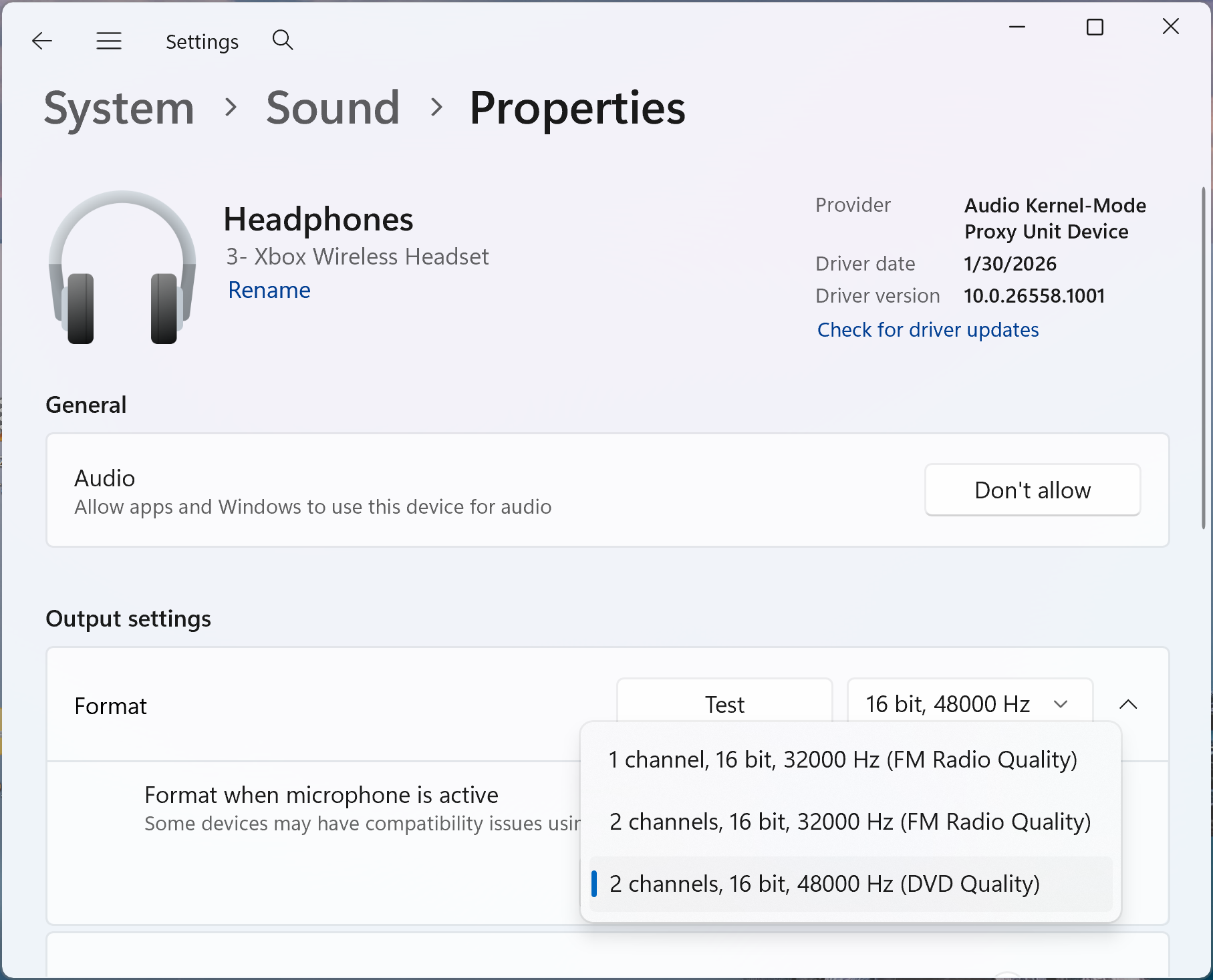
The biggest highlight of Windows 11 Experimental Build 26340.10032 is improved Bluetooth LE Audio support. Compatible devices can now deliver full-range stereo audio while simultaneously using their microphones.
This means users can maintain better audio quality during game chats, voice calls, voice typing, and Copilot Chat conversations. Microsoft says the feature requires a PC supporting Super Wideband Stereo and compatible Bluetooth LE Audio hardware.
To enable it, head to Settings > System > Sound > Output > Bluetooth device > Output settings. Under Format, when the microphone is active, select 2 channels, 16 bit, 48000Hz.
Windows 11 gets a new People widget, and Search gets richer results
Microsoft is also introducing a new People widget for the Windows Widgets board. It brings together contacts from supported communication apps, allowing users to quickly resume conversations. You can access it by pressing Windows + W, opening the widget picker, and adding People. Selecting a contact launches the relevant conversation in its supported application. However, you’ll need to configure Phone Link, WhatsApp, or both before contacts appear.
Moving on, the redesigned Windows Search experience is receiving another expansion. Microsoft is adding results for definitions, currency conversions, and general web searches. Meanwhile, File Explorer is also getting quick search filters. Users can filter results by file type and date, making large collections easier to navigate.
Windows Recovery Environment gets an important change
Microsoft is changing how Windows services its Recovery Environment. With this update, Windows can build a fresh recovery environment using updated operating system components during cumulative updates. This reduces reliance on separate Safe OS Dynamic Updates and should improve recovery reliability. BitLocker users won’t need to make any changes. Other disk-encryption solutions may require additional drivers integrated into WinRE. Not to forget, Microsoft has also improved the mobile devices experience in Quick Settings and the reliability of the Ctrl + Shift input-switching shortcut.
The missing Feature Flags section from the previous flight should also return. However, Microsoft is investigating reports that Task Manager no longer updates CPU speed after recent builds. As usual, Windows 11 Build 26340.10032 is gradually rolling out to Experimental Channel Insiders.

Read our disclosure page to find out how can you help Windows Report sustain the editorial team. Read more


Improve this guide




User forum
0 messages