
Mavis Beacon Teaches Typing for Windows: Browser Edition, Features, and Pricing
Annual paid license / Version Current browser edition


 2 min. read
 Published on
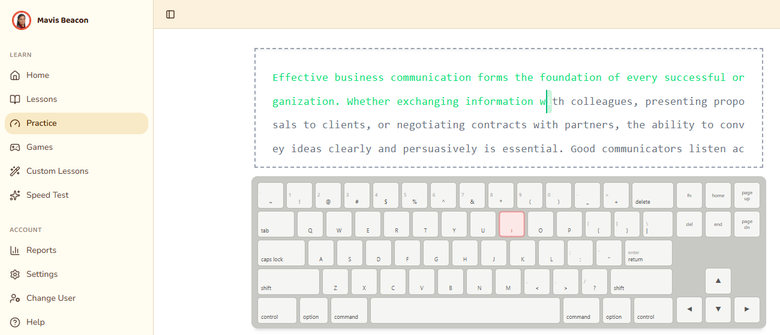
Mavis Beacon Teaches Typing is a browser-based typing tutor for teens and adults. The publisher’s current edition runs on Windows, Mac, and Chromebook without a software installation: activate a license, sign in, and practice in a web browser. It includes more than 100 skill checks and timed tests, 16 arcade-style games, personal speed and accuracy goals, and targeted practice for weak keys.
Current Mavis Beacon edition for Windows
The current Teaches Typing edition is delivered online, rather than as a new Windows installer. A single-user license is listed at $29.99 per year; a family plan for up to three typists is $49.99 per year. The publisher states that the annual plan can be set to auto-renew and that renewals can be turned off. Confirm the checkout terms before purchasing, since pricing and renewal conditions may change.
For children ages 6–12, the publisher offers Keyboarding Kidz as a separate browser edition. Classroom Edition provides rosters and progress reports for schools. The main Teaches Typing course includes English and Spanish practice, timed exercises, games, and a completion certificate after eight hours of practice, according to the publisher.
Publisher screenshots
How to start on Windows
Open the official Teaches Typing page to try the lesson or sign in. To buy a license, use the publisher’s checkout page. After purchase, the publisher emails an activation key and guide; activate it once, then log in through the browser. No Windows installer is required for this edition.
What about the desktop version?
Encore also lists Mavis Beacon Teaches Typing 2020 as a Windows and Mac DVD product. That is a separate, older desktop release. Check its system requirements and availability with the seller before buying; its version number and installation workflow do not describe the current browser edition.
Editorial assessment: This Windows Report assessment is based on the publisher’s current product and support information, not a user-review average or hands-on lab test. Mavis Beacon is a paid product; review the plan and renewal terms directly with the publisher.
Our Review
Windows Report editorial assessment: This reflects the current publisher product information; it is not a user-review average or hands-on lab test.
Full Specifications
- Software Version
- Current browser edition
- License
- Annual paid license
- Keywords
- Mavis Beacon, typing tutor, keyboarding practice, typing lessons, Windows typing software
- Release Notes
- https://mymavisbeacon.com/support/

Read our disclosure page to find out how can you help Windows Report sustain the editorial team. Read more


User forum
0 messages