
5 Best Vibe Coding Tools to Try in 2026


 10 min. read
 Published on
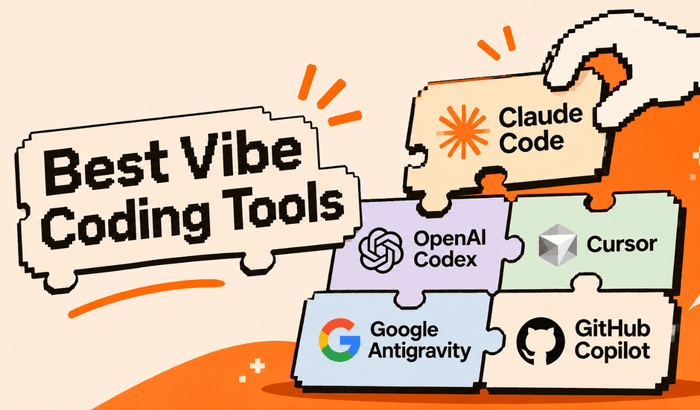
AI-powered coding has changed quite a bit in 2026. You no longer need to write every line of code yourself to build a functional website, mobile app, dashboard, or even a complicated software project. Tools such as Claude Code, OpenAI Codex, Cursor, and Google Antigravity can now take instructions in naatural language, understand existing code, make changes across multiple files, run tests, and help deploy applications.
However, not every AI coding tool is designed for the same job. Some are excellent at generating complete applications from a single prompt, while others are built to help experienced developers manage large codebases, fix complicated bugs, and automate repetitive programming tasks. That’s why choosing a vibe coding tool based purely on popularity isn’t a great idea. We looked at current product features, official documentation, independent industry comparisons, and developer feedback to identify the tools worth trying in 2026.
Top 5 AI Vibe Coding Tools You Should Try in 2026
Here are our rankings based on coding capabilities, agent autonomy, debugging, project handling, integrations, ease of use, and overall value.
1. Claude Code (Best Overall)
If you’re looking for an AI coding agent that can handle complicated development work, Claude Code deserves the first spot. Developed by Anthropic, it goes beyond suggesting code snippets and can actually understand your existing project, inspect files, modify code, run commands, and execute tests. One of its biggest advantages is how it handles larger codebases. You can ask it to investigate a bug, explain how different parts of your application work, or refactor an existing project. It can also work with GitHub and GitLab workflows to help turn issues into pull requests.
What makes Claude Code stand out?
- Understands existing codebases and project dependencies.
- Makes changes across multiple files.
- Runs terminal commands and tests.
- Supports extended coding tasks and multi-agent workflows.
- Integrates with VS Code and JetBrains IDEs.
Where it falls short: Claude Code isn’t the easiest starting point for someone who has never worked with code. It also requires attention to usage limits, particularly when handling large projects and lengthy tasks.
2. OpenAI Codex (Best for Autonomous Coding)
OpenAI Codex has become one of the strongest alternatives to Claude Code, particularly if you want to delegate development tasks instead of manually guiding every change. The Codex app allows developers to manage multiple coding agents, work on separate tasks in parallel, and review their changes. It can also work through the terminal, IDE integrations, and cloud-based coding environments. For example, you can ask Codex to build a new feature, investigate a bug, or review an existing implementation. Instead of simply returning instructions, it can work on the actual project and present its changes for review. In case you are new to it, here is an official guide on how to get started with Codex.
What makes Codex stand out?
- Can handle independent coding tasks in parallel.
- Supports local and cloud-based development workflows.
- Helps investigate bugs and implement features.
- Supports code reviews and pull request workflows.
- Integrates with the OpenAI development ecosystem.
Where it falls short: You still need to review generated code, especially when making changes involving authentication, databases, and sensitive application data. Usage limits also depend on your ChatGPT plan and available allowances.
3. Cursor (Best AI-Powered Code Editor)
Cursor is a slightly different experience because it combines an AI assistant with a full-fledged code editor. Instead of building everything through a browser-based prompt interface, you work directly with your project files and use AI to speed up development. Its Agent mode can understand project context, modify multiple files, execute commands, and help fix errors. It also supports multiple AI models, giving developers more flexibility when choosing how they want to work. You can learn using Cursor here.
What makes Cursor stand out?
- AI assistance directly inside the code editor.
- Multi-file editing and project-wide context.
- Agent-based coding and debugging.
- Support for multiple AI models.
- Familiar development environment for VS Code users.
Where it falls short: Beginners may need some time to understand its interface and development workflow. Heavy agent usage can also increase subscription costs.
4. Google Antigravity (Best for Multi-Agent Development)
Google Antigravity is Google’s agent-focused development environment, built around Gemini models and additional coding capabilities. What makes it interesting is its approach to multi-agent development. Instead of relying on one assistant for every task, you can delegate different parts of a project to agents working in parallel. These agents can help with coding, browser-based testing, and verifying changes. Its development environment also provides visual artifacts that help you review implementation plans and code changes. Learn more about using Google Antigravity here.
What makes Antigravity stand out?
- Multi-agent coding workflows.
- Integration with Google’s Gemini models.
- Support for parallel development tasks.
- Browser-based testing and verification.
- Tools for reviewing generated changes.
Where it falls short: The agent-first workflow may be overwhelming for beginners. It’s also important to check model availability and usage limits before committing to a particular plan.
What about Gemini CLI?
Google also offers Gemini CLI, an open-source terminal-based coding agent. It’s worth considering if you prefer working directly in a terminal rather than using a dedicated graphical development environment.
5. GitHub Copilot (Best for Everyday Coding)
GitHub Copilot is one of the most popular names in AI-assisted development. Initially popular for code completion and suggestions, it has expanded into agent-based coding, code reviews, and automated development workflows. Its biggest advantage is integration. You can use Copilot inside popular development environments, including VS Code, Visual Studio, and JetBrains IDEs. Its cloud agent can also research a repository, create an implementation plan, make changes on a branch, and prepare a pull request for review. You can check the official quick start guide for using GitHub Copilot.
What makes GitHub Copilot stand out?
- Code completion and AI-powered suggestions.
- Agent mode for autonomous coding tasks.
- Cloud-based coding agent.
- GitHub repository and pull request integration.
- Multiple AI model options depending on your plan.
Where it falls short: Advanced agent usage is subject to AI credit allowances and plan restrictions. Developers working on particularly complicated projects may also prefer a more specialized coding agent.
Other Vibe Coding Tools Worth Trying
The aforementioned five tools above are primarily focused on AI-assisted software development and coding agents. However, if you’re a beginner who wants to build an application without spending hours working with code, there are several other platforms worth considering. These aren’t necessarily weaker alternatives. They simply target a different type of user.
6. Lovable (Best for Beginners)
Lovable makes it easy to turn a plain-English description into a working web application. You can describe the interface, features, and functionality you want, and the platform generates the application for you. It also supports Supabase integration for database management, authentication, storage, and backend functionality.
The downside: Credits can run out quickly when you repeatedly modify a project, and complicated applications may require manual coding and debugging.
7. Bolt.new (Best for Quick Prototypes)
Bolt.new is a browser-based AI development platform that lets you create websites, web applications, and mobile applications using natural-language prompts. You can generate an application, preview it, edit the code, and connect additional services without setting up a traditional development environment.
The downside: Larger projects can become difficult to manage, and complicated prompts may require several rounds of corrections.
8. Replit Agent (Best for Building and Deploying Apps)
Replit combines an AI coding agent with a browser-based development environment, database tools, and hosting. Its biggest advantage is that you can build, test, and deploy an application within the same environment. This makes it particularly useful for beginners who don’t want to configure a local development setup.
The downside: AI agent usage and deployment resources can increase costs, and generated applications still require proper testing.
9. v0 by Vercel (Best for Website Interfaces)
v0 has evolved beyond simply generating website designs. It can create real React-based applications, connect databases and APIs, work with existing GitHub repositories, and deploy projects through Vercel. It’s especially useful for developers who want to create polished dashboards, landing pages, SaaS interfaces, and other web experiences.
The downside: Developers building complicated applications may still need additional backend services and manual development work. Vercel+2
Quick Comparison of the Best Vibe Coding Tools
| Tool | Best for | Skill level |
|---|---|---|
| Claude Code | Complex coding tasks | Intermediate to advanced |
| OpenAI Codex | Autonomous development | Beginner to advanced |
| Cursor | AI-assisted coding | Intermediate |
| Google Antigravity | Multi-agent development | Intermediate to advanced |
| GitHub Copilot | Everyday coding | Beginner to advanced |
| Lovable | Building apps from prompts | Beginner |
| Bolt.new | Rapid prototyping | Beginner to intermediate |
| Replit Agent | Building and deploying apps | Beginner to intermediate |
| v0 | Website and UI development | Beginner to intermediate |
How We Ranked These AI Coding Tools
We didn’t rank these platforms simply by looking at their marketing claims or the number of features they advertise. Instead, we considered several factors that matter when you’re actually building something.
- Coding features: How well can the tool generate, understand, and modify code?
- Agent autonomy: Can it handle multiple tasks independently, or does it require constant instructions?
- Debugging: Can it identify errors, run tests, and fix problems without repeatedly starting over?
- Project handling: How well does it work with larger applications and existing codebases?
- Ease of use: Can someone without extensive programming experience get started?
- Pricing and limitations: Are the available plans practical for regular development, or do usage limits make extended projects expensive?
Which Vibe Coding Tool Should You Choose?
It really depends on what you’re trying to build. If you’re an experienced developer, I’d start with Claude Code, Codex, or Cursor. If you want to experiment with multiple AI agents, Google Antigravity is worth exploring. On the other hand, beginners who want to build a website or application without learning an entire programming language should start with Lovable, Bolt.new, or Replit Agent.
Recommendation: Don’t pay for several subscriptions immediately. Pick one platform, build a small project, test its debugging capabilities, and see how well it handles changes when your initial prompt isn’t enough.
Why You Shouldn’t Trust AI-Generated Code Without Testing It
There’s one thing worth mentioning before you start building applications with these tools. Just because an AI coding agent successfully generates an application doesn’t mean the software is ready for production. AI-generated code can contain security vulnerabilities, broken authentication, poorly configured database permissions, and unexpected errors. You should always review important changes, test the application, and verify that sensitive information is handled properly. This becomes important when building applications involving payments, personal information, user accounts, or business data.
FAQs related to best vibe coding tools
1. What is the best vibe coding tool in 2026?
Claude Code is our overall pick for complex software development. OpenAI Codex is another excellent option for autonomous coding, while Cursor is a strong choice for developers who prefer working inside an AI-powered code editor.
2. Which AI coding tool is best for beginners?
Lovable, Bolt.new, and Replit Agent are among the easiest platforms to get started with. They allow you to describe an application in plain English and generate working projects without requiring extensive programming knowledge.
3. Is OpenAI Codex better than Claude Code?
Both are powerful coding agents, but they have different strengths. Claude Code is particularly good at understanding large codebases and handling complex development tasks. Codex is attractive for delegating tasks, running parallel agents, and working within the OpenAI ecosystem.
4. Is Google Gemini good for vibe coding?
Yes. Google’s Gemini ecosystem includes Antigravity, Gemini CLI, and Gemini Code Assist. Antigravity focuses on agent-based development, while Gemini CLI provides a terminal-based coding workflow.
5. Can I build a complete application using vibe coding tools?
Yes, you can build functional websites and applications using platforms such as Lovable, Bolt.new, Replit, and v0. However, more complicated projects still require testing, security checks, database configuration, and occasional manual coding.

Read our disclosure page to find out how can you help Windows Report sustain the editorial team. Read more


Improve this guide


User forum
0 messages