
ChatGPT Users Can Now Edit Photos, Design, and Work on PDFs with Adobe Apps
Support for Photoshop and Acrobat on Android is coming soon


 2 min. read
  Published on
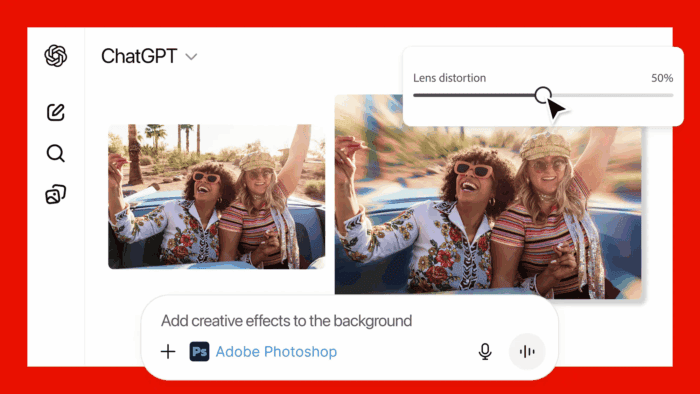
Adobe is making creativity more accessible than ever by launching Photoshop, Adobe Express, and Acrobat directly inside ChatGPT. Thanks to this collaboration, ChatGPT users can now edit photos, design graphics, and manage documents just by typing what they want to do.
Well, the new integration blends ChatGPT’s conversational interface with Adobe’s professional-grade tools. You can now give instructions like, “Adobe Photoshop, help me blur the background of this image,” and the AI guides them through the edit, all without leaving the chat.
“We’re thrilled to bring Photoshop, Adobe Express, and Acrobat directly into ChatGPT, combining our creative innovations with the ease of ChatGPT to make creativity accessible for everyone,” said David Wadhwani, president of digital media at Adobe.
The apps give users plenty of options:
- Photoshop: Adjust image brightness, contrast, and exposure, or apply creative effects like Glitch and Glow while keeping photo quality intact.
- Adobe Express: Create and personalize designs using templates, add text, swap images, and animate elements, all from within the chat.
- Acrobat: Edit PDFs, merge files, extract tables or text, compress documents, and redact sensitive information.
Basically, Adobe is letting people start small with conversational edits and scale up to more precise control with familiar sliders and tools when needed.
Adobe’s apps are free for ChatGPT users worldwide. Photoshop, Express, and Acrobat are live on ChatGPT for desktop, web, and iOS, with Express also on Android. Support for Photoshop and Acrobat on Android is coming soon. If you use Firefly, there’s an AI Assistant is coming for you.

Read our disclosure page to find out how can you help Windows Report sustain the editorial team. Read more



Improve this guide


User forum
0 messages