
Firefox 149 Brings Split View, Better Multitasking, and UI Tweaks


 3 min. read
  Published on
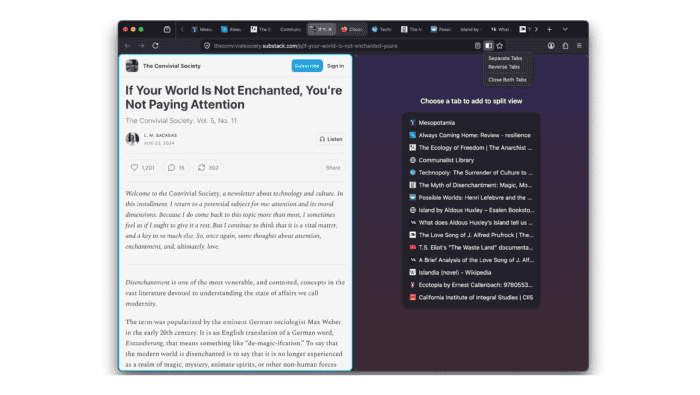
Firefox 149 is now rolling out, and this update puts a clear focus on how people actually use their browser day to day. Instead of big headline-grabbing features, Mozilla is refining multitasking, improving layout control, and polishing the interface. The result feels more practical than flashy, with changes that aim to make working across tabs and windows less messy and more efficient.
The split view feature is finally here
One of the biggest additions in Firefox 149 is split view. You can now place two tabs side by side in the same window, making it easier to compare content, read while writing, or keep a reference open.
The feature works in a simple way. You pick two tabs and snap them into a shared layout. There is no complicated setup, and resizing is smooth enough for regular use. It brings Firefox closer to what some other browsers have offered for a while, but it is still a welcome addition here.
Mozilla is giving the built-in vpn more control
Mozilla is also expanding its built-in VPN features. The update introduces better control over how the VPN behaves, including split tunneling in supported setups.
This means you can choose which traffic goes through the VPN and which does not. For example, you might keep your browser protected while letting other apps use your normal connection. It adds flexibility without changing how the core VPN works.
Small visual changes across the browser
Firefox 149 includes a handful of visual updates that are easy to miss at first but add up over time. Menus feel cleaner, spacing is more consistent, and some icons have been adjusted.
These are not major redesigns. Instead, they smooth out rough edges and make the interface feel a bit more modern without forcing users to relearn anything.
There are performance and background improvements
As expected, this release also includes general performance work and bug fixes. Tab handling is slightly more efficient, and there are improvements to stability in longer browsing sessions.
These changes do not stand out on their own, but they support the main goal of the update, which is to make everyday browsing feel more reliable and less cluttered.
It’s a practical update, not a flashy one
Firefox 149 is not trying to reinvent the browser. It focuses on things people actually do, like juggling tabs, comparing information, and managing privacy tools.
The new split view alone makes a noticeable difference for multitasking. Add in the VPN controls and small UI tweaks, and this update feels grounded and useful rather than experimental.
Via Neowin


Read our disclosure page to find out how can you help Windows Report sustain the editorial team. Read more



Improve this guide


User forum
0 messages