
Google Chrome rolls out Brave Search as a built-in search engine
Chrome 151 Stable adds Brave Search as a built-in search engine option alongside Google, Bing, Yahoo, and DuckDuckGo.


 2 min. read
  Published on
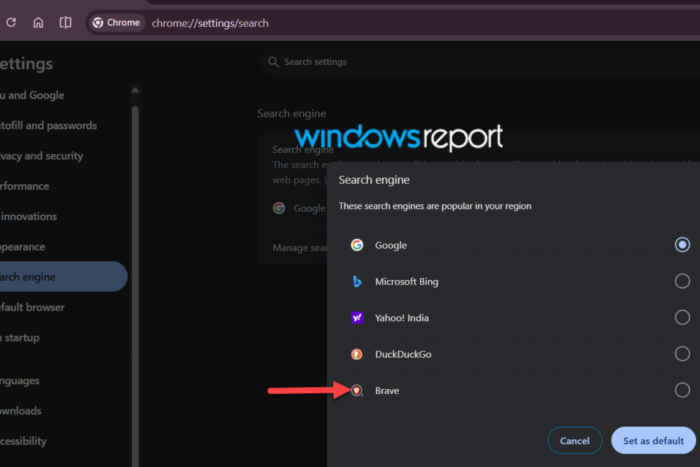
Google Chrome now lets some users choose Brave Search as a built-in search engine in Chrome 151 stable, without manually adding it to the browser’s search engine list, Windows Report has found. Brave appears alongside Google, Microsoft Bing, Yahoo, and DuckDuckGo in Chrome’s built-in search engine picker.
Users can find the option by going to Settings > Search engine and selecting “Change ” next to the default search engine.
Chrome notes that the list contains search engines that are “popular in your region,” so the available choices can vary by country. Selecting Brave Search makes it the browser’s default search engine, so searches entered in Chrome’s address bar are sent to Brave Search instead of the user’s previous search provider.
Chrome builds its prepopulated search engine list based on the user’s region, and Google periodically updates those choices based on regional popularity. For example, in our testing in India, Brave replaced Yandex in Chrome’s built-in list. Users in other regions may see a different set of search engines.
We first spotted Brave Search in Chrome Beta and Canary before it reached Stable. We’ve since confirmed the change in Chrome Stable, including in Serbia.
Brave Search launched in 2021 and operates on its own web index rather than relying on Google or Bing for web results. Chrome has long let users choose their preferred search engine, but Brave Search wasn’t generally listed among the browser’s built-in options. Chrome now changes that by letting eligible users select it directly from Google’s built-in search engine picker, without any manual configuration.
The change is notable because Brave has long positioned its browser and search engine as alternatives to Google. Despite competing directly in search, Google now includes Brave Search among Chrome’s built-in search engine options, making it easier for users to switch.


Read our disclosure page to find out how can you help Windows Report sustain the editorial team. Read more



Improve this guide




User forum
0 messages