
Google Earth Can Now Reimagine Any Place Using Nano Banana 2


 2 min. read
  Published on
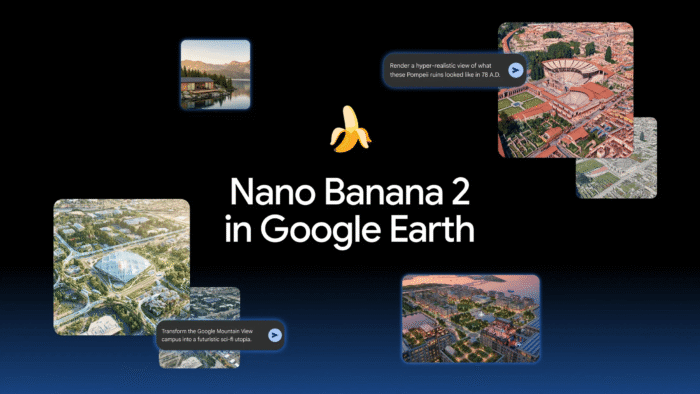
If you’ve ever wished you could see what your dream home, a historic landmark, or even your hometown might look like in another era, Google has finally made that possible. The company has added Nano Banana 2 to Google Earth, allowing you convert real-world locations into AI-generated scenes with a simple prompt.
Google Earth can now turn imagination into reality with the help of Nano Banana 2
The new feature combines Google Earth‘s satellite imagery, aerial photography, and 3D maps with Nano Banana 2’s image generation capabilities. Rather than starting off with a blank canvas, the AI works directly from real locations, creating concepts that remain grounded in the surrounding environment.
You can simply open Google Earth on the web, zoom into any location, click Create image, and describe what they want to see. Within seconds, the AI generates a customized version of that place. The company wants it to become a practical visualization tool for education, architecture, planning, and exploration.
It’s more than creating futuristic cities
One of the biggest use cases is education. Teachers can recreate ancient landmarks as they appeared centuries ago, giving students a visual way to understand history instead of relying only on textbooks.
The feature also supports AI-generated infographics. For example, you can ask Google Earth to explain the Statue of Liberty, with Gemini gathering historical facts while Nano Banana creates a visual guide.
Of course, Google hasn’t forgotten creativity. You can further transform neighborhoods into futuristic cities, redesign famous landmarks, or imagine what familiar places could look like decades from now. Google says the feature is available globally today for Google Earth on the web.

Read our disclosure page to find out how can you help Windows Report sustain the editorial team. Read more



Improve this guide




User forum
0 messages