
Is BlueSky Down & Not Working? How to Fix App, Feed & Website Issues


 6 min. read
  Updated on
Every now and then, Bluesky experiences outages or service disruptions that results in users complaining the Bluesky website and app not working. It’s frustrating because Bluesky has emerged as one of the best alternatives to X (formerly Twitter), giving users a familiar microblogging experience without relying on a single centralized platform. However, at times Bluesky app on Android or iOS may refuse to load, your feed might stop refreshing, or the Bluesky website could display an error instead of loading normally. Worry not, in this guide, we’ll explain why Bluesky isn’t working and show you the best ways to fix it.
How to Fix Bluesky App and Website Not Working Issue
1. Check if Bluesky is experiencing an outage
Server outages are one of the biggest reasons Bluesky suddenly stops working. During major incidents, the Android app, iPhone app, and website may all become unavailable at the same time. If that’s the case, troubleshooting your device won’t solve the problem until Bluesky restores its services.
- Visit the official Bluesky Status page.
- Check Downdetector for recent outage reports.
- Look for updates from Bluesky’s official account.
- Browse Reddit to see if other users are reporting the same issue.
If there’s a confirmed outage, your best option is simply to wait until the service is restored.
2. Restart/refresh the Bluesky app/website
Like most mobile apps, Bluesky can occasionally become stuck after running for a long period or after a failed background refresh. Restarting the app clears temporary glitches and often fixes loading or feed-related problems.
For app:
- Close the Bluesky app completely.
- Remove it from your Recent Apps screen.
- Reopen the app.
- Refresh your feed again.
For website:
- Make sure to refresh the Bluesky website
- Clear your browser’s cache
- Try again loading the Bluesky website
3. Check your internet connection if Bluesky isn’t working
A weak Wi-Fi signal or unstable mobile data connection can make it appear as though Bluesky is down, even when the service is working normally. If the app can’t communicate with Bluesky’s servers, your feed may stop updating or posts may fail to load.
- Restart your Wi-Fi router.
- Switch between Wi-Fi and mobile data.
- Open another website to confirm your connection is working.
- Disable your VPN if you’re using one.
4. Update the Bluesky app
Running an older version of the app can cause compatibility issues after Bluesky rolls out new features or backend updates. Installing the latest version ensures you’re using the newest bug fixes and improvements.
Android
- Open the Google Play Store.
- Search for Bluesky.
- Install any available updates.
iPhone (iOS)
- Open the App Store.
- Search for Bluesky.
- Tap Update if a newer version is available.
5. Clear the app cache (Android)
Corrupted cache files can cause the Bluesky app to crash, freeze, or refuse to load properly on Android devices. Clearing the cache removes temporary files without deleting your account or posts.
- Open Settings > Apps > Bluesky.
- Tap Storage.
- Select Clear Cache.

- Reopen the app.
If you’re using an iPhone, iOS doesn’t offer a manual cache clearing option, so reinstalling the app is usually the best alternative.
6. Try the Bluesky website if app isn’t working
If the mobile app isn’t working, switching to the web version can help determine whether the issue is limited to the app itself. Likewise, if the website isn’t loading, testing another browser may quickly solve the problem.
- Open Bluesky in Chrome, Edge, Firefox, or Safari.
- Try using an Incognito or Private browsing window.
- Disable browser extensions temporarily.
- Refresh the page.
7. Log out and sign back in if Bluesky feed won’t refresh
Occasionally, your login session may expire or become corrupted, preventing Bluesky from syncing your account correctly. Signing out and back in establishes a new connection with Bluesky’s servers.
- Open Bluesky Settings.
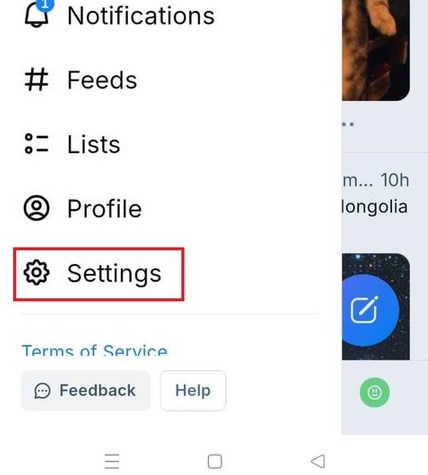
- Sign out of your account.
- Close the app.
- Sign back in using your account credentials.
8. Reinstall the Bluesky app
If Bluesky continues to crash or refuses to open after trying the previous fixes, reinstalling the app can replace damaged files that may be causing the problem.
- Uninstall the Bluesky app.
- Restart your phone.
- Download the latest version from the Google Play Store or App Store.
- Sign back into your account.
9. Wait for Bluesky to resolve server issues
If both the app and website stop working at the same time, there’s a strong chance the issue is affecting everyone. Reddit users frequently report outages during heavy traffic or maintenance periods, and these incidents are usually resolved within a few minutes to a few hours.
If multiple outage trackers show widespread reports, avoid repeatedly reinstalling the app. Instead, wait for Bluesky to restore its services before trying again.
Is Bluesky down today or just not working for me?
Before changing any settings on your phone or computer, it’s worth checking whether Bluesky is experiencing a widespread outage. When Bluesky’s servers are down, users commonly report problems such as:
- Feed not refreshing
- Timeline not loading
- Posts failing to publish
- Images not loading
- Login errors
- Notifications arriving late
- Website not opening
- App stuck on the loading screen
If many users are reporting the same issue at the same time, the problem is most likely with Bluesky’s servers rather than your device. You can check the official Bluesky Status page, Downdetector, or communities like Reddit to see whether others are experiencing similar issues. If everything seems perfect for everyone but not you, check the common issues and what they mean below.
Common Bluesky problems and what they mean
| Problem | Possible cause |
|---|---|
| Feed not loading | Server outage or internet issue |
| Timeline won’t refresh | Temporary service disruption |
| Can’t log in | Authentication or server problem |
| Website not opening | Browser issue or server outage |
| Posts won’t publish | Bluesky servers are overloaded |
| Images not loading | Slow connection or CDN issue |
| Notifications delayed | Temporary backend delay |
| App crashing | Outdated app or corrupted cache |
FAQs related to Bluesky not working issue
1. Why is Bluesky not working today?
Bluesky may be experiencing a temporary outage, server maintenance, or unusually high traffic. It can also be caused by an outdated app, poor internet connection, or corrupted cache files.
2. Is Bluesky down right now?
If many users are reporting the same issue on outage tracking websites or Reddit, the problem is likely affecting Bluesky’s servers rather than your device.
3. Why won’t my Bluesky feed refresh?
This usually happens because of server issues, internet connectivity problems, or temporary syncing delays. Restarting the app and checking your connection often resolves the issue.
4. Why is the Bluesky website not loading?
The website may be temporarily unavailable due to server maintenance, browser-related issues, or a network problem. Trying another browser or opening the site in a private window can help.
5. Why is the Bluesky app crashing on Android or iPhone?
An outdated app, corrupted cache files, or software bugs are the most common causes. Updating or reinstalling the app usually fixes the problem.
6. How do I know if Bluesky is down?
The easiest way is to check Bluesky’s official status page, Downdetector, or Reddit. If many users are reporting the same issue, it’s likely a widespread outage rather than a problem with your device.

Read our disclosure page to find out how can you help Windows Report sustain the editorial team. Read more



Improve this guide


User forum
0 messages