
Microsoft 365 Copilot Redesign Focuses on Speed, Simplicity, and Less Clutter


 3 min. read
  Published on
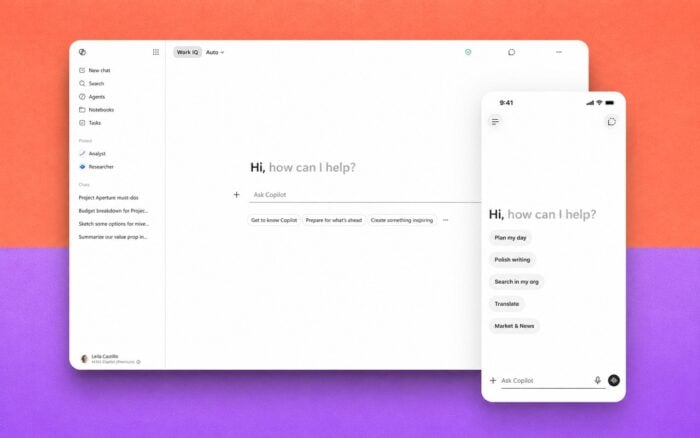
Microsoft has now introduced the first update to its Copilot Design System, an effort focused on making the AI assistant more practical, easier to navigate, and less disruptive during everyday work. The company detailed the redesign in a recent Copilot blog post.
The update introduces a redesigned Copilot interface, faster response times, and smarter ways of surfacing tools only when users actually need them.
Copilot Gets a Larger Prompt Box and Cleaner Layout
One of the biggest visual changes is the new Copilot prompt area. Microsoft has expanded the prompt box and moved controls and tools beneath it instead of crowding the main interface.
According to Microsoft, the new layout should help users focus more on conversations and spend less time searching through menus and options.
The redesign also adds inline formatting tools directly inside the prompt area. Users can now perform more actions without leaving the main input field.
Microsoft Uses “Progressive Disclosure” to Reduce Clutter
Microsoft says the redesign follows a design principle called progressive disclosure.
Instead of displaying every feature, integration, or control at all times, Copilot now reveals options only when they become relevant to the current task.
Microsoft wants Copilot to feel less overwhelming and more approachable because the company believes a simpler experience will help more users adopt the AI assistant while still keeping advanced tools available when needed.
Work IQ Intelligence Layer Powers Smarter Responses
The updated experience also relies on Microsoft’s Work IQ intelligence layer.
Work IQ helps Copilot ground responses using work-related context and organizational data. Microsoft says this should improve how Copilot understands tasks and generates more relevant answers.
The redesign also introduces an expandable left-side pane for additional content and navigation items.
Users Can Now Choose Between AI Models
Microsoft is also adding model selection support inside Copilot.
Users will be able to choose between different AI models depending on the task they want to complete. Microsoft says this flexibility should help Copilot better handle both lightweight requests and more complex reasoning tasks.
Microsoft Claims Major Performance Improvements
Microsoft says the updated Copilot app now runs twice as fast as before.
The company also claims response times for more complex questions improved by roughly 10%. These improvements appear to focus on both interface responsiveness and AI-generated answers.
Microsoft additionally reported increased usage of new Copilot experiences across Office applications following rollout. However, the company only referenced early post-launch data, so it remains unclear whether adoption growth will continue long term.
The redesign arrives as Microsoft expands Copilot deeper across Windows 11 and Microsoft 365. The company is also testing a new Copilot docking mode in Windows 11, while Microsoft 365 Copilot recently passed another external security audit.

Read our disclosure page to find out how can you help Windows Report sustain the editorial team. Read more



Improve this guide



User forum
0 messages