
Microsoft 365’s Accessibility Assistant Gets Smarter at Detecting Tables and Shapes
New update reduces false alerts and improves screen reader compatibility


 2 min. read
  Published on
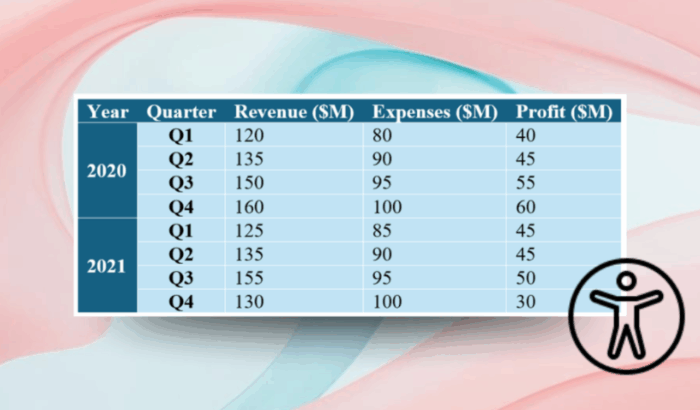
Microsoft has rolled out an update for its Accessibility Assistant in Microsoft 365, and it brings smarter handling of tables and shapes across Word, Excel, and PowerPoint. The changes, now available to Microsoft 365 Insiders, make the assistant more accurate and less intrusive.
One of the key changes ensures that tables using valid row and column headers are no longer flagged as violations. Previously, the Accessibility Assistant often reported tables as non-compliant even when screen readers could interpret them correctly.
The latest change ensures that proper headers are treated as sufficient. Similarly, merged headers that span multiple columns or rows, such as year or category labels, are now correctly recognized in Word and PowerPoint, while Excel remains unchanged since it doesn’t support merged table cells.
Microsoft has also improved how the tool treats small tables, which screen readers typically handle without difficulty. Tables with fewer than four rows or columns will no longer trigger merge or split warnings, reducing unnecessary noise for document creators.
In addition, decorative or empty shapes and text boxes used for layout or spacing are no longer flagged as accessibility violations in Word and Excel, since they don’t impact navigation or comprehension. This update makes Accessibility Assistant more context-aware, ensuring that alerts reflect genuine accessibility concerns.
The new logic for table handling is rolling out to Word, Excel, and PowerPoint users running Version 2411 (Build 19412.20000) or later on Windows and Version 16.103 (Build 25101121) or later on Mac. Moreover, the changes to shape handling are available for Word and Excel users running Version 2411 (Build 19329.20000) or later on Windows and Version 16.103 (Build 25100813) or later on Mac.

Read our disclosure page to find out how can you help Windows Report sustain the editorial team. Read more



Improve this guide



User forum
0 messages