
Microsoft Delays General Availability of Native Teams macOS Screen Sharing Until Mid-May


 2 min. read
  Published on
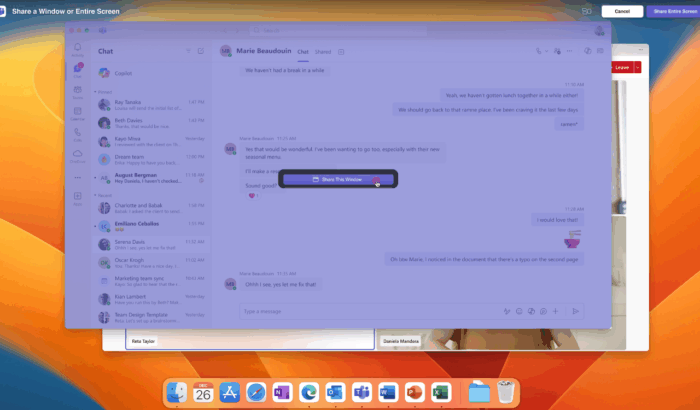
Microsoft has updated its rollout timeline for native screen sharing in Microsoft Teams on Mac, pushing full availability further into 2026. The feature, which uses macOS native APIs, is now expected to reach general availability by mid-May, rather than the earlier January window.
The rollout of native Teams screen sharing in macOS faces delay
The updated timeline shared in the Microsoft 365 Admin Center under Message ID MC1187801 suggests the company is taking more time to improve the experience (via Neowin).
“As part of our ongoing commitment to delivering a polished, platform-native experience for Mac users, Microsoft Teams is introducing native screen and window sharing capabilities tailored specifically for macOS. This opt-in experience leverages Apple’s macOS native screen sharing APIs, allowing users to share their screen or window directly from macOS during Teams meetings,” notes the company in the Admin Center message.
The company further notes that the rollout began with Targeted Release users in December 2025. However, the general availability phase has been delayed. Worldwide and GCC environments will now see completion by mid-May 2026, while GCC High and DoD environments may take until late May.
The update mainly affects Mac users within Microsoft 365 environments. The Redmond giant encourages admins to inform users and update internal documentation, although no admin action is strictly required.
In a previous announcement, Microsoft confirmed that the feature is disabled by default. Users can enable it by following the steps given below:
- Open Teams on Mac
- Select Settings and more > Settings, then select General.
- Under Screen sharing, toggle on Use macOS content sharing.
- Once in a meeting, select Share to start a screen share, and then Select a screen or window to begin using the Mac native experience.
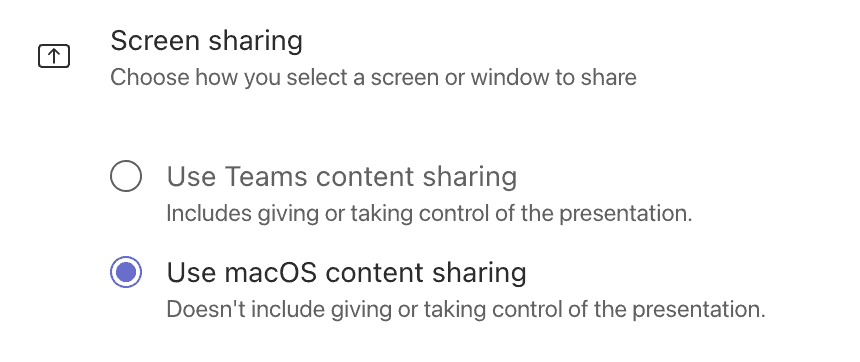
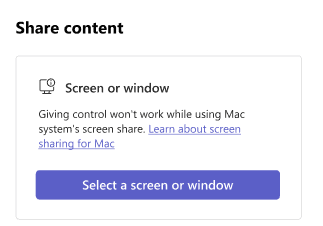
The company further noted that users can’t give or take control when using the Mac native experience for screen sharing. Not to forget, Microsoft is also working on bringing a built-in Do Not Disturb setting to Teams on Windows, along with smarter meetings, video summaries, and more. You can read more about it in our separate article.

Read our disclosure page to find out how can you help Windows Report sustain the editorial team. Read more



Improve this guide




User forum
0 messages