
Microsoft's Windows 11 Baseline Protection Could Lock You Out of Your Favorite Games and Apps


 3 min. read
 Published on
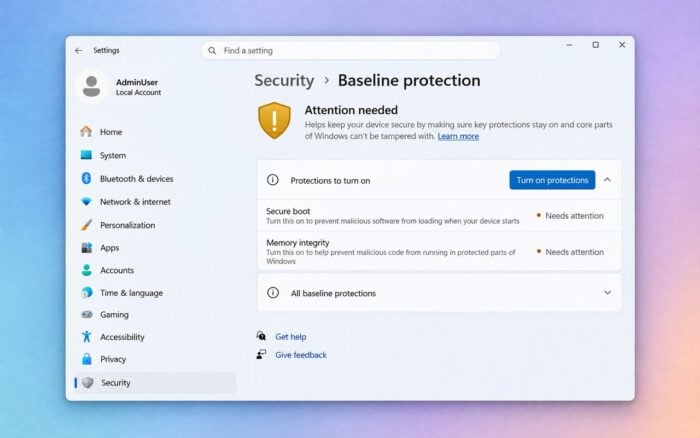
Microsoft has announced Windows Baseline Protection, a new Windows 11 security feature that could prevent certain applications and games from running on PCs that fail to meet specific security requirements.
Unveiled at Microsoft Ignite 2026, the feature combines existing Windows security protections into a single security status that applications can verify before launching.
Windows Baseline Protection is currently available in preview through the Windows Insider Program, with general availability expected in 2027.
Windows 11 Baseline Protection checks eight security requirements
According to Microsoft’s announcement, Windows Baseline Protection checks eight security features to determine whether a PC meets the required security standard.
These include:
- TPM 2.0: A security processor that helps protect encryption keys and system credentials.
- Secure Boot: Prevents unauthorized software from loading during startup.
- Virtualization-based security (VBS): Uses hardware virtualization to isolate sensitive system components.
- Memory integrity: Protects critical Windows processes from malicious code.
- Signed drivers only: Requires drivers to carry valid digital signatures.
- Windows-certified drivers: Ensures drivers meet Microsoft’s certification requirements.
- Kernel debugger protection: Helps prevent unauthorized kernel debugging.
- Vulnerable driver protection: Blocks drivers with known security vulnerabilities.
A PC must satisfy all eight requirements to pass the baseline security check.
Windows verifies these protections during startup and generates a security status or hardware attestation token that compatible applications can check.
Games and applications could refuse to launch
Windows Baseline Protection could have significant implications for gamers and users who modify their Windows security settings.
Developers can choose how their applications respond when a PC fails the security verification. They can allow the application to run, display a warning, disable certain features, or block it entirely.
Microsoft has already identified several early partners, including Adobe, Battle.net, 1Password, Raycast, and Schoolyear.
This could affect gamers who disable Memory Integrity to improve performance or users who turn off Secure Boot for dual-boot configurations.
PCs running Windows 11 on unsupported hardware could also encounter problems if they cannot satisfy the required protections.
However, Windows Baseline Protection does not automatically block applications. Developers must implement the checks and decide what happens when a device fails.
Microsoft also plans to strengthen baseline security requirements over time, potentially making some previously compliant PCs ineligible for certain applications.
Windows 11 will show which security requirements are missing
Microsoft is introducing a dedicated Settings > Security > Baseline protection section to help users check their PC’s security status.
The page will identify which requirements a device meets and which protections need attention.
On unmanaged PCs, users will also have access to a one-click option that enables missing Windows-level security features, followed by a system restart.
However, some hardware-related requirements may need additional BIOS or UEFI configuration changes.
With the feature scheduled for general availability in 2027, Windows 11 users have time to review their security configurations before more developers begin adopting the new verification system.
In other Microsoft security news, Windows 11 and 10 recently received new Microsoft Defender updates for installation images.
Researchers also discovered BubbleLoader malware hiding inside Windows Media Player, while Microsoft updated the Windows 11 Media Creation Tool with the November 2026 update.

Read our disclosure page to find out how can you help Windows Report sustain the editorial team. Read more


Improve this guide

User forum
0 messages