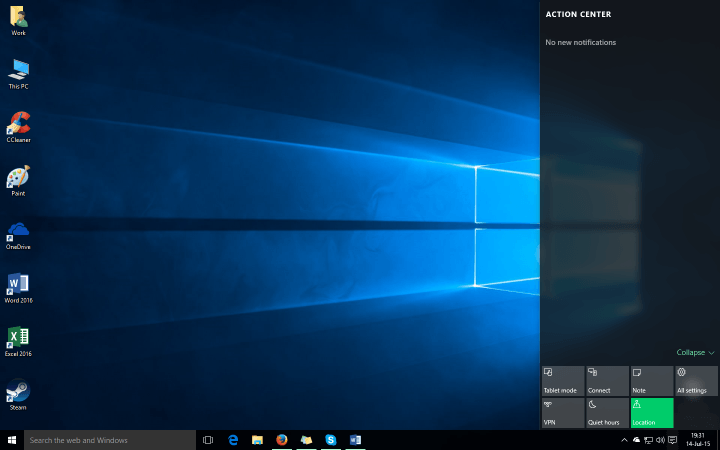
Windows 10 how-to: Make quick shortcuts to specific settings on your desktop

Windows 10 how-to: Make quick shortcuts to specific settings on your desktop

Here at WinBeta, we have a vibrant community mixed with both technology experts who have been around the block a few times and new users who are getting their feet wet when it comes to Microsoft’s Windows operating system. This type of tutorial is more focused towards the new Windows user, who might be using Windows 10 for the first time. With that being said, let’s dive right into how you can easily make shortcuts to specific settings on your Windows 10 desktop.

With Windows 10, there are still two areas to configure settings  — the old school Control Panel and the new Settings app. For those of you who wish to access the old school Control Panel app, simply right click on the Start button and select Control Panel. Otherwise, let’s focus on the new Settings app.

Each setting in the Settings app has a unique identifier called a URI. If we extract this URI, we can easily use it in a run command or as a desktop shortcut. All you have to do is pick one of the URIs listed below, right click on your desktop, select New, then select Shortcut, and paste the URI into the location field (the URI starts with “ms-settings”). You can also choose an icon for your new shortcut by right-clicking on the shortcut, and selecting properties. Then click the “Change Icon” button. 

Here are a list of URIs (courtesy of WinAero) you can use to create desktop shortcuts to your commonly used settings:

  • Battery Saver: ms-settings:batterysaver
  • Battery Saver Settings: ms-settings:batterysaver-settings
  • Battery use: ms-settings:batterysaver-usagedetails
  • Bluetooth: ms-settings:bluetooth
  • Colors: ms-settings:colors
  • Data Usage: ms-settings:datausage
  • Date and Time: ms-settings:dateandtime
  • Closed Captioning: ms-settings:easeofaccess-closedcaptioning
  • High Contrast: ms-settings:easeofaccess-highcontrast
  • Magnifier: ms-settings:easeofaccess-magnifier
  • Narrator: ms-settings:easeofaccess-narrator
  • Keyboard: ms-settings:easeofaccess-keyboard
  • Mouse: ms-settings:easeofaccess-mouse
  • Other Options (Ease of Access): ms-settings:easeofaccess-otheroptions
  • Lockscreen: ms-settings:lockscreen
  • Offline maps: ms-settings:maps
  • Airplane mode: ms-settings:network-airplanemode
  • Proxy: ms-settings:network-proxy
  • VPN: ms-settings:network-vpn
  • Notifications & actions: ms-settings:notifications
  • Account info: ms-settings:privacy-accountinfo
  • Calendar: ms-settings:privacy-calendar
  • Contacts: ms-settings:privacy-contacts
  • Other Devices: ms-settings:privacy-customdevices
  • Feedback: ms-settings:privacy-feedback
  • Location: ms-settings:privacy-location
  • Messaging: ms-settings:privacy-messaging
  • Microphone: ms-settings:privacy-microphone
  • Motion: ms-settings:privacy-motion
  • Radios: ms-settings:privacy-radios
  • Speech, inking, & typing: ms-settings:privacy-speechtyping
  • Camera: ms-settings:privacy-webcam
  • Region & language: ms-settings:regionlanguage
  • Speech: ms-settings:speech
  • Windows Update: ms-settings:windowsupdate
  • Work access: ms-settings:workplace
  • Connected devices: ms-settings:connecteddevices
  • For developers: ms-settings:developers
  • Display: ms-settings:display
  • Mouse & touchpad: ms-settings:mousetouchpad
  • Cellular: ms-settings:network-cellular
  • Dial-up: ms-settings:network-dialup
  • DirectAccess: ms-settings:network-directaccess
  • Ethernet: ms-settings:network-ethernet
  • Mobile hotspot: ms-settings:network-mobilehotspot
  • Wi-Fi: ms-settings:network-wifi
  • Manage Wi-Fi Settings: ms-settings:network-wifisettings
  • Optional features: ms-settings:optionalfeatures
  • Family & other: users ms-settings:otherusers
  • Personalization: ms-settings:personalization
  • Backgrounds: ms-settings:personalization-background
  • Colors: ms-settings:personalization-colors
  • Start: ms-settings:personalization-start
  • Power & sleep: ms-settings:powersleep
  • Proximity: ms-settings:proximity
  • Display: ms-settings:screenrotation
  • Sign-in options: ms-settings:signinoptions
  • Storage Sense: ms-settings:storagesense
  • Themes: ms-settings:themes
  • Typing: ms-settings:typing
  • Tablet mode: ms-settings://tabletmode/
  • Privacy: ms-settings:privacy
Mother and daughter capture courageous stories with the help of Skype

Marla & Kasha Slavner

If you’ve ever felt like taking a year off and traveling around the world, then take inspiration from mother and daughter duo Marla and Kasha Slavner. Kasha, aged 16, convinced her mother to travel with her from Toronto, Canada to Asia. However, this was no ordinary trip as they went with the intention of filming stories of courage, hope and resilience shown by people who have risen above the difficulties in their lives. They named the project “The Global Sunrise Project” and ended up with more than 130 hours of footage and over 20,000 photographs.

Throughout their time in Asia, the two used Skype extensively to connect with loved ones back home, get in touch with organizations they wished to visit meet contacts in advance and co-ordinate travel plans. Even when the mother and daughter returned home, they used Skype for video interviews, production meetings, and keeping in touch with people they met on their travels.

Now with the aid of Skype, Marla and Kasha are creating a video series called the “Sunrise Chat for Social Good Series”. In this series, the mother and daughter team will discuss with different people about how to create change to improve lives. Each episode will have a different theme and introduce people to support the theme of the conversation.

In the first part of the series, which can be seen below, Kasha and her mom talk about putting purpose behind your passion to Lola Akinmade Åkerström, a National Geographic Creative Photographer/Writer, and Dylan Lowe, Social Entrepreneur & Founder of The Ripple Movement.

In the second part of the series, the two will be attending Chris Guillebeau’s World Domination Summit. There, Kasha will show off her photography exhibition “Travels into the Heartland” which she took on the trip to Asia.

This project reminds us how useful a tool like Skype can be. With the recent addition of automatic translation and its integration into Windows 10, Skype will be around for quite some time to come.

Microsoft's unified Windows Store brings new changes to listings and search algorithms for developers

Image Credit: WinBeta

Part of Microsoft’s new initiative with Windows 10 is to unify Windows users experiences across multiple devices. During Microsoft’s developer conference //Build/ 2015, Microsoft sold its vision of a unified buying experience that would occur in a combined Windows, Windows Mobile, and Xbox Store, eventually. More than directing Windows users to a single purchase point, the combined Store is intended to help developers make money.

As Windows 10 nears its July 29th launch date, curious Windows developers are finally getting answers regarding Microsoft’s progress on its //Build/ 2015 unified vision. According to Microsoft, the changes to the Store are finally coming. The new Store changes affect lists, search algorithms, a new web experience, and updates to ratings and reviews.

Aside from the most obvious “app gap” compliant, the Windows Store on both PC and Mobile were criticized for their lack of discoverability. Many Windows app developers complained about their app’s lack of surfacing among the sea of copy-cat apps or misdirected tutorial pages that used copyrighted material. With today’s announcement, the Windows team is addressing that specific concern with its new listing and search algorithms.

  • Search algorithms optimized for apps, games, movies, and music rather than the general web search used earlier. These algorithms take a more holistic approach when evaluating an app’s relevancy to the search terms, factoring in attributes such as click-through rates in the Store listings, ratings and reviews, keywords, and total downloads.
  • Apps that customers have previously acquired are not currently filtered out of searches or app lists. As a result, customers may see apps they already own in the Store lists and recommendations. We are planning to remove previously-owned apps from the recommendations in a future update.
  • Lists will not include ‘top grossing.’ The lists available today include ‘top free,’ ‘top paid,’ ‘best rated,’ and ‘new and rising.’ The ‘top grossing’ app list, which is currently available in the Store on Windows 8, will be temporarily unavailable, with plans to bring back this capability in a future update.
  • Store lists always show Apps first, then Games, then Music, then Movies. When users search for items, the order of the results might not be the ideal, and that is also a focus area for future improvement.

Microsoft offers a note of caution regarding the new algorithm. Due to the changes being applied to current Windows 8 and Windows Phone data, developers may experience some ranking changes in both Store lists and search results. Microsoft is encouraging developers to evaluate their app’s descriptions and keywords to ensure they are best optimized for the list and search results they would like to be displayed as.

Image Credit: Microsoft

Alongside the new Store found on Windows devices, Microsoft is also putting its Store on the web for easier accessibility. Windows 8 had a version of the Store that could be accessed via the browser, but Microsoft’s new web-based Store now includes listings for media content such as music, movies, and TV shows. The inclusion of Windows Media content now offers a more full-featured Store experience to Windows users on any device.

  • Windows Phone screenshot auto-rotation orientation no longer available. Windows Phone Dev Center enabled developers to submit vertical screenshots, and Dev Center would rotate them. The new Dev Center does not have this ‘auto rotate’ filter. So you might see some Windows Phone screenshots appear vertical instead of horizontal in the Store. The fix is easy: re-submit the screenshots rotated with any image editor, and then upload to Dev Center.
  • New web Store and URL redirects: The previous Store URLs windows.microsoft.com and www.windowsphone.com now redirect customers to the new web Store apps.microsoft.com. Existing URLs and links continue to work and automatically redirect customers to the new Store.
  • Installing apps from web Store not available. Installing apps to a Windows Phone when using the Store in a PC browser is not supported. Apps must be installed from the device itself.
  • Logged out customers may see both Windows and Windows Phone apps. If a customer is not logged in to their Microsoft account on Windows 8.x or Windows 7, the web Store will show both the Windows and Windows Phone apps. This means the customer may see duplicate apps (for non-linked apps).
  • URL to show all apps from one publisher no longer available. The URLs that pointed to all apps from a single publisher in Windows Phone (e.g. https://www.windowsphone.com/en-US/store/publishers?publisherId=xxx) are no longer supported. Customers can select a publisher’s name in an app’s product description page to view a list of the publisher’s apps.

Image Credit: WinBeta

Once again, Microsoft is issuing some suggestion to help guide developers through this change, which include, adjusting their app descriptions as a heads up about app versions. According to Microsoft, “The app description pages do not include which devices the app works on, nor does it show the app version and last update date. We are working to bring these popular features back in a future update.” To get around this, Microsoft recommends putting the app version in with the app description when apps are updated.

Lastly, Microsoft is addressing the Ratings and Reviews portion of the Store. Now users will be able to read the combined reviews for both Windows and Windows Phone apps together.

  • New Ratings and Reviews Algorithm. The Windows 10 Store uses new review sorting logic to improve the customer experience in a variety of ways:
  • The most recent reviews with most ‘helpful’ votes are bubbled to the top of the list, ensuring comments on are relevant and useful for customers looking at your app.
  • The profanity detection algorithm has been updated and improved. As customers change the way they use profanity in reviews, the algorithm will adapt and further refine the way it detects inappropriate language.
  • New spam detection will detect and remove more spam before customers see it.

We reported on the unified Dev Center dashboard before, but it looks like Microsoft is offering a bit more detail in this recent announcement.

Image Credit: Microsoft

  • Unified Ratings and Reviews for Linked Apps. The unified Dev Center dashboard treats linked Windows and Windows Phone apps as a single app with multiple packages. Ratings and reviews for any package in the linked app are applied to the app, regardless of whether the rating was provided on a Windows Phone app or a Windows 8.x app. In Windows 10, customers will see combined reviews and ratings for both apps in the new Store as well a unified star rating.  Customers accessing the Store on earlier OS versions (e.g., Windows Phone 8.1) will not see the new combined rating.  A device-specific filter is planned for a future update, enabling customers to see just reviews for their device type.
  • Ratings and reviews submitted in Windows 10 previous to July 15 were deleted. Ratings and reviews submitted by customers using the preview versions of Windows 10 were removed from the Store on July 15, 2015.  This action was taken to ensure an app’s rating and reviews are not based on customer experiences with preview versions of Windows 10.  Instead, apps will only show Windows 10 ratings and reviews generated after July 15. Depending on the ratings your app received in the Store Preview, you may see your average star rating change.

Similar to many of the Windows teams most recent offerings, the Store is a “from the ground up” process that is going to take a little bit of time to work out. Hopefully, developers stay on board long enough to see their efforts as well as Microsoft’s pay off.

Microsoft will revoke access to the Windows Store from those running older Windows 10 builds

Microsoft will revoke access to the Windows Store from those running older Windows 10 builds

Windows Insiders, if for some reason you are not running the latest Windows 10 build (10240), Microsoft will be imposing limitations on you starting today.

In an announcement, Microsoft revealed that access to the Windows Store will be revoked from anyone running an older Insider Preview of Windows 10. This is done to ensure that users take advantage of all the latest bug fixes and performance improvements, offering a more reliable user experience.

Users will also need to be running the latest version of the Windows Store, which is current version 2015.7.22.2. Older versions will display a message and a button to upgrade to the latest version.

Now that Windows is offered as a service, it will be interesting to see how Microsoft will respond to users who are not running the absolute latest version of Windows put out, and what other limitations the company might impose. Let us know your thoughts on the matter in the comments section below.

Microsoft Surface 3 with 4G LTE now available in the United States

Surface 3

Earlier this week, we reported that the Microsoft Surface 3 4G LTE version, following its earlier release in Europe, would be making its way to AT&T. Well now that date has arrived, and the 4G LTE version of Redmond’s svelte tablet/PC hybrid is now available for purchase on contract.

Two versions to offer the SIM capabilities are available, the first having 64GB in internal storage space, the second 128GB. AT&T is not the only option however. LTE enabled Surface 3 models can also be bought through Microsoft Stores, where T-Mobile and AT&T SIM cards are available, and also through T-Mobile, through its @Work channel, as revealed by Microsoft in a blog post.

The Surface 3 is the latest hybrid computing device to emerge from Microsoft. Smaller and less powerful than the Surface Pro 3, it is also a sight less expensive, being a little more tablet than laptop in its design, as opposed to its bigger brother.

Will you be picking up a Surface 3 4G LTE from AT&T? Let us know in the comments below.

iStudiez Pro Review – One of the Best Windows Apps Students can Use

College life could be difficult for students with all those classes, exams, assignments, and other important everyday obligations, but people from iStudiez Team want make their life a little bit easier by presenting one of the best student’s assistants on the market, iStudiez Pro.

This app is one of the most popular class planners in Apple’s App Store, and now, it finally made its way to Windows users.

How to use iStudiez Pro

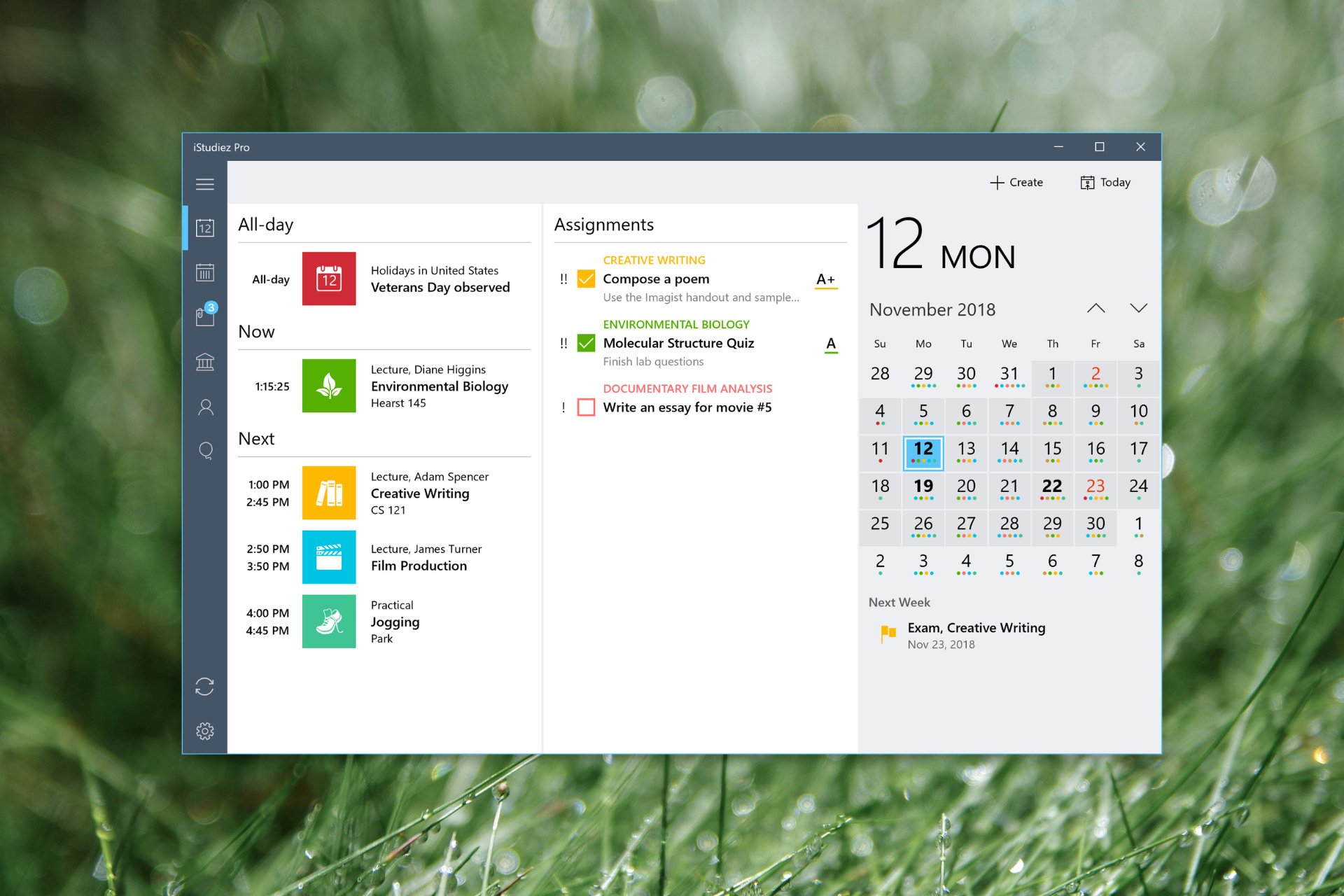
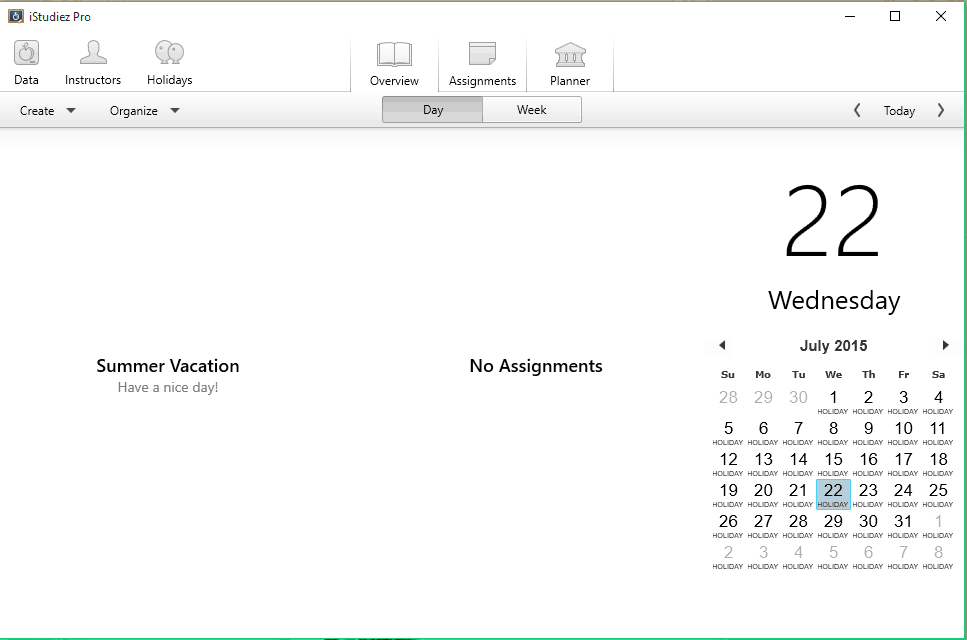
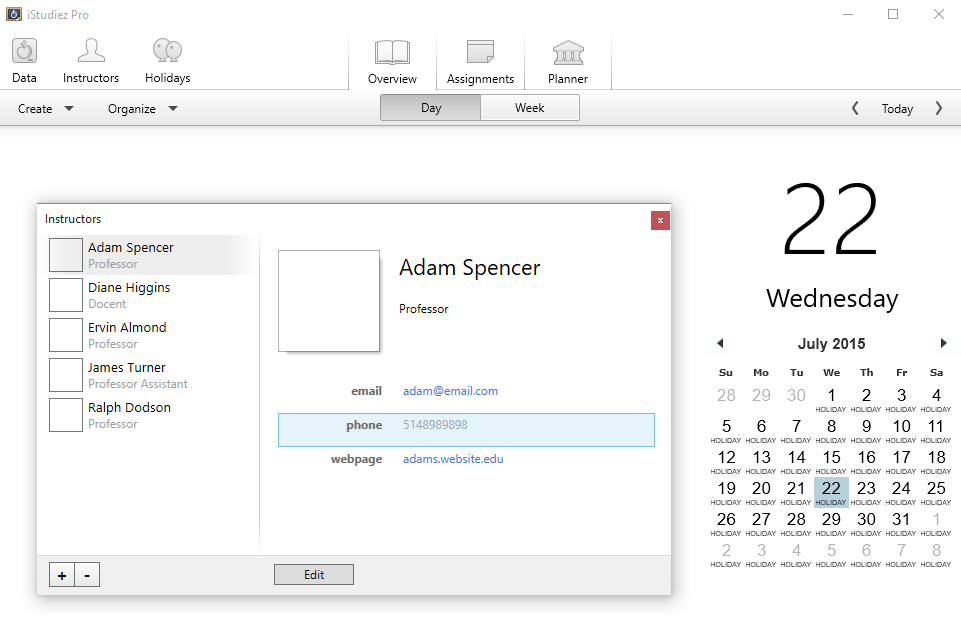
When you open iStudiez Pro you’ll get to the Overview window. Here you can track all your courses, classes, or assignments from the calendar on the right side. You click on the date in the calendar, and you’ll see all classes or assignments you need to attend on this date.

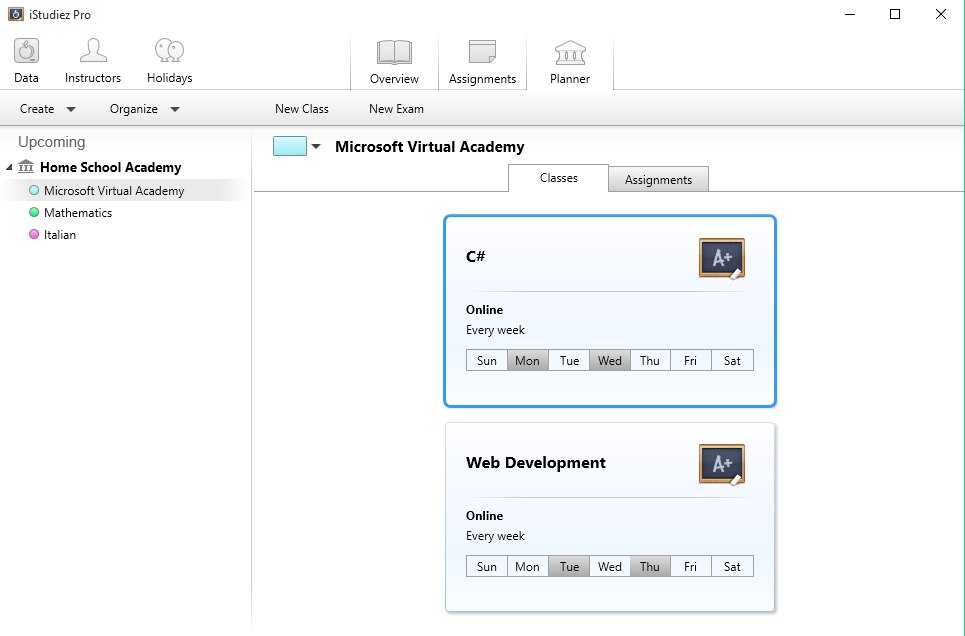
Beside Overview, you also have Assignments and Planner tabs, where you can add your semesters, courses, classes, exams, and other assignments. Let’s start with Planner tab. This is probably the most important section of the app.

The first thing you need to do is to add your current semester, and then you can add courses within that semester, and classes within courses.

To and your first semester, go to Create > New Semester, and give your semester a name, and set for how long it will last. Once you created a new semester, you should add courses to it. You can do that by clicking on Create > New Course.

Add the name of your course and choose its color for better management. Now you can add classes to your course, by clicking on the New Class button. It will give you the option to set the name, date, schedule and type of your class. You can also add assignments and exams to your classes and courses.

Besides Overview and Planner, Assignments tab is also one of the main tabs of this program. All assignments form all your courses will be placed there, so you can easily manage them. When you create an assignment, it will show up in Overview tab, with the notification on Assignments tab, and it will be visible until you complete that assignment.

Besides pending tasks, Assignment tab is also going to give you a list of all your completed tasks. You can easily manage all assignments by due date, course or priority.

And finally, on the upper left side of the window, you can find Data, Instructors and Holidays tabs. Data managing is very useful feature because it gives you an option to back up all your data in case you delete the app. With Load Data Backup… you can later load all your data back.

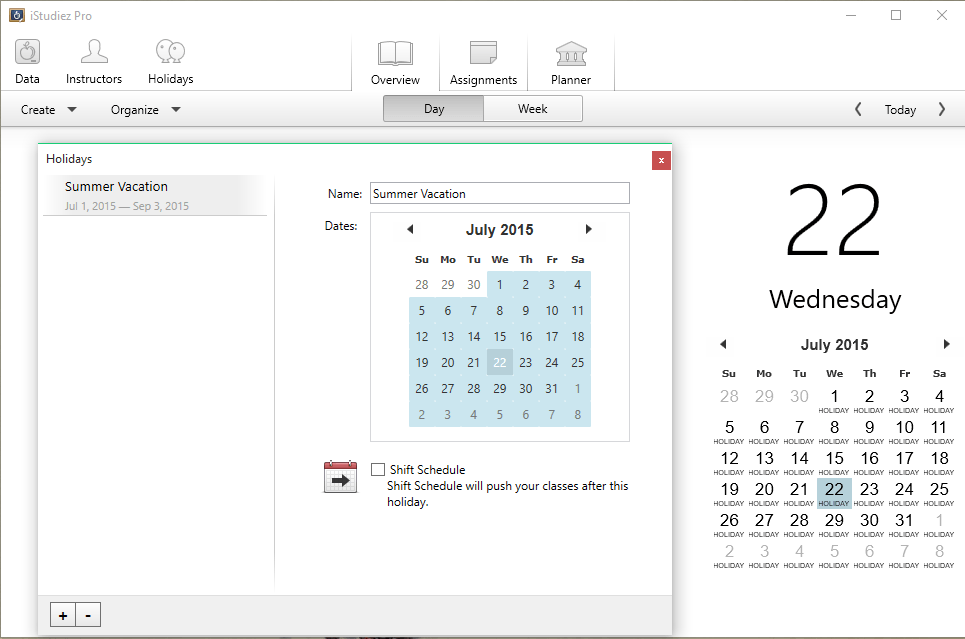
The instructors tab allows you to add info about all your professors or instructors, you can also assign them latter to the appropriate classes. And Holiday determines when your vacation starts. You can choose days of your vacation, simply by selecting them on a calendar.

Design

Although features are pretty much same, design of Windows version of iStudiez Pro is quite different from iPad version.

The iPad version has a book-like layout, which gives you feeling that you’re indeed using workbook for managing your obligations, while Windows version is some mixture of Mac OS and Windows interfaces.

This mix makes iStudiez Pro for Windows very elegant. The app is very well-designed, yet simple and easy to use. So, we have to say that stuff from iStudiez Team did a great job when designing this app.

Photo Gallery

iStudiez Pro 4
iStudiez Pro Windows 2
iStudiez Pro Windows 3
iStudiez Pro Windows

Bottom line

Introducing iStudiez Pro to Windows users is a great move. Because Microsoft offers great laptops, tablets, and PCs for students, the availability of this great planner could bring even more benefits.

It is very easy to use, and gives you a lot of options, in one word, it gives you all you need to plan your whole semester successfully. So students who want to have complete control over their college obligations should use this handy app.

You can download iStudiez pro from its official Web Store for the price of $9.99.

Reflecting on Microsoft’s ninjacats, babies, schoolgirls and dancers

Reflecting on Microsoft's ninjacats, babies, schoolgirls and dancers

Nothing screams “internet” more than an image or video of a cat and while the overuse of the feline species in product marketing and merchandise has begun to wear a bit thin, it can still be fun to see cats used in self-aware media creations such as in the new Xbox One game, Trials Fusion The Awesome Max Edition and Just Dance 2015’s bizarre “Holding Out for a Hero” level.

Microsoft’s ninjacat is another example of a fun use of the ol’ internet cat cliché. Inspired by the popular image created by Jason Heuser featuring the holy trinity of internet memes; cats, unicorns and rainbows, Microsoft’s version first appeared on Microsoft’s campus in the form of stickers distributed to attendees. Once the internet became aware of this, its popularity grew to the point where Microsoft has now released their own ninjacat wallpapers and raw images for Windows 10 fans to customize and distribute. It’s a way to share in the fun nerdery of the niche craze but is also an obvious attempt at an almost-organic viral marketing campaign for the new operating system which is just a week away.

In addition to the original “Ninjacat Riding a Unicorn” design, two new designs featuring the cat riding a T-Rex and a narwhal (which is also skewering two slices of bacon, another recent internet meme) can be downloaded in a variety of sizes for PCs and tablets, smartphones, and the Microsoft Band.

The ninjacat may be a relatively niche marketing attempt by Microsoft but it does target the more internet-savvy consumer who may not relate to, or may be even been turned off by, the recent mainstream Windows 10 commercials featuring babies (who are essentially the “internet cat” of modern TV). These new ads are obviously promoting the longevity of the Windows 10 platform through the use of babies but they are also leaving some people confused due to the ambiguous nature of their presentation. Sometimes people just want information over hype.

The baby commercials may not be the most groundbreakingly original marketing Microsoft has ever done but it’s getting a much more positive reaction than their recent attempt at internet meme creation which many have nicknamed, “the anti-diversity tweets”. Unlike the ninjacat, which experienced an organic growth in popularity, this attempt at viral image marketing by Microsoft was a completely forced creation that not only misinterpreted online humor but totally underestimated the images’ potential to offend.

These images, which were tweeted out by official Microsoft Twitter accounts, attempted to use self-deprecating humor to poke fun at developers, programmers and marketers but resulted in perpetuating negative stereotypes that many in those fields fight on a daily basis. The mobile worker was shown as an unhygienic and lazy man who leaves rotting food on his desk while the chief financial officer was portrayed as wearing a toupee and having an odd sense of humor. There was also the fact that all of the jobs were filled by men except for the marketer who was shown to be the stereotypical high heel-wearing, small dog-carrying business woman who suffers from a mood disorder. Yeah, that.

Microsoft's Anti-Diversity Images

These tweets were quickly deleted but the images had already gone viral and not in the way Microsoft had intended. People were outraged.

Microsoft has often been criticized for an apparent inability to read their audience and promote their products with their initial presentation of the Xbox One being one such example of a major misfire and the less than successful launch of Windows 8 being another.

It’s not just in the West that Microsoft has suffered from odd marketing decisions. Microsoft continues to do poorly with their newly launched Xbox One console in China due to an inability to promote it in a relevant way to the local culture and sell it at a reasonable price. The company has also had a hard time in Japan and barely promotes their Xbox One console at all. They have admittedly done fairly well though with Windows and have done significant domestic promotion for the Surface line of products, often using repurposed American commercials such as the enjoyable Surface “The Vibe” and “Movement” commercials which featured an eclectic mix of professional dancers from a variety of demographics.

While not high on technical product details, these ads did do a great job of presenting the unique physical design of the Surface line while also managing to introduce the use of a stylus to traditional Windows PC users. “The Vibe” and “Movement” also exuded a sense of fun and energy that had been sorely lacking in Microsoft marketing up until then, and many could argue, hasn’t been seen since.

Of course, Microsoft also produces some marketing campaigns specifically targeted at the Japanese market with some being more successful than others. The most obvious example of a Japan-specific marketing campaign is the creation of a Japanese schoolgirl anime-style mascot for each new operating system it launches. These characters are designed more to sell products to the niche hardcore demographics than the general population and have been successful with their target audience in the past though with Japan suffering more and more from mascot fatigue due to companies relying on them to advertise almost everything it will be interesting to see how popular Windows 10’s schoolgirl will be. With Windows 10 being Microsoft’s last OS though, the days of Microsoft OS Japanese mascots may thankfully be over.

Microsoft's Japanese Windows Mascots

While some of Microsoft’s marketing campaigns have been more successful than others over the years, it’s hard not to respect the company for at least trying something new with their advertising each time a product or service is released. It stands in sharp contrast to other companies such as Apple who simply release new iterations of what is essentially the same commercial over and over again.

Which Microsoft commercial or marketing strategy do you like (or loathe!) the most? Are you all aboard the ninjacat train or do you find that so 2012? What do you think about the new Windows 10 baby commercials? Epic win or massive fail? Share your thoughts with us in the comments below and let us know what you think Microsoft should do to better market themselves to consumers in the future.

Windows 10 build 10240 receives another "hotfix" update

Image Credit" WinBeta

The release of Windows 10 build 10240 to Windows Insiders was the last preview build before “Release To Manufacture” (RTM). However, that doesn’t mean the Windows team is done working on it. Microsoft has been releasing fit and finish updates since the build was released. Today, Microsoft has released another “hotfix” update, announced by Gabe Aul on Twitter:

There’s no documentation or blog post yet to indicate what the “hotfix rollup” does, but it will install automatically via Windows update in the next day or so. Alternatively, Windows 10 Insiders can install the update immediately via “Check for updates”.

The updates for Windows 10 Insider build 10240 are arriving quickly as Microsoft patches things up for an RTM release due date of July 29. After RTM Windows Insiders will continue to receive new builds and updates for the next Windows version while regular Windows 10 users will have a choice of how fast they want the updates to arrive with Slow and Fast rings.

Show you're ready for Windows 10 with this new profile picture badge

Show you're ready for Windows 10 with this new profile picture badge

With just a little more than a week left until the RTM of Windows 10, Microsoft is pulling out more promotional tools to support the launch of their latest operating system.

We’ve recently seen TV spots with cute kids, a series of advertisements for 10 reasons to love Windows 10, and Microsoft’s own “Bleed Blue” campaign on its Redmond campus.

Now Microsoft is giving its fans a way to show their enthusiasm for the new operating system with Windows 10 profile picture badges for both Facebook and Twitter.

Gabe Aul, the General Manager for Microsoft’s OSG Data and Fundamentals team, posted on twitter his new profile picture with his “Do Windows 10” badge and link for you to create your own.

To upgrade click this link, which will direct you to a page asking if you want to update either your Facebook or Twitter profile pictures. You can either apply the badge to your existing profile picture or choose a different one either from your Facebook photos, or by uploading an all together new one.

Are you going to sport the new badge across your social media? Let us know what you think of it in the comment section below.

Microsoft's "Noteworthy" Surface 3 ad focuses on students in time for back to school

Microsoft's Surface 3 ad focuses on students in time for back to school

Microsoft is ramping up their advertising campaign and one of the latest editions is an ad for the Surface 3. It’s directed towards students and heavily features OneNote, Microsoft Office’s note taking program. With back to school in only a few weeks, many students will be buying a device for their upcoming studies. With that influx of shoppers, Microsoft is pushing their newest addition to the Surface line.

The ad shows off how the Surface 3 and OneNote can help students in the classroom. OneNote allows you to record lectures and also type while recording. When you play back the audio it can highlight what you were typing at that moment in the recording. It also displays taking hand written notes and converting them to text.

In addition to OneNote on the Surface 3, the ad shows off the StaffPad app for Surface that converts hand written music into sheet music and other features.

The Surface 3 is being sold to many types of customers but an obvious customer base is students. The Surface 3 has a relatively low price point, especially for what it offers, integrates well with OneNote with its stylus, and is also a solid media consumption device. If you’re interested in the Surface 3 for yourself or someone you know, you can check out our full review.

GE to bring Office 365 to its 300,000 employees in 170 countries

GE to bring Office 365 to its 300,000 employees in 170 countries

Microsoft announced today that General Electric is the latest company moving to Office 365, which will bring the productivity platform to GE’s more than 300,000 employees across 170 countries.

Office 365, Microsoft’s cloud-based and Software as a Service modeled version of its popular productivity suite, has been a popular choice for many companies of all sizes. As WinBeta previously reported, Office 365 usage has been “skyrocketing” to surpass Google Apps and nearly catch Salesforce.com in terms of future enterprise deployment plans. Now with GE signing up for Office 365, its user base will grow by an additional 300,000.

In Microsoft’s Business Matters blog, GE’s Chief Technology Officer Larry Biagini describes why they chose Office 365. Biagini says that the previous idea of upgrading every few years was not sustainable for a company of GE’s size, and that “we wanted to get out of an environment where upgrades were a point-in-time decision, and that cadence of being able to take advantage of new functionality is something that we believe we’re going to get huge advantage from.”

Biagini also notes that Microsoft’s open approach to supporting solutions from other providers was key to their decision. He says:

“A one-size-fits-all solution is unrealistic for a company of our size, so the interoperability and flexibility of the platform, the ability to integrate with other tools was an extremely important piece. Some of our solutions may not come from Microsoft, but the ability to integrate has to come from Microsoft.”

To learn more about today’s announcement you can read on at Microsoft’s Business Matters blog, which details more about why GE chose Office 365 as the productivity platform for its worldwide operations.

Visual Studio 2015 final release event starts at 8:30 PDT

Visual Studio 2015 final release event starts at 8:30 PDT today

Microsoft’s latest version of Visual Studio, the popular integrated development environment, is available today and comes with a new cross platform support to help developers build regardless of what platform they are coming from.

S. Somasegar, corporate vice president of Microsoft’s Developer Division, previously described the release saying:

“We are opening up Visual Studio to developers targeting new platforms – from cross-platform mobile development targeting iOS, Android and Windows, to game development targeting Unity, Unreal, Cocos and more.  At the same time, Visual Studio 2015 redefines developer productivity with proactive diagnostics tooling and the new Rolsyn language services for C# and VB.  And together, Visual Studio 2015, Team Foundation Server 2015 and Visual Studio Online help teams to embrace DevOps with great agile backlog management, Azure cloud tooling, hosted continuous integration, and Application Insights across all the components of your application.”

Now that the RTM for Visual Studio 2015 is here, Microsoft is hosting a half day event, which will be broadcast here, to show off the many new tools for developers contained in the latest edition. Microsoft has also released a set of videos on Channel 9 to help explain new features for cross-platform mobile app development, .Net 2015, Azure SDK 2.6, Apache Cordova, Windows 10 in general, and more.

Visual Studio 2015 has been promised as a big move to support developers from multiple platforms in Microsoft’s efforts to encourage more app development in Windows 10. Some of the new features are:

  • Tools and services for projects of any size or complexity
  • C#, Visual Basic, F#, C++, Python, Node.js and HTML/JavaScript
  • Build for iOS, Android, Windows devices, Windows Server or Linux
  • Advanced debugging, profiling, automated and manual testing
  • DevOps with automated deployments and continuous monitoring

If you are interested in these new features and learning more about the latest version of Visual Studio, you can watch the webcast of today’s release event or head over to Channel 9 if you miss the broadcast for more demonstrations of Visual Studio.

Microsoft shuffles more managers as reorganization continues

Microsoft

The extent of Nadella’s recent ‘tough choices’ continue to reverberate around the tech sphere; it was nothing less than a Big Bang for the new CEO. And yet, the changes keep coming, with more managers now being shuffled around between different divisions.

In the latest move, as reported by ZD Net, David Treadwell, formerly Corporate Vice President in charge of Windows Engineering program management, is being moved to Microsoft’s Cloud and Enterprise group, though the role he will assume has not yet been disclosed. Harv Bhela, an Exchange veteran, will take his place. Jeff Teper is also to be given a new role, heading both OneDrive and SharePoint, which were recently unified.

Given that Treadwell and Bhela are Microsoft veterans of a considerable vintage, it is likely that their appointments are as safe hands, to help lead the company as it continues further towards an uncertain future. Expect more such moves as time goes by, and the waves of the ‘tough choices’ continue to flow.

Do you believe this move will be beneficial? Let us know in the comments below.

Microsoft is 'bleeding blue' on campus as Windows 10's debut nears

Microsoft is 'bleeding blue' on campus as Windows 10's debut nears

Microsoft is set to release Windows 10 on July 29 and the company is already raising banners all throughout the Redmond campus. As you can see in the image above, the banners are blue in color and feature slogans like “Bleed Blue” and “From Redmond with Love.”

The guys over at Geekwire took a quick trip to the Redmond campus, which is the corporate headquarters located in Redmond, Washington. Microsoft has pasted slogans onto the elevator doors inside the company’s buildings too. Microsoft is clearly looking to spark excitement with its employees as the imminent release of the company’s most important operating system looms over the horizon.

Microsoft is 'bleeding blue' on campus as Windows 10's debut nears

Microsoft is 'bleeding blue' on campus as Windows 10's debut nears

Windows 10 news recap: RTM released, campaign announcement and more

Windows 10 news recap: RTM released, campaign announcement and more

This last week was a super busy one for Windows 10 watchers. Microsoft kicked the week off by announcing a new marketing campaign which is set to begin next week called #UpgradeYourWorld. As part of the new Upgrade Your World initiative, Microsoft will be partnering with 10 global and 100 local non-profits to help spread Windows 10 across the world. Windows 10 is built to empower people to do great things. It has new innovations like Cortana, Microsoft Edge and the new and improved Xbox app.

This week also saw the company release the Windows 10 RTM to Insiders. Microsoft originally stated that they would not be rolling out the Windows 10 RTM to Insiders until July 29th, so it’s very interesting to see them backtrack on that statement. Regardless, Microsoft did not officially announce that build 10240 is the RTM, even though it is. You can also head over here to check out some of the screenshots from build 10240, but you wont notice anything visually different compared to previous builds.

In light of the Windows 10 RTM, Microsoft temporarily suspended the distribution of Windows 10 preview builds too. Windows Insiders on the latest builds have nothing to worry about as far as the stability or feature set of the builds. Instead, Gabe is alerting Insiders that due to the upcoming release of Windows 10, the Windows 10 Insider build well will be drying up for the time being.

Pre-orders for Windows 10 on USB sticks also began showing up on various online retailers too. For users who do not have a valid copy of Windows 7 or 8.1 or prefer to do a fresh install of Windows 10, Microsoft has them covered. The good news is that Microsoft has put flash drives with Windows 10 for pre-order on Amazon. The flash drives come available in Windows 10 Home for $119 as well as the Pro edition for $199 if you prefer.

Along with the release of the Windows 10 RTM also came some new licensing agreements. There doesn’t appear to be any surprises. As Terry Myerson has stated time and time again, the “Windows as a service” only refers to Microsoft’s new update method for Windows 10. Here are some things you should know. 

  • The transfer rights are just the same on Windows 10 as was on Windows 7 and 8.1. So if your PC is running a retail version of Windows 10, you can still transfer your Windows 10 operating system to another PC provided Windows 10 has been uninstalled on your other PC. Of course, if you’re running an OEM version of Windows 10, then it’s locked on that device. 
  • If you have an OEM edition of Windows 10 Pro, your downgrade rights remain largely the same. In the new agreement, you may only downgrade to a supported version of Windows under the 10-year lifespan. So your downgrade rights for Windows 7 end on 2020, and Windows 8.1 ends 2023. 
  • Windows 10 delivers automatic updates without users being able to delay or reject updates on consumers’ and small business PCs. According to the terms “The software periodically checks for system and app updates, and downloads and installs them for you…. By accepting this agreement, you agree to receive these types of automatic updates without any additional notice.” Luckily for business customers, they have advanced options for Windows Update, and enterprise users can assign mission-critical devices to the Long Term Servicing Branch, including only security fixes, but no feature updates. 
  • As per usual, Windows 10 does require activation. The new agreement states that upgrading a PC from a non-genuine copy of Windows does not make your final version genuine, and as such, you are not licensed to use the software. 
  • And finally, some editions of Windows 10 come with Microsoft Office programs that are to be used only for personal and non-commercial purposes.

It has been a very busy week, and Windows 10 hasn’t even officially launched yet. What was your favorite story? Let us know below.

Windows 10 Desktop: Microsoft postpones apps to SD card functionality

Windows 10 Desktop: Microsoft postpones apps to SD card functionality

Microsoft has postponed a feature in Windows 10 (for desktops only) that would allow a consumer to install their apps onto an SD Card, rather than a hard drive. Windows 10 Mobile, on the other hand, is unaffected and will continue to support this feature.

“We have actually made the decision to postpone the apps on SD functionality to a later release. While I know this feature excited many of us, we didn’t feel like it was ready for prime time. Our goal is to delight users with everything that we build, and we truly feel that that is what will happen once we have fully built our vision for this feature,” a Microsoft spokesperson stated.

Apparently, this feature is not ready for prime time, as stated in the quote above. But have no fear — this delay does not impact Windows 10 Mobile. However, if you plan to run Windows 10 on a smaller tablet, you wont be able to save your apps to an SD card to conserve system disk space. No word on when Microsoft plans to enable this feature on Windows 10 for desktop. It will likely arrive in a future update — perfectly fitting the ideology of “Windows as a Service.”

FBR analyst maintains 'Outperform' rating on Microsoft ahead of F4Q15 results

Image Credit: WinBeta

It’s quarterly results time ladies and gentlemen. Over the next couple of weeks, a plethora of companies will be forced by regulatory bodies and interested investors to crack open their books and explain where money is coming in and where it is going out. For investors, quarterly results are a time to move money in positive and negative directions. There is a delicate dance publicly traded companies engage in when reporting their quarterly financials. A dance between Chief Financial Officers (CFO) and skittish investors is as unpredictable as the weather. For fair weather investors, shortened reports and quick performance sheets help with day to day trades.

Fortunately for Microsoft, a published report from FBR Capital Markets analyst Daniel Ives and caught by Benzinga, is making a strong case in favor of the software company. In Ives’ Friday report, he suggests that Microsoft is maintaining an ‘Outperforming’ rating. Ives also sets a stock price target of $53 (US) which is an increase from the company’s current spot at $46.62 (US). This news comes just days before Microsoft is scheduled to report its Fiscal 4Q results for 2015 — on July 21st. The crux of Ives’ report leans on a $7.6 billion dollar Nokia write-down Microsoft is expected to report. While Ives expects Microsoft to report $22 billion dollars in total revenue for the quarter, other estimates have Microsoft’s GAAP EPS estimates dropping from $0.56 to $0.45 respectively, due to the Nokia write-down. 

For the few still scratching their heads at the news, Microsoft’s CEO Satya Nadella dropped the news earlier in the month about ‘tough choices’ and Windows Mobile; Ives’ report sums up Nadella’s intentions beautifully. Ives likens the news about Nokia to ripping off a Band-Aid. As some have argued, Microsoft could have sustained a few more quarters of Nokia’s drain to ride out a possible resurgence in mobile. However, when reporting the numbers, Microsoft’s quick disposal of Nokia as well as focusing on revenue generating software puts Microsoft onto a very healthy financial path.

Image Credit: Microsoft

Not only will Microsoft be affected by the Nokia fiasco, but a Windows 10 revenue recognition policy is bringing Microsoft’s FY16 revenue down from an estimated $96.6 billion to a mere $88.5 billion. Despite the widespread contractions, Ives stands by Microsoft’s recent decisions and points to F4Q15 as being “another important step in the right direction.” Specifically Ive’s believes, “Overall, with Nadella making the tough but smart move, in our opinion, to ‘rip off the Band-Aid’ in terms of the Nokia acquisition/write-down, we believe Microsoft’s laser-focus on software versus hardware with a massive product cycle in its back pocket leaves it well positioned to enter the ‘golden age’ of cloud computing with Windows 10 front and center as a major potential catalyst.”

Similar to most stock analysts who attempt to judge the future earning potential of a company, Ives believes that Microsoft’s focus on the cloud with Azure puts much of Microsoft’s brighter days ahead of it. Microsoft’s commercial cloud businesses in on an annual run-rate trajectory of $6 billion dollars. Ives’ report reflects positive gains from Microsoft in the future as more and more businesses show a solid need for cloud-based options.

Todoist announces a Windows 10 app in development and seeks alpha testers

Todoist announces a Windows 10 app in development and seeks alpha testers

Productivity has been Microsoft’s new rallying call and has been a key differentiator when comparing themselves to other big tech companies. One major aspect of being productive and getting things done involves making and keeping to-do lists. Luckily there are a wide variety of different apps which help users track projects and get things done, and one of the more popular ones is Todoist.

In a recent blog post Todoist has announced alpha testing has opened for their new unreleased Windows 10 app. While they don’t explicitly state this will be a Universal Windows App within the questionnaire they do ask if you use Windows 10 Mobile which would imply the app will eventually be universal.

Getting more app support for Windows 10 before it has even launched is great news for Microsoft and for Windows users. Apps like Todoist are popular across ecosystems and are a must have for anyone making an assessment of the app environment on Windows. Task management apps also have an opportunity to make Universal Windows Apps shine as they highlight the ease of cross development and large user base.

India may soon get the Surface, "the perfect device to showcase Windows 10"

India will soon get the Surface devices, maybe around the launch of Windows 10

This year at the Worldwide Partner Conference this year Microsoft didn’t share a whole lot of details concerning new products, but Surface did get some news concerning its retail channels. Currently the Surface can only be purchased directly from Microsoft or from a couple hundred retail partners like Best Buy, Fry’s, Costco, Walmart, but soon there will be a few thousand resellers of the device. Opening up the retail channels also opens the device to more markets.

Neowin picked up on The Times of India interview with Vineet Durani, Director – Windows Business Group at Microsoft (India) who said Surface would be coming to India, without much further detail. However Durani did say,

“We feel there’s a market in India for all devices including high-end convertibles and the Surface is the perfect device to showcase Windows 10, which adapts to 2-in-1s easily with seamless switching between PC and tablet UIs,”

This statement alludes to Microsoft releasing the Surface after or on the launch of Windows 10 on July 29th. Microsoft has already commented they will be selling Surface devices with Windows 10 preloaded and that may also coincide with when devices will come to their new retail channels and new markets like India. Hopefully this will all become more clear after July 29th when Windows 10 has launched and there is less mystery surrounding the launch devices.

Previously Microsoft didn’t target India because of “the price sensitive nature of the market” and the Surface is a premium device with a big price tag. In these markets the Surface could be hurt by the pricey extras which most users would want such as the keyboard and pen. Instead of releasing a flop Microsoft had previously taken a pass. Now with a couple versions at different price points Microsoft must see the Indian market as more viable.

Microsoft's Bing partnerships could be hurting Google more than direct competition

Image Credit: Bing Blog

As Microsoft makes its departure from display advertising, US paid search numbers are rolling in for the quarter. According to a Digital Marketing report published by the firm Merkle RKG and gathered by Search Engine Land, search ad spend growth slowed in the US. CPC (cost-per-click) growth for the quarter was hindered by advertisers wising up and maintaining more efficient search programs rather than exhibiting more traditional spending habits. On average, clicks rose a mere 3% in the quarter, which is a 14% drop from last years Q2 results. On the other hand, CPC’s did show a rise of 11% for the quarter.

As tablet news and sales have begun to slow, predictably so has the click return for those devices. Tablet clicks accounted for a meager 3% increase in Q2 of this year, but ultimately clicks are down 14%  year over year. Once again though, CPC’s managed to show an increase of 11% year over year in Q2. On the plus side, phone revenue shows signs of improvement and the trend points to continued growth. Last year, the RPC (revenue-per-click) for phone revenues were 66% lower than that of desktops. This year however, the gap has shrunken to 58% revenue-per-click.

As far as traffic for the large search engines are concerned, Google’s growth is slowing but its Brand CPC’s are offsetting the decline. According to the Merkle Report, “Google’s share of the paid search market among Merkle RKG clients fell from the previous year but remained steady from Q1. The year-over-year decline is in large part to Yahoo’s deal with Firefox to be the default search engine. The report found that Google lost roughly 2 percent of overall click share as a result of the deal.”

Image Credit: Merkle RKG

Bing, on the other hand, saw increases in Search ad spend to the tune of a 27%. However, the search engine’s CPC stumbled along the way. Bing CPC’s were only up 2% in year over year reporting. Other areas of note for Bing came from click volume. While Bing’s growth slowed, it managed a 24% increase on the back of the recent Yahoo and Firefox deal. Specifically, 10 points of the click volume growth Bing experienced could be traced back to the Firefox deal. Merkle notes that the recent deal between Yahoo and Firefox may have played a role in the small declines Google experienced in the paid search market. In many ways, Bing continues to benefit from the newly formed Yahoo and Firefox deal.

The Firefox and Yahoo deal presented a new platform for Yahoo to utilize called Gemini. Gemini was originally designed to serve only mobile search ads, but after some negotiations with Microsoft, a new deal was struck. Now Gemini can serve ads to the desktop as well.The new platform months into its launch now accounts for 15% of the total Yahoo and Bing consortium of search as clicks on all devices. 

Image Credit: Merkle RKG

Microsoft’s decisions that resulted in the company stepping away from display advertising, renegotiated terms with Yahoo, as well as a new deal with AOL, could have Bing reaping rewards from a multitude of avenues. The Merkle report explains, “For Merkle RKG clients, Google search partners generated 8 percent of Google’s overall search ad clicks, and partner AOL generated 1 percent of those clicks in Q2 2015. In a 10-year deal signed last month, Bing will begin serving search results and ads on AOL in the beginning of 2016 .” Microsoft has chosen to stop going head to head with Google in various search aspects and would now rather support other companies doing so.

Microsoft’s new approach is already having some effect on Google’s numbers, but we’ll have to wait and see if this quarter is an indirect anomaly or the start of a direct trend.

Two lucky fans in South Africa can be a part of an invite-only Windows 10 launch celebration

Image Credit: ???

July has been a busy month for Microsoft. Amid more restructuring announcements that cost the jobs of over 7,800 employees as well various emails outlining strategic movements by Microsoft, the company is also pushing out, quite possibly, its most vital operating system release. As of July 29th, Microsoft will be releasing its pivotal Windows 10 upgrade. Over the past two years, Windows 10 has been reported as the culmination of an extensive range of philosophical, structural and engineering changes that have been occurring within Microsoft.

Along with those changes, comes a change in how Microsoft plans to release and celebrate Windows 10’s public arrival. Previous iterations of Windows released alongside massive marketing efforts, flashy events and arguably poor video spots for the OS. While the details of how Microsoft plans to celebrate Windows 10 are a bit sparse now, the company has gone on record explaining that this release will be different.

Microsoft is moving away from ‘fancy launch spectacles’ to instead, focus on Windows fans. Specifically, this is what the company has to say:

“From the beginning, Windows 10 has been different – built alongside our fans, delivered as a service and offered as a free upgrade. Our approach to launch is also different and in support of a more aspirational goal, inspired by Windows 10. You won’t see fancy launch spectacles from Windows – our broader aspiration is to celebrate and empower those who upgrade the world every day. Our events are designed to celebrate our fans. They will offer hands-on opportunities, experiential demo’s, entertainment and opportunities to meet the Windows team. These events will be invite-only, designed for our fans in each market.”

Image Credit: Nokia

Recently, Microsoft published on its Microsoft South Africa Facebook page some details and disclaimers about the ‘how’s’ and ‘what’s’ of an invite-only celebration for the Windows 10 launch. As of two days ago, Windows 10 fans in South Africa could sign up to be a part of a contest that will grant them invite status to their local Microsoft Windows 10 launch. The contest runs from July 15th until 12 am (local time) on July 25, 2015.

“To enter the Contest, individuals must participate by submitting a voice recording, text post or image of their favorite Windows moment via Twitter or Facebook with the competition hashtag #Windows10.  Individuals who submit their favorite Windows moment during the stipulated competition period with the stipulated hashtag on Twitter or Facebook will be eligible to win a prize.”

The prizes for the lucky contestant winners include access to the private Windows 10 launch event in Johannesburg on July 29th and or tickets to Rage Expo for later this year.

There are other disclaimers and notations worthy of reading. Interested parties are encouraged to visit the Facebook page for details. As we reported earlier, unlike previous releases, not every Microsoft Store in every country will be participating in the exclusive release celebration. Participating cities include Sydney, Tokyo, Singapore, Beijing, New Delhi, Dubai, Nairobi, Berlin, Madrid, London Sao Paulo, New York and Johannesburg. While those are the highlighted cities for the invite-only celebration, it does not exclude the possibility of local Microsoft Store participation. News also surfaced a few days ago of Microsoft Stores supporting the Windows 10 launch with free in-store upgrades. No word yet if any other location will be allowing fans a chance to be a part of the private celebrations — but we’ll be keeping an eye and we will let you know when and where you can sign up.

Pre-order Windows 10 on USB drive from Amazon, available August 16th

Pre-order Windows 10 on USB drive from Amazon, available August 16th

The release of Windows 10 on July 29 is getting real close, and will be a free upgrade to users of Windows 7 and Windows 8.1. However, not everyone qualifies for the free upgrade offer. 

For users who do not have a valid copy of Windows 7 or 8.1 or prefer to do a fresh install of Windows 10, Microsoft has them covered. The good news is that Microsoft has put flash drives with Windows 10 for pre-order on Amazon. The flash drives come available in Windows 10 Home for $119 as well as the Pro edition for $199 if you prefer.

The USB sticks won’t be available until August 16, though. Nevertheless, you can still pre-order them by clicking one of the links below. 

Will you be pre-ordering a Windows 10 flash drive? Let us know what you’ll be doing in the comments below. 

That new unified Apps on Windows web experience? It's not the new "Windows Store"

Windows Store confusion

Earlier today, we posted on a report from Windows Central that Microsoft had released a new unified “Apps on Windows” experience on the web, to replace the separate Windows and Windows Phone web experiences. In that post, we referred to Microsoft launching a “universal apps store”, in this case meaning both Windows and Windows Phone apps. This however, is not the same as the upcoming Windows Store, which has not been released yet and will feature “universal Windows apps”, meaning apps that run on both Windows and Windows Phone (and Xbox and HoloLens and etc.)

A Microsoft spokesperson reached out to us and offered this clarification:

“The Apps on Windows site lets you browse both Windows and Windows Phone apps, but is not the new unified Windows Store. We’ll share more on the Windows Store soon.”

You can still now (or soon) get both Windows and Windows Phone apps from a single place, at https://www.microsoft.com/en-us/store/apps/, but the “Windows Store” is still yet to come.

Hope that clears up any confusion.

Microsoft acquires FieldOne, for Dynamics CRM

Microsoft acquires FieldOne, for Dynamics CRM

Today, Microsoft announced the acquisition of FieldOne Systems LCC, makers of the cloud based field services management software FieldOne.

In an announcement by Bob Stutz, Corporate Vice President of Microsoft Dynamics CRM, today’s acquisition is described as a “great fit” for Dynamics CRM to help expand its customer service capabilities. The strengths of FieldOne that Microsoft hopes will bolster Dynamics, their Customer Relations Management software platform which competes with other platforms such as Salesforce.com, are described as:

“Their industry-leading solution specializes in delivering a full set of capabilities that include work order management, automated scheduling, asset contract, inventory and procurement management, workflow capabilities and mobile collaboration – providing enterprises with a comprehensive modern field service solution. This gives companies the ability to do things such as adjusting routing on the fly and delivering service arrival estimate times within a smaller window, which is essential for more personal customer engagement.”

In today’s announcement, Stutz also says that the purchase of FieldOne is part of Microsoft’s investment in delivering true systems of intelligence. Stutz goes on to say that Microsoft will help companies leverage predictive field services through a combination of FieldOne, Azure IoT, and Cortana Analytics; offering a solution that moves away from a reactive field service model of just fixing things when it breaks, to a predictive model.

If more predictive intelligence is brought to Dynamics in addition to this acquisition, Dynamics CRM would gain abilities greater than the sum of its parts, potentially differentiating the CRM solution from its competitors.

Office 365 integration will help the Air Force and Department of Defense save money

Image Credit: Microsoft

Office 365’s cloud connected nature has seen Microsoft’s productivity suite expand to various usage scenarios beyond previous iterations of Office. Schools are utilizing tools such as OneNote and OneDrive in much broader communicative use-cases between teachers and students. Enterprise customers are using the cloud sync options to foster better collaborations while keeping the flow of information up to the minute. Office 365’s cloud first approach enables much-needed scalability for uses that range from a single person licenses to government contract deployments.

Over the past year, we’ve been reporting on the broad swath of success stories piling up at Office 365’s adoption doorstep. A recent agreement between the U.S. Air Force and the Defense Logistics Agency (DLA) will add yet another story of Office 365 adoption and deployment to a quickly growing list. The U.S. Air Force has entered into a partnership with the DLA to award more than 100,000 seats of the Department of Defense dedicated version of Microsoft Office 365 to Microsoft, Dell and General Dynamics.

Image Credit: NORAD

According to Microsoft senior director Leigh Madden, this agreement signals one of the largest commercial cloud contracts the DoD has issued in its history. Leigh has specialized insights into how the contract will specifically benefit the parties involved, as he heads up Microsoft’s U.S. Air Force business unit. The Department of Defense is looking to Office 365 to help the Air Force and DLA significantly reduce cost over the next three years. According to Leigh, using Office 365 is “helping the agency communicate more easily across active, civilian, and reserve personnel and move toward a consolidated mobile and messaging platform.” The contract will take effect during the next government fiscal year and will enable the Air Force access to secure email, calendaring, Office Web Applications, Skype for Business as well as other collaborative tools.

The use of Office 365 was under careful consideration and ultimately chosen as it aligns with the Air Force’s commitment to building a successful DoD Enterprise Email initiative. In addition to further encouraging the Air Forces initiative, Office 365 will also be supporting the DoD’s unique security requirements and best practices.

The recent DoD contract is yet another example of Microsoft’s cloud-first and secure Office suite meeting the ever-expanding demands of users big and small.

HP is shipping their new Windows 10 PCs a day before Dell

https://www.onmsft.com/wp-content/uploads/oldwinbetafiles/news/hp_2.jpg

The race is on to have as many PCs with Windows 10 pre-installed available for customers to buy as close to the new operating system’s 29th of July launch date as possible. Last month, Dell announced that customers could pre-order devices from them and they would ship on the 29th and if customers selected same day shipping, they could get their computers delivered on the 30th (which obviously isn’t “same day” but is still pretty fast).

Today, HP has revealed their strategy for the launch of Windows 10 and they will begin shipping pre-orders for their computers on the 28th of July and will offer free next day shipping to allow customers to get their devices on launch day.

Naturally, you don’t need to purchase a new computer to get Windows 10. Microsoft’s new operating system will be a free update on launch day for all current Windows 7, 8 and 8.1 device owners. The majority of the population will simply be updating their current computer on the 29th of July and there really are very few reasons not to buy a new computer before then, enjoy its current operating system until launch and then update to Windows 10.

Due to the availability of Windows 10 as a free upgrade on most current devices, a new computer having Windows 10 pre-installed isn’t a selling point in and of itself. Where things get interesting is in regards to the several devices that have been specifically designed to work with the Windows 10 operating system. Several of Dell’s computers for example incorporate the use of specialized cameras and microphones to work with the new Microsoft Hello and Cortana features in Windows 10 and both Dell and HP have been developing all of their future products with Windows 10 in mind.                                                                     

Will you be buying new hardware for the launch of Windows 10 or will you just update your existing device? Let us know in the comments below.

Poll: Will you be upgrading to Windows 10?

Poll for the podcast: Will you be upgrading to Windows 10?

This week we have a very special poll for the podcast because it is written by one of the co-founders of Straw, Ben Rudolph. Straw is the polling platform that we use to power our polls and helps users get feedback from groups large and small. Ben is also the Worldwide Retail Sales Evangelism Director at Microsoft and is this week’s guest on the WinBeta Podcast.

You can watch this week’s episode live at 3PM EDT on Friday or check it out over the weekend on YouTube, SoundCloud, or your favorite podcast app.

With build 10240 (which is being reported as the RTM build) being released to insiders and the July 29 release to the public just around the corner, there’s plenty to discuss about the Windows 10 rollout. Please vote to share if you’ll be upgrading and discuss your reasoning in the comments below.

Problems with Windows 10 Mobile Technical Preview? Here’s a solution

Problems with Windows 10 Mobile Technical Preview? Here's a solution

As an average Joe Lumia Icon owner, I waited for what seemed like forever just to get the Lumia Cyan update on Verizon. Instead, Verizon chose to bypass Lumia Cyan altogether and release Lumia Denim instead. Once I got Lumia Denim, more and more people online start chatting up about what would soon become known as Windows 10 Mobile previews. Even when Windows 10 Mobile was set to get its first build, I thought, “Maybe they’ll include the Lumia Icon this time.” Nope.

Finally, when I was able to update to the first Windows 10 Mobile build 10080 for the Lumia Icon, I was excited to finally put it on my Icon. Now I know many of you are going to say, “you’re not supposed to use it on your daily phone, moron. Microsoft even says so.” I didn’t get an extra computer to test out Windows 10 Technical Preview, so I wasn’t going to buy another Windows Phone to test out Windows 10 Mobile Technical Preview either. So I threw caution to the wind and upgraded my Lumia Icon to Windows 10 Mobile Build 10080.

Problems with Windows 10 Mobile Technical Preview? Here's a solution

Needless to say, I found build 10080 extremely buggy and entirely unusable on my Icon. So, I accepted defeat and rolled back my Icon back to Windows Phone 8.1 with the Windows Phone Recovery Tool. I assumed there would be a future Windows 10 Mobile build that would be more stable. So, I waited, and waited. I dealt with the same problems with builds 10136 and 10149 on my Icon, so I found myself trying to upgrade again and again, only to then roll back to Windows Phone 8.1.

On my birthday, July 10, Windows 10 Mobile Build 10166 was released. From the YouTube videos I viewed online (like the one below), it seemed like build 10166 was smoother and faster than previous builds and I was determined to get the Windows 10 Mobile 10166 build on my Lumia. I grew sick and tired of seeing other people online showing off the latest Windows 10 Mobile features on their Lumia while I stood on the sidelines as a spectator. So after hours of tinkering, I came up with my own method of putting a clean install of Windows 10 Mobile on my Lumia:

  • 1. Back up all your data, either through Backup Assistant Plus through Verizon (in my case, or your preferred backup service cellular provider) and OneDrive, just to be safe.
  • 2. Hard reset your Windows Phone through the Windows Phone Recovery Tool to completely wipe your Windows Phone.
  • 3. After the hard reset, DO NOT restore from a previous backup, instead set it up as a new phone (last option).
  • 4. Download the Windows Insider app for Windows Phone.
  • 5. Open Windows Insider app and select Fast Ring or Slow Ring for Insiders based on your preference (Fast Ring is best).
  • 6. When your Windows Phone reboots, go to Settings>Phone Update, then download and install Windows Phone 8.1 Update 2 (if it is available for your Windows Phone).
  • 7. After your phone reboots, go back to Phone Update to download the latest Windows 10 Mobile Technical Preview Build.
  • 8. Once the latest Windows 10 Technical Preview Build is installed, go to Settings>System>About and factory reset your Windows Phone again.
  • 9. Setup your Windows Phone as normal and restore your apps through the Windows Store.

Please note: Not all of your Windows Phone 8.1 apps will survive the migration, but you’ll get a cleaner Windows 10 Mobile experience with fewer bugs experienced. I tried installing the Windows 8.1 Update 2 first before downloading the Windows Insider app and ran into a myriad of problems getting my Lumia actually to run Windows 10 Mobile consistently and bug–free. Sometimes, my Lumia would constantly reset itself for hours even though I followed all the steps that even Microsoft posts.

Microsoft releases new open source SDK for integrating Facebook into Windows apps

Facebook Login

Microsoft has always seen the value of Facebook. Even from the inception of the social media giant in 2007, Microsoft invested $240 million in the company. Lately, there have been some bumps in their relationship with Facebook changing their Facebook Connect Graph API, resulting in Facebook contacts not integrating with Microsoft’s People app. However, in early June, they announced a partnership on Oculus Rift. With Windows 10 supporting this popular headset, Microsoft now has a firm foothold in VR; which bodes well for the future of the company’s latest OS.

Today, Microsoft has announced the latest way for Windows app developers to integrate Facebook functionality into their apps. This new open source SDK works with all universal apps on Windows Phone 8.1, Windows 8.1 and Windows 10. The new SDK will enable developers to utilize Facebook features such as Likes, Facebook Authorization, Graph and Facebook Feeds.

The release of the SDK is a fairly big deal because it allows developers to tap easily into the Facebook community. If an app accepts Facebook Authorization, for example, that app becomes more attractive for a user to download and use it. When developers see a large accessible user base, they make more apps. This should translates into more apps in the Windows Stores.

Microsoft Stores promote their own 1 Day sale – great deals on laptops, more

Microsoft Stores promote their own 1 Day sale - great deals on laptops, more

Amazon.com is trying to create a new tradition by offering “more deals than Black Friday” In an event they’re calling Amazon Prime Day, taking place today, July 15th. A number of other retailers, including Walmart, have jumped on the bandwagon to promote their own 1 day sales, trying to counter Amazon’s marketing coup.  Not to be left out, Microsoft Stores has joined the fray and is offering a set of 1 day only deals of its own, including up to 53% off on laptops, up to 80% off on some headphones and accessories, up to 70% off on Xbox games, and deals on phones, monitors, and more.

In addition, Microsoft Stores are offering free two day shipping, with no minimum order required, so it’s a great time to take advantage of the snowball effect that Amazon has created and get yourself some new tech goodies just in time for Windows 10.

Windows 10 hits RTM milestone ahead of July 29th launch

Windows 10

The Verge is reporting that Windows 10 has reached RTM ahead of its July 29th launch, and WinBeta is able to confirm that this has indeed happened. In fact, we heard that Windows 10 had been confirmed as hitting RTM on Sunday. The RTM is what Microsoft considers a ready product to begin distributing to the public, and has already began distributing the RTM build to a number of partners and OEMs. Windows Insiders are set to receive the Windows 10 RTM on July 29th, just as it starts rolling out to the public.

Windows 10 has been in development for over a year now, which makes Windows 10’s development the shortest ever development cycle for a major Windows version. The typical development cycle of a major version of Windows is about 3 years, so for Microsoft to get Windows 10 out to the public after only 1 year of development is impressive. Admittedly, a number of features which were slated for RTM are now coming in future updates, but that’s not so bad.

For those interested, the RTM build is 10240. We have a screenshot gallery already up if you want to take a look. We’ll also have a video soon.

Windows 10 will launch on July 29th for free to anyone running Windows 7 and Windows 8.1. Those looking to purchase a new device with Windows 10 should start seeing those devices on July 29th too.

Screenshot Gallery: Windows 10 RTM Build 10240

Windows 10

Windows 10 is set to launch on July 29th, however the final build is already being distributed to Microsoft OEM’s and Partners in preparation of launch day. Of course, as the build get’s into more and more hands outside of Microsoft, screenshots begin to leak. WinBeta has obtained screenshots of what we believe is the Windows 10 RTM.

Although Microsoft has not yet made an official announcement regarding the RTM, build 10240 has passed all of Microsoft’s QA tests. It’s only a matter of time before the company announces that the RTM has been chosen. Until then however, check out these screenshots of build 10240, and let us know what you think below.

Windows 10

Windows 10

Windows 10

Windows 10

Windows 10

Windows 10

Microsoft Ends Support for Windows Server 2003

The support of Windows XP officially ended on April 8, 2014, and now, more than a year later Microsoft will shut down another Windows version. This time the company stopped supporting Windows Server 2003 on July 14th.
windows server 2003 win8apps
Windows Server 2003 was released on April 24, 2003, and now, twelve years after, Microsoft decided to officially end its support yesterday, on July 14th, as the company rolled out the latest batch of updates as a part of this month’s Patch Tuesday monthly cycle. After the update, users who are still using Windows Server 2003 may become vulnerable to various security attacks in case un-patched security holes are found in their system, because Microsoft won’t fix them anymore.

Microsoft will still provide support for Windows Server 2003, but for the specific price, just like it was the case with Windows XP. Company didn’t actually reveal how much the extended support will cost on a yearly basis, but we know that it cost approximately $200 in the first 12 months after end of support for each PC using Windows XP.

Although the support for Windows 2003 is now officially ended, a lot of companies still use it. For example, the study conducted by Dell showed us that more than 23 percent of businesses using this operating system for their servers said that they have absolutely no reason to upgrade, while 40 percent of businesses explained they will delay the upgrade process, because of application support requirements.

But decision to stick with Windows Server 2003 could be tricky for those who decide to do that. Because, as we said security of Windows Servers 2003 will be minimal now the support from Microsoft is officially over, so many believe that machines running this operating system will become the main target for hackers in the next few months.

Read Also: Windows 10 PCs to be Available in Retail Stores on Launch Day

Microsoft's fan-focused Windows 10 launch events will be invite-only

Microsoft's fan-focused events will be invite-only

Windows 10 launch is just around the corner — set to rock PCs across the globe starting July 29th. Earlier this week, Microsoft announced that it will hold fan-focused events special events in 13 cities around the world, including Sydney, Tokyo, Singapore, Beijing, New Delhi, Dubai, Nairobi, Berlin, Johannesburg, Madrid, London, São Paulo, and New York City, to celebrate the launch of the new operating system. 

The folks at Windows Central received a word from the Redmond-based company regarding the events which will take place on July 29th. It may disappoint some people, but these events will be invite-only. There’s no word on how the invites will be sent out, but Windows Insiders residing in areas near the above-mentioned location should keep an eye on their inboxes. The company’s spokesperson said:

“From the beginning, Windows 10 has been different – built alongside our fans, delivered as a service and offered as a free upgrade. Our approach to launch is also different and in support of a more aspirational goal, inspired by Windows 10. You won’t see fancy launch spectacles from Windows – our broader aspiration is to celebrate and empower those who upgrade the world every day. Our events are designed to celebrate our fans. They will offer hands-on opportunities, experiential demo’s, entertainment and opportunities to meet the Windows team. These events will be invite-only, designed for our fans in each market.”

Windows 10 is one of the most highly anticipated operating system releases from Microsoft, especially after Windows 8/8.1 which failed to gain as much user traction as Microsoft may have expected. Furthermore, the company initiated the Windows Insiders program to allow users to get the taste of how the new Windows 10 operating system works, and provide their valuable feedback to help the company polish the operating system before it’s official. The company announced lately that there are over five million Windows Insiders.

Stay tuned to WinBeta to get an extensive coverage of the new operating system once it’s available for users across the globe.

Action Center in Windows 10: How to Use It

The Action Center in Windows 10 shows your notifications and quick settings in one place. Here’s how to open it, use it, and customize it.

🧭 What Is the Action Center in Windows 10?

The Action Center is a slide-out panel on the right side of your screen. It shows:

  • App and system notifications (like email, updates, security alerts)
  • Quick settings (Wi-Fi, brightness, Bluetooth, Focus Assist, etc.)

📍 How to Open Action Center in Windows 10

Method 1: From the Taskbar

  • Click the speech bubble icon in the bottom-right corner of your screen (next to the clock)

Method 2: Keyboard Shortcut

  • Press Windows key + A to open the Action Center instantly

⚙️ What You Can Do in Action Center

1. View Notifications

  • See missed emails, app alerts, system messages
  • Click a notification to open it
  • Right-click to clear or disable future alerts from that app

2. Use Quick Settings

  • Toggle Wi-Fi, Bluetooth, Airplane Mode, Night Light, and more
  • Adjust brightness or project your screen
  • Expand the panel to see all available quick actions

3. Use Focus Assist

  • Mute notifications during work, gaming, or presentations
  • Set automatic rules for quiet hours

🛠️ How to Customize Action Center

  1. Go to Settings > System > Notifications & actions
  2. Click Edit your quick actions to rearrange or remove toggles
  3. Turn notifications on/off per app
  4. Enable Focus Assist modes based on your preference

❌ If Action Center Is Missing

Try this:

  • Restart Windows Explorer from Task Manager
  • Run System File Checker with sfc /scannow in Command Prompt
  • Make sure it’s enabled:
    Settings > Personalization > Taskbar > Turn system icons on or off

FAQs

Where is Action Center in Windows 10?
Click the chat bubble icon at the bottom right of the screen or press Win + A.

Can I turn off Action Center?
You can hide notifications and quick actions from Settings > Notifications.

Is Action Center available in Windows 11?
Windows 11 replaced it with Notification Center and Quick Settings as separate panels.

Microsoft kills 2 security bugs

Microsoft kills 2 security bugs

Two new security bugs have been squashed by Microsoft as part of Patch Tuesday, making computing safer for everyone.

The first involved a security flaw in the latest version of Internet Explorer 11 on Windows 7 and Windows 8.1 devices. One of the three companies credited with reporting this vulnerability was Vectra Networks, which discovered it through monitoring an online conversation between a security researcher and malware developer Hacker Team regarding the sale of information relating to the flaw.

The second security flaw was discovered by Google’s Project Zero and First Look Media’s Morgan Marquis-Boire who found it in a Hacking Team data dump. The flaw provides a, not so serious, escalation of privileges on a user’s computer but when combined with a separate Flash security flaw, allows for the installation of malware.

Both of these Windows security flaws have now been fixed and have been labelled, CVE-2015-2425 and CVE-2015-2387 by Microsoft respectively. Adobe has also fixed the Flash security bug in addition to several others earlier this week.

Is security something that concerns you? What steps do you take to stay safe?