Stable 64-bit version of Chrome comes to Windows offering fast, secure browsing

Stable 64-bit version of Chrome comes to Windows offering fast, secure browsing

In recent years there has been an increase in the number of 64-bit software titles that are available, but there have been a few notable exceptions. One late-comer to the 64-bit party is Chrome, but the wait is now over. Having launched 64-bit versions of its browser in the developer and experimental Canary channels, and official, stable release is now coming to Windows.

As with other 64-bit titles, the advantages of this particular version of Chrome are increased stability, better performance, and enhanced security. Google’s own tests show that the 32-bit version of Chrome renders web content at around half the speed of the 64-bit version — which should translate into a very noticeable improvement in use. There are improvements when decoding YouTube videos.

The new release is not entirely without problems. There is no 32-bit NPAPI plugin support, and some users have complained about fuzzy fonts — a Chrome issue found on high DPI devices that had been fixed recently. The 32-bit version of Chrome remains available, and there are no plans to stop supporting it any time soon.

If you’re interested in checking it out, you’ll need to manually download the installer as there is no upgrade path from the 32-bit version. Hit the link below to grab it!

Microsoft lowers Azure SQL Database prices and offers new standard plan

Microsoft lowers Azure prices and offers new standard plan

Microsoft has announced the latest in price cuts for its Azure service. With these new cuts customers, who use the standard and premium tiers will be able to see 50% savings. There will also be a new standard tier, S0. This new tier will allow customers to test some of the features of the standard tier at a lower price point. In addition to these changes, Microsoft is also increasing their Service-Level-Agreement from 99.90% to 99.99% availability.

Microsoft has been continually improving and upgrading Azure to stay competitive in the cloud industry. Azure has seen increases in speed, storage, and decreases in price. This highlights the strengths of using a cloud service over an on-premise solution. Companies using Azure can be sure their applications are running on advanced and secure data centers.

The major concern of cloud services is up-time. What do IT professionals do when their cloud services go down and all of their customers blame them? Well with this latest round of improvements to Azure, Microsoft has increased the SLA from 99.90% to 99.99% availability. That means Microsoft expects Azure to only have downtime of less than an hour a year.

Microsoft has detailed the plans on their website for further review, hit the VIA link to check them out. The new lower prices is a welcome change. It is also nice to see Microsoft staying competitive in the cloud space. Users can expect to see the new plan in September, and lower prices in November.

Do you think Microsoft is doing a good job of being competitive in the cloud space? Where does Microsoft still need to do some work on their Azure platform? Let us know in the comments below!

Windows Threshold Preview to be named “Technical Preview for Enterprise”

Threshold

A new report has surfaced today claiming that the upcoming preview for Windows Threshold will be named “Windows Technical Preview for Enterprise”. Now obviously, the naming of this preview pretty much confirms that the preview expected at the end of September will be focused on businesses, most likely trying to convince them that Windows is still a viable option for their businesses. There will also be a public preview of Windows Threshold too, which is rumored to land September 30th.

The public preview and Enterprise preview are said to be identical, however that’s not 100% confirmed. According to Neowin, the public preview may be slightly different to the Enterprise preview. This may not be the case however, so do keep that in mind. Of course, since this is a ‘technical preview’ new user-interface elements won’t be present in these early builds.

The updated UI is coming later, more closely to RTM sometime in 2015. Microsoft is expected to open up about it’s plans with Threshold very shortly too, as they are preparing to begin shipping pre-release builds to OEM’s and other partners. Once the builds reach people outside of Microsoft, they never stay unleaked for too long.

So, will you be downloading the Windows Technical Preview or will you be waiting for a more stable release? What ever you do, stick around at WinBeta for all the Threshold coverage as we’ll definitely have a hands-on tour of the operating system!

Windows 9 (Threshold): Welcome to Modern UI 2.0

Modern UI

The Start Screen is a feature available in Windows 8.x and is loved by many. Admittedly, it had a rough start when it first entered the market thanks to Microsoft and its idea that the Start Screen was suitable for devices that didn’t support touch. The Start Screen and Modern UI has come a long way since it’s original debut with Windows 8.0, and it’s about to get a lot better with Threshold.

WinBeta can reveal that Windows Threshold will include an updated Modern UI when it launches in 2015. The new Modern UI is set to include a whole bunch of new features which is aimed to align it with competing tablet operating systems like iOS and Android. The Modern UI (being the Start Screen and related apps) will be front and center with tablets, and will remove the desktop for tablets devices which do not need it.

There is no middle ground between devices that have the Modern UI and devices that have the desktop. You either have the desktop or you have the Modern UI, you cannot have both. As reported around a month ago, the Start Menu for desktop users in Windows Threshold can ‘act’ like a full screen Start Menu however, meaning if you want that functionality you can have it on the desktop. This will be helpful for devices like the Surface Pro 3.

The removal of the desktop has been talked about about in the past, and will be mostly apparent with Windows RT devices. Current Win32 applications are being replaced with Modern UI alternatives which means the desktop will have no real use. Of course, the removal of the desktop isn’t for all devices, so don’t be alarmed fellow desktop users.

The idea with Threshold on tablets is to make it an immersive experience. The inclusion of the Desktop with Windows RT was a huge mistake for Microsoft. It’s a jarring transition between both environments and consumers never really knew which one they wanted to use. With Threshold, Microsoft wants to make sure that devices which run the Modern UI and devices which run the desktop and distinctly different, and the way they’re doing this is simple.

Consumers shouldn’t be able to tell that it’s Windows underlying the UI. This means no registry, desktop icons, close buttons, win32 applications or windows. The Modern UI is front and center and the only thing users should have to deal with.

The Start Screen in Windows Threshold sports a few new features. The first being interactive live tiles. Microsoft demoed an early version of this functionality before, and in Threshold this feature allows users to interact with live tiles without needing to open the app. Not all apps support this feature right now, and not all of them have to, but we expect the main ones will. Developers will need to update their apps to support the new interactive live tiles too. The interactive tiles aren’t as ‘feature rich’ as seen in the Microsoft Research project, meaning you can’t tap your phone on them and stuff, at least not yet.

The next notable feature with the Modern UI is the inclusion of a notification center. Details are still scarce regarding this feature in it’s entirety, but we do know it’s in the works. It’s likely that it will act very similar to the Windows Phone 8.1 version, as both Windows Phone and Windows RT are set to be merged with Threshold.

Of course, considering Windows Phone 8.1 Update 1 includes live folders, Windows Threshold must have them too right? We understand that the feature is being worked on for tablets, however we’re not sure whether this feature will make the final cut. Considering the Start Screen allows for ‘groups’ already with Windows 8.1, Microsoft may opt to keep that strategy instead.

Cortana will have her own live tile on the Start Screen too. The Cortana app is similar to the Windows Phone version, which means there’s a search box at the bottom of the app and the Cortana circle is in the middle and bouncing around. We’re currently unsure whether Cortana will be accessible via a hardware command such as holding the Start button, we’ll have to wait and see.

We’ve already spoken about the removal of the Charms bar. The removal of said feature means developers are required to update their apps to include Charm functionality. Although the Charms bar has been removed, the ‘contracts’ are still there meaning developers can still utilize things such as Play To and Share.

Rather obviously there will be more customization options too, which will allow you to further make your Start Screen personal.

Not all of these features may make the final cut for RTM however, some of them may end up appearing in updates post-RTM of Windows Threshold, and others may not ever make it, so bare that in mind.

Now since the Modern UI and desktop is separated with Windows Threshold, we’re not entirely sure if the upcoming technical preview of Threshold will allow us to see any of these updates. Microsoft most likely will not release a technical preview of Windows RT Threshold, however you never know. Microsoft could opt to talk about Windows RT and Windows Phone Threshold this September too, we’ll just have to wait and see.

Current internal builds of Windows Threshold are no longer branded as ‘Windows 8’, which means things are beginning to change marketing wise. Windows 8 is in the rear-view mirror for Microsoft, and Threshold is the next big thing that Microsoft wishes to focus on. The most recent internal builds of Threshold are also much more stable than they were previously, which is evidence towards Microsoft preparing a technical preview, and is rumored to be hitting the public at the end of September.


Windows 9 (Threshold): What’s in a name?

Windows Threshold

We know a fair bit about Windows Threshold now, and Microsoft is yet to even comment on its existence. We’re always on step ahead of Microsoft when it comes to the PR of their own products, and so far the tech industry has uncovered a whole load of information and features that Threshold will include when it launches in 2015. One thing that isn’t so clear however is what Windows Threshold will be called, the majority believe Windows Threshold would be called Windows 9, however we do have a few people who believe it won’t be called that.

WinBeta has been in contact with some of its sources, and the mindset currently is that Threshold will ultimately be called Windows 9. Windows 9 hasn’t always been the name in plan for Threshold however, do keep in mind that Threshold was originally (and still technically is) another update for Windows 8. Windows Blue and Windows Threshold are very similar development wise, and if Windows 8.1 sold well and was popular amongst consumers, Windows Threshold would have ultimately been called Windows 8.2 or 8.5.

Now, the idea that Threshold will be called Windows 9 has stemmed from the repeated failure of Windows 8.x. With every update, the operating systems market share has stalled. Windows 8.x is considered by many as Vista 2.0, not because it isn’t stable, but because it has gained that reputation of being awful. Go and ask your average Joe about Windows 8, and I can guarantee you they’ll say something negative about it. You and I both know Windows 8.x isn’t a bad operating system, but because of what consumers have heard, they don’t want Windows 8.x.

As Windows Threshold is an update like Windows 8.1 was for Windows 8 and not an upgrade like Windows 8 was to Windows 7, what happened to the ‘real’ major version of Windows after Threshold? The next major version of Windows after Threshold could be called Windows 10, perhaps Windows X, or maybe even Windows 365. We’ll be talking about Windows after Threshold somewhat soon, so stay tuned for that.

So, if you’ve been confused as to what you’ve been hearing regarding Windows Threshold and it’s name, be confused no more. Windows Threshold will most likely launch as Windows 9 (or at the very least anything other than Windows 8.x). We’re currently unsure whether or not the upcoming preview of Threshold will include the new name, or perhaps it will stick to the more conventional “Windows Developer Preview” or “Windows Technical Preview”.

Considering Windows Threshold is a big change from what Windows 8.1 is, it’d be stupid for Microsoft to name Threshold “Windows 8.2”. Windows 9 is the most logical and sensible name for this specific release of Windows.

Microsoft’s cloud gaming comes closer to reality with project DeLorean

Microsoft's cloud gaming comes closer to reality with project DeLorean

Sony has largely overshadowed Microsoft when it comes to cloud gaming. PlayStation Now, their cloud streaming service, is meant to provide backwards compatibility for the PS4 and to be a major differentiator from the Xbox One.

However, Microsoft has been working on its own cloud gaming services, and demoed it last year on a Lumia device. The DeLorean study is a big step forward in Microsoft’s cloud computing future.

The premise of cloud gaming is very simple. Instead of the device you own doing the heavy lifting, it is done on a remote server. Your device sends your interactions to the server, and it displays output frames from the server. This allows you to play games on a variety of devices, and is what allowed Sony to promise backwards compatibility even though the PS4 does not support it itself.

Aside from backwards compatibility, there are many other possibilities. To use cloud computing you would not need as powerful a machine, basically a glorified streaming device. Devices less powerful than the Xbox One, such tablets and phones could allow you to play games that they by themselves could not handle.

The problem with cloud based gaming is basically latency. Since you are communicating with a server, how do you make the experience seamless and smooth?

This paper by Microsoft Research may hold the answer. The DeLorean project aims to account for up to 250ms of network latency by delivering rendered frames up to one round-trip time (RTT, also called Ping), the time for a packet to be sent by your computer and acknowledged by the server. It aims to do this by future input prediction, state space subsampling and time shifting, misprediction compensation, and bandwidth compression.

They have tested the system with Doom 3 and Fable 3, and found that DeLorean “successfully mimics playing across a low-latency network”. The future of this is very exciting, as it could expand the gaming experience between all Windows devices – phones, tablets, consoles, and PCs.

What are you hoping cloud gaming will bring to your gaming experience? What devices do you want to see it on the most: a similar experience as PlayStation Now, or on lower powered mobile devices?

Microsoft may have lobbied in Chile to stifle competition from free software (editorial)

Mirosevic

Like many companies and government agencies, Chile has been using Microsoft services, and paying a significant licensing fee for them, 36 billion pesos (roughly $27 million US Dollars). This is a significant amount of money, especially in a country such as Chile.

Congressman Vlado Mirosevic wrote a bill that would make the government prioritize free software, over that of proprietary software. In this bill, a government department would have to submit a written request with justifications before it would be allowed to buy a license.

The Controversy

This proposal was ultimately passed, with 64 votes for and 12 votes against. Before this vote, Alex Pessó, the manager of legal and corporate affairs, had made an argument against the bill, citing various studies and arguments.

After the bill was passed, in 24 hours, another congressman, Farcas, had submitted a bill that practically nullified the Mirosevic’s bill that had just been passed. Farcas’s bill was passed with 39 votes in favor, 66 votes against, 5 members that abstained.

Now, just from that, something seems fishy. It gets worse as 5 members that were listed as supporters (their version of sponsoring a bill, I believe), who had voted in favor of Mirosevic’s bill. Further, Farcas had cited arguments identical to Microsoft’s before the passing of the first bill. Mirosevic claims that this is a sign of Microsoft lobbying.

The one thing against the evidence is that when the first bill passed, Mirosevic says that half of the representatives didn’t understand the debate. So it is plausible that it wasn’t money that convinced them to change their votes, but a further understanding of the subject.

But an understanding of the matter in 24 hours does not seem too convincing. Additionally, Fasca’s new bill not only does not promote free software, it gives incentives in the form of tax breaks for companies that use proprietary software.

Thoughts

Those are facts, as best as I have managed to compile. This compounded by accusations of tampering in Munich and other countries does not look good.

Aside, a lot of people forget that free software isn’t really free. The companies that make the most used enterprise free software, Canonical which makes Ubuntu and Red Hat which makes Red Hat Linux, stay afloat because of paid support. They make sure that bugs are fixed on time and shipped, etc. Even with software from organizations that don’t charge such as LibreOffice or CentOS, you have to fund an IT department to make sure everything works smoothly. 

So the debate isn’t going from paying Microsoft to not paying anything at all. It is about finding different solutions that fit best, and get the most value for their money. Some companies chose open software/free software, others chose proprietary software.

But you should be allowed to choose. Incentivizing proprietary software through subsidizes isn’t a fair level field. These accusations of lobbying to retain customers is not healthy for Microsoft’s image, and if true, is not an ethical strategy.

Mirosevic, a new member of Chile’s congress, says he finally got his first taste of lobbying in politics. Unsurprisingly, he is furious, and says that he “lost his innocence,” and that “Microsoft violated us. And worse, it was a rape that ended in pregnancy.” If his accusations are true, the heat, however, seems to be justified.

Take all this with a hint of salt, there doesn’t seem to be many sources, and on matters like this I really do like different viewpoints. Additionally, all the primary sources are in Spanish, which make it harder to understand the details. 

Microsoft acknowledges presence of fake apps on Windows Store, will re-evaluate its current policies

Microsoft acknowledges presence of fake apps on Windows Store, to re-evaluate its policies

Much like any other app portal, the Windows Store also shelters home to several fake apps. If you’re not careful enough, you could end up downloading – and more often than not, paying for – a fake counterpart of the app you’re looking for. Microsoft has until now maintained silence on this matter, but the company today has finally acknowledged this concerning issue.

Many of you may have found several entries for the popular VLC app for Windows 8. However, if you are under the impression that VLC is the only app which has several dozens of its fake counterparts available on the Store, then you’re seriously mistaken. How-to-Geek investigated on this matter, and found that there are several more such apps polluting the ecosystem.

How-to Geek was able to find fake paid versions of WhatsApp, uTorrent, IMDB, Candy Crush, Adobe Flash Player, Spotify, Google Hangouts, Picasa, Clash of Clans, Pandora, and Firefox – among several others. Editor’s note: The first app I literally looked for was the popular game title Flappy Bird. As you can see pictured above, there are plenty of knock-offs available on the Windows Store. Interestingly enough, the app hasn’t even been released for Windows 8!

Microsoft said this in a recent statement.

We strive to make the Windows Store a high-quality experience for customers and also accessible to the broadest audience of developers. Based on customer and developer feedback, we recently took actions to help users discover the specific app titles they’re searching for and improve the overall Store experience. Those updates provide clear guidance to developers and also improve our ability to identify, audit and remove problematic apps. We recognize that there is more work to do and will continue to re-evaluate our policies to strike a balance between the opportunity for developers and the app quality that our customers expect.

Back in June of this year, we investigated the same subject, in a piece we titled, “Dealing with fake, misleading and copyright infringing apps: Microsoft responds.” We learned that Microsoft encourages users and app developers alike to be more involved in reporting fake or scam apps. Microsoft may have their own measures in place, but it is far from foolproof.

Have you ever accidentally downloaded the knock-off version of an application? 

UK retailer Currys offering £100 cashback on Windows laptops worth £599 or above

UK retailer Currys offering £100 on Windows laptops worth £599 or above

If you’re planning to buy a new Windows laptop and happen to live in the UK, you should check this slick deal. Currys, a UK electronics retailer, is offering £100 cashback on any Windows-powered laptops, as well as Apple MacBooks, worth £599 or above.

The catalog includes several high-end top notch laptops, including HP ENVY 17-J184na, ASUS Transformer Book TP550,  LENOVO Yoga 2 13.3″ Touchscreen 2 in 1, TOSHIBA Satellite S50-B-12Z 15.6″ among several others.

According to the website, a consumer has to claim the cashback offer between 21 and 60 days after purchase. The deal will be running until September 24, so you don’t have to rush. Go through the store, test these laptops and see what interests you the most.

Windows 9 (Threshold) technical preview on track for late September

Windows 9 (Threshold) technical preview on track for late September

Microsoft is planning to release a technical preview of Windows 9 (threshold) in late September or early October to anyone interested. This is similar to what Microsoft did with Windows 8. Getting software into the hands of customers enables Microsoft to make tweaks to the operating system before releasing it publicly.

Mary Jo Foley, who initially broke this story, reports users should expect mandatory monthly updates to the tech preview. This will enable Microsoft to treat Windows like it currently treats its Xbox One preview program by releasing new features and fixes monthly. Hopefully these monthly updates will refine Windows 9 to perfection for its rumored spring 2015 public release.

Windows 9 has been rumored to come with many user requested improvements. These include a scaled down ‘Mini-Start’, Windowed Metro apps, and removal of the Charms bar. In addition to these refinements, Microsoft is also rumored to be bringing virtual desktops like in Mac and Ubuntu. Finally Cortana is rumored to be making an appearance on Windows 9 in some capacity.

Microsoft will probably evolve the tech preview with user feedback each month. It is unclear if the development pattern with Windows 8 will be followed where multiple previews will be released or if Microsoft will choose to keep evolving the tech preview monthly until final release. There is a possibility Microsoft may release a public preview to anyone at the end of 2014, but this may get skipped in favor of just rolling changes into the tech preview.

Are you going to get the technical preview? When do you expect Microsoft to deliver this preview? Are you excited for Windows 9? Let us know in the comments below!

Microsoft and Intel talk up DirectX 12 at SIGGRAPH 2014

Microsoft and Intel talk up DirectX 12 at SIGGRAPH 2014

Microsoft and Intel are both at SIGGRAPH 2014 talking about the benefits of DirectX 12. SIGGRAPH is a conference dedicated to desktop graphics, so it makes sense for Microsoft and Intel to be involved showing off their new tech. This year DirectX 12 is a hot topic in a lot of different categories.

Announced earlier this year, DirectX 12 bring efficiencies to how a computer renders graphics. These efficiencies can be utilized in a couple of different ways. The obvious use of a more efficient platform is more performance, so more frames per second. Another way to take advantage of a more efficient system is to use less power. Less power means longer battery life and less heat.

Intel demonstrated this gain in efficiency by running a simulation of 50,000 unique asteroids, and plotted power consumption. When switching from DX11 to DX12, the power being consumed by the CPU and GPU dropped by approximately 50%! When Intel unlocked the frame rate and allowed constant power consumption, the frame rate increased by 50%. This means when DX12 is released, supported hardware will get a bump in graphics capability with a simple software update.

Microsoft and Intel talk up DirectX 12 at SIGGRAPH 2014

Neither Microsoft nor Intel gave an explanation on how these efficiencies were achieved with DX12. The only explanation given by Microsoft is that DX12 enables lower level access to the hardware. Hopefully these results are the same when DX12 hits consumers later this year. These improvements could mean big savings for companies who work with high polygon count models, such as MRIs, large simulations, etc.

“DirectX 12 can save more than 50% of CPU power compared to DirectX 11. When allowed to use equivalent power to DirectX 11, DirectX 12 can also yield 50% better FPS performance. DirectX 12 can run and show these improvements on a wide variety of devices including Microsoft’s flagship device the Surface Pro 3,” Microsoft explained.

Are you excited for DirectX 12? Do you game on a laptop or tablet? Would you go for less power consumption or higher FPS? Let us know in the comments below!

Support a savory cause by helping end zombie hunger in Plight of the Zombie

Support a savory cause by helping end zombie hunger in Plight of the Zombie for Windows Phone

Zombie games are always fun and entertaining, there is no denying this fact. A new zombie-themed game has hit the Windows Phone Store, but its not your typical zombie shoot-em-up type game. 

“We are tired of all of these zombie games designed for those apathetic people who just want to kill poor, innocent zombies all the time. They’re just hungry!” the app description reads. Wait, what? Yes, you read that correctly. In this sympathetic puzzle game, you will take control of a hungry zombie in their quest for yummy brains.

Plight of the Zombies lets you play over 50 deliciously brainy puzzles, allowing you to be one with your inner zombie as you eat yummy brains. You are supporting a savory cause by helping end zombie hunger. The app even features a store where you can snag tasteful accessories for your zombies.

Enough words, check out the game in action below. Hit the download link to snag the app for Windows Phone – it runs for $2.99. The app for Windows 8.1 runs for $4.99.

Thanks for sending this in, Steveo!

Microsoft showcases how its technology can be used in the classroom, partners with Parade magazine

Microsoft showcases how its technology can be used in the classroom, partners with Parade magazine

Partnering with Parade magazine, Microsoft held discussions around the US centered on technology in the classroom. Technology is becoming a part of students’ education process (now more than ever), so Microsoft is suggesting teachers take a more active role. Students using technology in the classroom can be a hot topic when it comes to data security, and Microsoft is keen to highlight its own strengths in the area of safe data practices.

Due to Microsoft’s diverse software portfolio there are a lot of different ways Microsoft technology can find its way into a classroom. A teacher using Skype to have a guest expert give a lesson. Students using OneNote to do their homework. Searching the web with Bing in the Classroom to avoid exposing students to ads during class. These are just some of the ways Microsoft says technology can help teachers and students.

Although, Microsoft didn’t just highlight their own technology during these discussions. Minecraft and 3D printing in the classroom were also mentioned to help students explore and learn using new tools. Teachers can seek help at Microsoft Stores as another way Microsoft employees can assist teachers by showing them how to use existing tech to do more.

Data security is a very important issue for schools and educators. Ensuring their students data is not being farmed or exploited is critical for teachers. Microsoft outlines how student data can be used for good to identify students who may need more attention or assistance. Microsoft subtly calls out Google by saying, “[c]ompanies should not use student data for advertising or corporate gains.” While Microsoft may see schools as customers, they make it clear students’ data is off limits.

Here is the video Microsoft has provided:

How have you seen technology in the classroom? Do you think Microsoft is doing a good job talking to schools and teachers about technology? Let us know in the comments below!

Microsoft thinks Windows 9 needs to be “deeply personal” to stay relevant in 2015

Microsoft Motivation

Something rather heartwarming is currently floating around internally at Microsoft. It appears to be a poster with tag lines which may or may not be used to market the next major version Windows when it launches in 2015, and the tag lines seem to tell us where Microsoft is headed with Windows 9.

Recode.net has acquired the poster, and as you can see above, it appears to be motivating the company to build something better. The current stance with the development team is to get Windows 9 out the door and pretend Windows 8 didn’t happen. How will Microsoft do this? They can’t go back to Windows 7 as the world doesn’t want just another operating system.

If this poster is anything to go by, Microsoft is worried that Windows will no longer be relevant in 2015, and that Windows 9 will need to change the game by becoming “deeply personal, [and a] universally human way of operating.” Whatever this means, I like the sound of it. We already know that the personal assistant Cortana is on the way, with user experience improvements for both desktop and tablets users too.

The poster finishes with a simple but true statement, “Because the world needs Windows”. Windows in 2015 is set to align everything, including phone, tablet, PC, TV and indeed Xbox. This is Microsoft’s biggest ever release of Windows, and we’re excited for it. A preview version of the operating system is set to debut this fall, with an RTM release sometime in Spring 2015.

Symbian also losing Skype access in ‘coming weeks’

Symbian also losing Skype access in 'coming weeks'

Windows Phone 7 isn’t the only mobile operating system which will soon become incompatible for Skype. Microsoft has announced that Symbian users too will soon lose access to the popular instant messenger and video chat service.

Earlier this year, Microsoft had unpublished the Skype app from the Nokia Store. However, at that time, the users could still sideload the app to use the service “for a while”. Microsoft is now chopping the support lines for the Skype app from several outdated operating systems.

The company says that Skype for Symbian will stop working “within the next few weeks”. Some Symbian users who have used Skype on their handsets are receiving email from the Skype support.

Skype apps for Symbian are permanently retiring

We’ve noticed that you are, or previously were, signed into Skype on a Symbian phone, and we’re sorry to inform you that we are now permanently retiring all Skype apps for Symbian phones. As a result, within the next few weeks, you’ll no longer be able to sign in and use Skype on any Symbian phone.

You can still stay in touch with friends and family using Skype on an Android device, Nokia Lumia phone or desktop computer. You can sign into them all using the same Skype account. The latest versions of Skype for all your devices are available at https://www.skype.com/download.

Any Symbian users among our readers? What are you planning to do now? Would you get yourself a Windows Phone or any other OS-powered smartphone to continue using Skype?

This Microsoft technology turns your shaky GoPro recording into a smooth timelapse video

This Microsoft technology turns your shaky GoPro recording into a smooth timelapse video

Microsoft Research has introduced new technology called “first-person hyperlapse videos” which turns your shaky recordings into smooth time-lapse videos. This technology is especially useful if you own a GoPro camera and find yourself recording lots of shaky videos.

“We present a method for converting first-person videos, for example, captured with a helmet camera during activities such as rock climbing or bicycling, into hyperlapse videos: time-lapse videos with a smoothly moving camera,” Microsoft Research stated.

The way it works is simple. Microsoft’s technology first reconstructs the 3D input camera path and the dense, per-frame proxy geometries. A camera path is then optimized for the output of video that is smooth and passes near the input cameras while ensuring the virtual camera looks in directions that can be rendered well from the input. In other words, the 3D camera path takes a different, smoother route resulting in each frame being rendered from the new viewpoint.

At the moment, the researchers working on this technology are looking to create a Windows app, but no availability timeframe was given. If you are someone who enjoys the outdoors and happens to own a GoPro (or similar) camera, check out the technology in action below.

Microsoft Interns send a balloon to the edge of space, with the help of Surface, Bing apps, and more

Interns at Microsoft send a balloon to the edge of space

Today, August 9th at noon PT, a team of interns at Microsoft launched a balloon to the edge of space. David Rappaport, an intern at Microsoft had the idea to send a camera to space on a balloon. This was originally supposed to be a small pet project of David’s, but it grew to become much more.

By the end, this project involved many different Microsoft technologies such as Surface, Microsoft Azure, Internet Explorer and Bing apps, all to create an interactive experience. The FAA was even involved to ensure all federal guidelines were followed. The public were invited to help the team control the camera. A website was also created to stream live video of the flight.

The website now has video from the flight posted (see embedded video below). A chat system allows anyone to vote on where to point the camera. The site also posts the longitude and latitude of the balloon. The project also involves custom fiberglass and foam frame to hold the payload. Some of the details of their flight are on their site, but the rest will be released in a detailed technical write-up. As a bonus, the team added a ‘beloved Xbox character’ to the payload whose identity was a mystery before launch.

What do you think? Cool project? Have you ever done anything like this? Let us know in the comments below!

XBMC pushes forward to version 13.2 with release candidate 1

XBMC pushes forward to version 13.2 with release candidate 1

XBMC, which was named after a combination of Xbox and Media Center, is moving on with a new name in version 14. It wishes to escape the lack of control it currently has, thanks to Microsoft controlling those brands. But before we get to 14 (well, you can, as its in alpha now) there is 13.2, which still falls under the XBMC name and goes as Gotham. 

The latest release is in candidate form, and follows several, well three, betas, but it brings a number of changes. All are fixes — don’t expect new features to come flying off your TV screen. 

“Do note that this release only contains fixes and no new features. So it should be safe to install on top of any of the current 13.X releases”, the organization states. 

For now there is no exact schedule for final release, with XBMC only saying “in due time”. There are some important caveats with this release and users should follow the via link below to head over to the official announcement from XBMC and read through everything the organization has to say. There is much about Linux, iOS and backing up data.

Microsoft teams with ifixit to train repair people

Microsoft teams with ifixit to train repair people

Fixing electronics can be difficult, especially when it comes to phones and tablets, which are hard to even take apart. Microsoft is teaming up with the popular ifixit website in an effort to solve this problem, training employees of repair shops to get devices back in running condition. 

The training will be provided online and it will be free of charge. The goal behind all of this expense being laid out by the two companies is, according to Microsoft, increasing the reuse of smartphones and tablets, saving recycle costs and e-waste. 

“One study in the USA found that 62% of people said they have at least one unused mobile phone in their household. With mobile electronics containing valuable and often scarce resources, including copper, gold, lead, zinc, beryllium, tantalum, and coltan, they represent a large materials resource that can be “mined” by recycling them to help build the next generation of devices”, says Microsoft’s Josh Henretig. 

What Microsoft and ifixit plan is a better database of information. The software giant claims that a real resource of information to help out people was the missing element in today’s electronics environment. The hope is that more devices will get improved longevity, as opposed to finding the way to the landfill. 

“By sponsoring this repair business toolkit, we hope that some of the visitors may see this as an opportunity to create a green business for themselves, for their neighborhood, and for the planet”, Microsoft concludes. You can learn more about the Pro Tech Network here. 

Microsoft shows you how Cortana can keep you up to date with your favorite interests

Microsoft shows you how Cortana can keep you up to date with your favorite interests

Microsoft has uploaded a new video to the company’s Windows Phone YouTube page, showcasing one of Cortana’s key features. With Cortana, you can keep up to date on things that are interesting to you. Cortana can send you timely notifications for those interests, so you don’t miss a beat on stuff that you care about the most.

You can add or remove interests, turn updates and notifications on and off, and more from Cortana’s Notebook. Cortana’s Notebook already comes with some default interests, such as the weather near you, the latest headline news, a trip planner, getting around, and daily glance. You can easily turn off these interests and add your own.

For example, you can add a daily routine or a sports team to follow and Cortana can keep you in the loop whenever there is an update. Want to track your favorite sports team and their scores? Cortana can do that for you!

We’ve embedded the video below for your viewing pleasure. For those of you who are running Windows Phone 8.1, which comes with Cortana, let us know if you have toyed around with this new feature and if you have been using it to keep up to date on things that matter the most to you.

How to Take Screenshots on Windows RT

If you are trying to take a screenshot for work or even in a game you’re playing then you will need a screenshot app.Well in Windows RT we have this app, the Snipping app or we can just use the print screen keyboard buttons situated on the upper left of the keyboard .So if you don’t have a visual memory the Snipping tool will make things easier for you to save your work by quickly taking a picture.
Windows RT screenshot app

Taking a screenshot on Windows RT should be relatively easy, either you take a screenshot of a work document,a moment in a movie you are watching or just an in game screenshot of your favorite character, all of these can be done with the proper app in windows RT.In this case we have the Snipping tool used to select exactly the portion on the screen you wish to capture and then just by doing a few clicks you will be able to save it to your Windows RT tablet.Seeing that most users are used to the old operating systems and the old methods of capturing and saving an image we will walk you through a few steps to see how easy it is in Windows RT to do the same.

How to take screenshots in Windows RT

There are two methods of capturing an image on your Windows RT,either use the buttons shortcuts on your Windows RT tablet or just use the Snipping app i presented above.But we will see exactly how to make a screenshot with both methods in the rows below.

First method i will present is using the buttons on the Surface RT PC with Windows RT operating system :

  1. The first thing we need to do is press and hold the button “Window” (situated right under the display) and the lower volume button(situated on the left side of the display).
  2. Now you should see the screen dim a little and then it should flash like a camera on your smartphone.
  3. The screenshot is now saved to the computer, you can find it by searching in your “Pictures” folder in the PC under the “Screenshots” directory.

Second Method to take a screenshot is by using the Snipping app you have in your Windows RT.

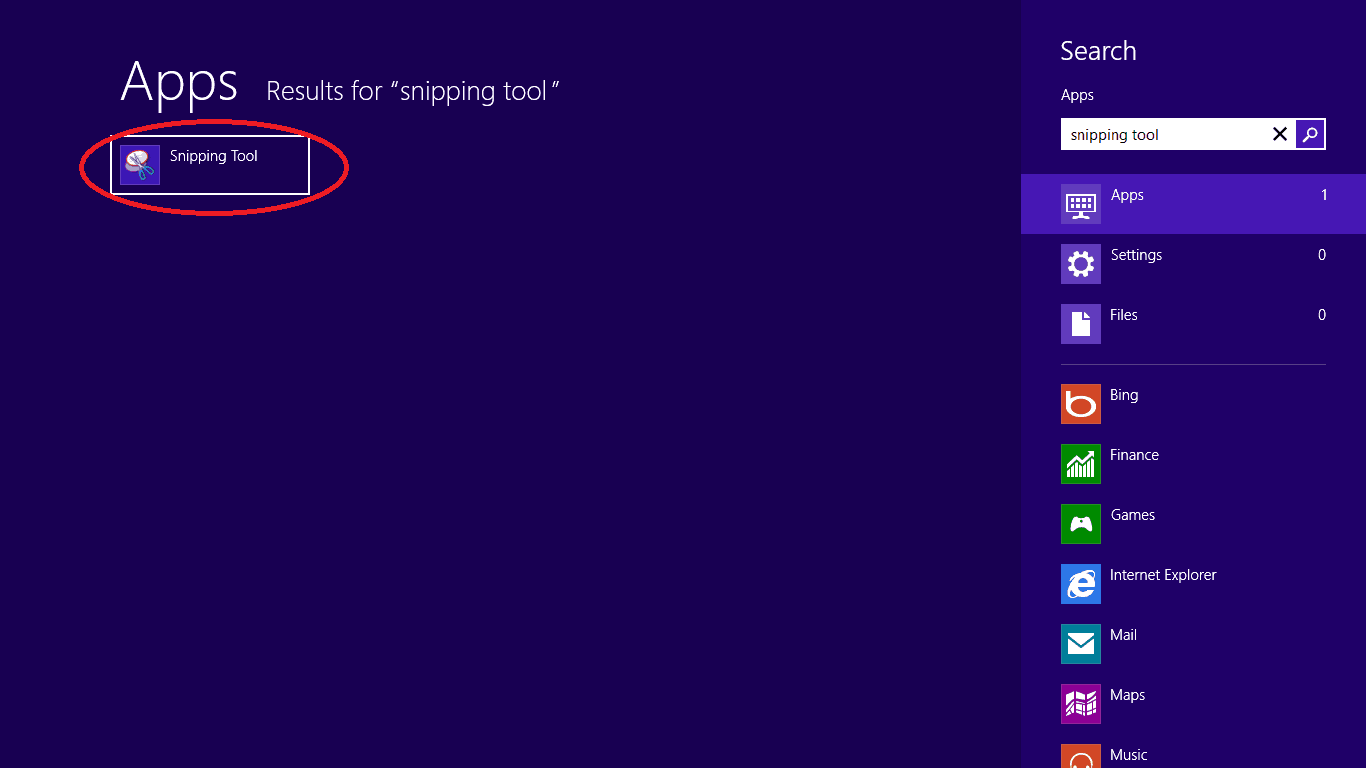
  1. First thing we need to do to find the Snipping tool is go to the right of the screen under the “charms” bar.
  2. Lets click (left click)on the “Search” app you have there that looks like a magnifying glass.
  3. Type in the search box “Snipping tool”
  4. Now you should have on the left the “Snipping tool” app
  5. Click (left click) on the icon you have to the left called “Snipping tool“
  6. The desktop should now open
  7. If you click(right click) it should show you the Snipping tool menu on the lower side of the screen,from there you can pin the icon to the start menu or to the taskbar.
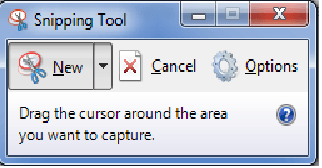
  8. After you clicked(left click) the Snipping tool icon a window should appear.snipping app windows RT
  9. We need to click (left click) on “New” in the Snipping tool window.
  10. Check if the mouse cursor on the screen changed to a set of cross hairs, if not click again on “New”
  11. We need to click (left click) on the image we want to save and drag the cursor while holding the click pressed over the entire photo we want to save.
  12. After we release the click the Snipping window will show how the image looks like
  13. Click(left click) on “File” in the upper side of the Snipping tool window
  14. Click(left click) on “Save As”
  15. Select the location where the Image will be saved .Example :Desktop
  16. In the box next to “File name” on the “Save as” window write a name for the photo you want to save but be sure to leave the .PNG at the end of the name.
  17. Click(left click) on “Save” on the lower side of the window “Save As”
  18. Now you can find your print screen on the directory you’ve chosen to save it.

These are the two methods used for screenshots on Windows RT, if you have anything else to add and any new suggestions please write us a few ideas below.

Poll: Is Microsoft doing the right thing with Windows Threshold?

Windows Threshold

It’s pretty much common knowledge now that Windows Threshold is currently in development, and that it’s set to bring back beloved Windows 7 features such as a Start Menu for desktop users. When Windows 8 was released, the Start Screen was hated by the majority of users who used it, and that story had stayed similar up until the launch of Windows 8.1, however as of recently we’ve been hearing more from the users who actually like the Start Screen, the Charms bar, and many other Windows 8.x elements.

We recently broke the news that the Charms bar, one of the Modern UI’s key features will be going away in Threshold. It was revealed months back that the Start Screen is taking center stage again for desktops, meaning the Start Screen is gone from the desktop in Threshold. The expected response to this news was “hooray!” but instead we had a 50/50 split between people who were happy with this change and people who were not.

It’s pretty obvious now that with every new story about Threshold that breaks, another Modern UI feature is shoved into the background, and every time this news has broken we’ve been hearing more and more from users who hate the changes Microsoft are making. So I ask you, which side are you on? Do you think Microsoft is doing the right thing with Threshold, or would you prefer it if they stuck to their guns and stayed on the Windows 8.x path?

We want to know YOUR own personal opinion, we don’t want to factor in any facts regarding market share and other boring stuff, we want to know whether you actually like what Microsoft had done with Windows 8.x or whether you think Threshold is a good change. Answer our poll below and leave us detailed comments for us to read. We’ll get involved too!

Microsoft takes you back 20 years, showcasing their first website ever

Microsoft Homepage

20 years ago, the internet was not the same as it is today. It was, what should I say, much simpler since people didn’t have faster connections, or ultra fast PCs. It was an era where kids used to play in the lawn, and not Titanfall all day long on their consoles and PCs. There was a dial-up internet accessed by only a few who actually needed it.

Today, Microsoft went back in time and showed their fans the design of their first website 20 years ago. By today’s standards, one would not even open it because there’s nothing to please the eyes — no attractive graphics, no advance options, but hey folks, it was 20 years ago. At that time, it was managed by just one guy, Mark Ingalls, the first administrator of Microsoft.com. He says it was a heavy web page at that time, and would have taken some time to load on a normal dial-up connection. 

“For most folks at home in that day and age, you would have been able to count to three or five before that picture showed up on your screen,” he says. “There wasn’t much for authoring tools. There was this thing called HTML that almost nobody knew.”

Later, Ingalls was joined by Steve Heaney to manage the site so he could get some relief. “Steve Heaney and I put together PERL scripts that handled a lot of these daily publishing duties for us,” he says. “For a while, we ran the site like a newspaper, where we published content twice a day. And if you missed the cutoff for the publishing deadline, you didn’t get it published until the next running of the presses, or however you want to term it.”

Today, it’s managed by almost 30 people who work on the homepage and make sure it’s up to date. Microsoft.com is one of the biggest websites on the planet, catering 20 to 30 million visits a month. 

The webpage is still up for people who want to take a look at how the website worked 20 years ago. Take a look at the page here.

Myth Defense 2 Dark Forces hits the Windows Store, build towers and traps in this strategy game

Myth Defense 2 Dark Forces hits the Windows Store, build towers and traps in this strategy game

Myth Defense 2 Dark Forces is now available in the Windows Store for your Windows 8.1 device. In this strategy game, you must fight on the dark side and restore balance between light and darkness. This sequel to Myth Defense Light Forces features three races with unique towers, four battle maps, fifty campaign missions, and much more.

“Popular tower defense game is back! Light Forces repulsed the attack of Dark Forces and passed to the offensive. Now you fight on the dark side. Restore the balance between Light and Darkness! Build towers and traps using technologies of Orcs, Goblins and Necromancers. Show your tactical skills combining various towers’ effects and using terrain features. Protect the stronghold of the Dark Forces from the onslaught of hostile armies of Light,” the app description reads.

Enough words, take a look at the game in action below. If you like tower defense and strategic games, hit the download link to snag the game for free.

Microsoft reportedly opening first ever New York City retail store on Fifth Ave

Microsoft reportedly opening first ever New York City retail store on Fifth Ave

A Microsoft Store offers an assortment of products and services, including Windows 8.1 devices, Windows Phone smartphones, Xbox One consoles, Office 365, and much more. Customers can also receive support and services from staff members who can make recommendations and more. A kiosk-style specialty store is a smaller store that features the best of what Microsoft has to offer in a smaller space.

Microsoft is rumored to open its first ever New York City retail store on Fifth Ave, going head to head against Apple’s glass cube store, which just so happens to be nearby. “For Microsoft to land on Fifth Avenue just a few blocks from Apple would certainly be interesting,” said Faith Hope Consolo, a top retail broker with Douglas Elliman, who was not involved in the deal. “It would be very dramatic.”

The 8,700-square-foot, two-story space that Microsoft is looking to snag is located at 677 Fifth Avenue near 53rd Street. Not only is this a prime location, but prices to rent ground floor stores are nearing $3,500 per square foot. It will be interesting to see how flashy Microsoft plans to make this particular store, if negotiations go through as expected. Apple’s huge 32-foot glass panels make up the entrance to the company’s flagship store.

We’ve reached out to Microsoft for comment and a company spokesperson told us what we had already figured. “We are always working to identify the best possible locations for our Microsoft retail stores to deliver the choice value and service our customers are looking for, but do not have any additional information to share at this time.” 

Microsoft recently unveiled to WinBeta a list of thirteen new Microsoft Store locations that are set to open in the next few months.

HTC One W8 makes another appearance on Telfort’s website, hints at a possible global launch

HTC One W8

HTC is rumored to launch a Windows Phone version of their popular HTC One M8 handset. We’ve heard about the device several times in the past few weeks from many reputed sources. The alleged device even made an unexpected appearance on Verizon website, showing us the press render of the purported handset. Well, it’s not just the folks at Verizon who have jumped the gun a little early. Recently, Telfort, a Dutch mobile telecommunication company, also leaked the HTC One W8 on their website’s homepage as shown above albeit small.

We can clearly see a similar press render of the HTC One M8 running on Microsoft’s operating system. This could mean a few things: first it confirms the existence of the device. Secondly, it also means the alleged device is not only making its way to the US, but also in other global markets as well.

The alleged device is expected to come with a bunch of exclusive HTC apps, possibly to make use of the Duo cameras dubbed as the HTC Camera. In addition, Blinkfeed is said to make an appearance on the handset as well. As for the internals, it should bring a similar set of specifications as the HTC One M8, a 5-inch 1080p display, powered by a quad-core Snapdragon 801 SoC with 2GB of RAM and 16GB of internal storage coupled with a microSD card support. 

HTC has scheduled an event on August 19th in New York City. Rumors suggest we may see the HTC One W8 at the event, or some information about the upcoming HTC tablet. It’s just a speculation so a grain of salt is required. We’ll update you as soon as any other information pops up.

Windows 9 (Threshold) still on track for preview release this fall

Threshold

We’ve had an entire raid of Windows Threshold news over the last week, with Neowin unveiling a possible new feature called Virtual Desktops coming in Threshold, and WinBeta exclusively revealing changes coming to the Charms bar. Today, Mary Jo Foley from ZDNet has confirmed both the Virtual Desktop and Charms bar changes, whilst also reiterating that Threshold is on track for a preview release this fall.

Foley has expanded on our report earlier, explaining how the Charms will work for not only desktop users, but tablet users too. We reported that the Charms bar was going away for desktop users, and it appears, according to Foley’s unnamed sources, that the Charms bar is going away for tablet users too. Read more about that here.

Foley claims that Threshold is on track for a preview release at the end of this year, meaning there isn’t a lot of time between now and getting our hands on a new build of Windows Threshold to test out. Of course, more information about Threshold is expected to be revealed before then, and we’ve got even more juicy bits about Threshold to reveal soon. So stick around for that!

What do you expect to see in the Windows Threshold Preview? Do you think we’ll have an official name by then, or will Microsoft stick with Threshold until closer to release? Leave us your thoughts below!

Windows 9 (Threshold) to include Ubuntu-like virtual desktop spaces

Threshold

Microsoft is currently hard at work on the next iteration of Windows, currently codenamed Threshold, the operating system is set to put the desktop back in the spotlight for desktop users, whilst making the Modern UI even better for tablet users. So far, we’ve heard about improvements to the desktop side of things, including the new Start Menu, windowed Modern UI apps and a brand new taskbar which is set to include live icons and Cortana.

Today, more information about Windows Threshold has been revealed, courtesy of Neowin. The desktop is set to include a feature very similar to Virtual Desktops, users of Ubuntu and other Linux variants are already accustomed to a feature like this, and Microsoft seems to be interested in bringing said feature to Windows too.

If you’ve never seen a virtual desktop, let’s explain it. Virtual Desktops allow for more than one desktop at a time. You can have 3 windows on one desktop, and 4 windows on another. In Threshold, this feature would be activated via a button on the taskbar, clicking it will reveal all your desktops, which will allow you to click in on your selected desktop environment.

This feature will be very good for users with small screens, as it allows for more windows in the environment at a certain time. Of course, considering Threshold is in early stages, we must remember that this feature may not make it into the final build of Threshold, so bare that in mind.

It’s good to see Microsoft developing desktop features again. Microsoft left the desktop out in the cold with Windows 8, introducing hardly any new features for the environment. Threshold is set to bring the desktop back into the limelight for desktop users, and having Virtual Desktops will make power users very happy.

Microsoft quietly ends some Azure discounts for new customers

Microsoft quietly ends some Azure discounts for new customers

All good things must come to an end, and it seems that this old adage applies to discount pricing. No announcement was made, but as GigaOM noticed, at some point in the last three weeks, Microsoft changed the criteria to qualify for “commitment discounts”.

Pay a visit to the Azure Commitment Plans page, and the headline has now been changed so that it reads “this offer is no longer available to new subscribers. Existing subscribers are able to continue utilizing this offer”. As the remainder of the text explains, existing subscribers will still receive a discount of between 20 and 32 percent upon signing up for a 6 or 12 month contract.

With the current price wars in cloud storage, Microsoft’s decision is slightly strange. No explanation is yet forthcoming, but we’ll update the story if we hear more about what has happened.

GigaOM speculates that the reasoning could be that Microsoft is now more interested in promoting use of existing accounts rather than taking on new customers. But the key word here is “speculates” — we have no way of knowing what the reason is at the moment, and it is entirely possible that there is a replacement discount around the corner.

Rumor: Windows 9 Free for XP and above users

Threshold

According to Microsoft watcher Mary Jo Foley, Windows 9 is soon to be ready and is expected to be the best version of Windows released to date.  The operating system is expected to be available in early 2015 with the ability to run on all devices whether tablet, PC or mobile phones. 

This rumor highlights that users on Windows XP, Vista and 7 will all get this update for free.  This would allow for many users to jump aboard the operating system while reducing the confusion with the different Windows versions.  This update is also considered to be useful to the PC market, allowing for more PC’s to be sold to masses. 

Rumors of free upgrades from Microsoft are not new but would be interesting to see in this scenario.  It is believed that there will be two different beta versions of the operating system that will be released before launch.  One, if not both, betas of Windows 9 could be released by October or November. 

Keep in mind this is still a rumor, once there is more information released on this we will let you all know.  Do give your feedback of whether you believe this is accurate or not. 

Microsoft sends Yammer’s plush blue mascot ‘Yammy’ into space, because why not?

Microsoft sends Yammer's plush blue mascot 'Yammy' into space, because why not?

Microsoft is showcasing a video that highlight’s Yammer’s plush blue mascot ‘Yammy’ soaring above the earth. Microsoft attached Yammy onto a weather balloon with a camera to record Yammy’s adventures in space.. because, why not?

“We got a great response from our social media followers and a lot of people asked for more information about how we did it. The short answer to that question is a weather balloon attached to a box with a video camera shooting out of the side. The long answer is that some of Yammer’s most creative minds had a fun idea that they turned into an even more fun project,” writes Adam Bonefeste, from the Yammer team.

Yammer, for those that did not know is a communication tool used within organizations and is an example of enterprise social software from Microsoft. This video has nothing to do with product advertisement, and is simply showcasing the Yammer team having fun.

The Yammer team followed up on questions raised by people on social media with some answers on the behind-the-scenes teamwork it took to pull off Yammy’s greatest adventure yet. You can head over to the VIA link below to read up on how Yammy was sent into space.

Official Roku App for Windows 8.1 is Now Available

The wait is finally over and you can now go ahead and follow the download link at the end of this article to get the official Roku app on your Windows 8.1 devices. Let’s have a look at its features.
roku app windows 8
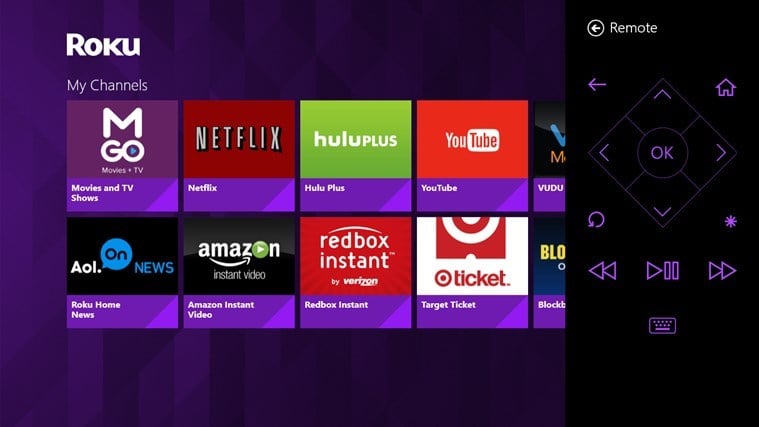
The official Roku app for Windows 8.1 allows Roku users to control their Roku player over their home network. So, if you have a Roku player around, you can now use the app to get more controls. Here are its most important features:

Roku lands on the Windows 8 Store

  • Automatically detect all Roku players on the local network
  • View installed Roku channels and launch the channel with a tap
  • Control your Roku player with an on-screen remote control

So, by using Roku on your Windows 8 device, you can transform it into a remote control to get better access to your channels. Go ahead and download it and let us know what you think of it.

Download Roku app for Windows 8 

Microsoft Dynamics CRM Online is now live in 17 additional markets

Microsoft Dynamics CRM Online is now live in 17 additional markets

Microsoft has expanded the availability of Dynamics CRM Online to 17 new markets. This now means that Dynamics CRM Online is available globally in more than 50 markets. Microsoft is pushing hard to deliver platforms and applications that enable people to do more and achieve more.

“Together with Microsoft Azure and Office 365, CRM Online is a critical part of the Microsoft Cloud for Business that delivers experiences that users love and businesses can count on,” writes Bob Stutz, Corporate Vice President, Microsoft Dynamics CRM, in a blog post. “We want to do everything we can to bring these cloud benefits to as many businesses and countries as possible.”

The new markets include Argentina, Uruguay, Ecuador, U.S. Virgin Islands, Indonesia, Thailand, Taiwan, Philippines, Bahrain, Egypt, Kuwait, Oman, Qatar, Saudi Arabia, South Africa, Ukraine, and the United Arab Emirates. Microsoft plans to announce country-specific events and announcements over the course of the next few months.

Rumor: Microsoft expected to launch a new cloud service called Sway, but what could it be?

Rumor: Microsoft expected to launch a new cloud service called Sway

Recently, Microsoft purchased the domain name Sway.com, which appears to be a cloud service — CDN as per the report. The information was first discovered by Jamie Zoch of DotWeekly, who mentioned that Microsoft may launch a content delivery network service soon.

There are several variations mentioned which points on what the domain name could be used for, including sway-CDN.com, sway-CDN.net, sway-INT.com and sway-INT.net. Surprisingly, the domain name currently redirects to Bing, with search results for the terms. Microsoft has a habit of doing this with every domain they register or acquire.

“I think Microsoft is getting ready to launch the software pretty soon, or it isn’t likely that they would have revealed they were behind the purchase of the domain name yet. They have also set domain name servers,” Zoch wrote.

Along with the domain registration, the software giant also registered a trademark for Sway with a wide focus: computer software, computer application software, online computer software, and software as a service.

It’s a little hard to guess what sway.com will be used for, but cloud apps are a possibility since the company has been focusing on cloud apps since Nadella took the charge of the company.

Have your say on what Sway could really be. We’re open to the guessing games for now until Microsoft officially unveils it.

Simplified Office 365 admin experience arrives for SharePoint Online admin center

Simplified Office 365 admin experience arrives for SharePoint Online admin center

Microsoft has simplified the SharePoint Online admin center, as part of the company’s journey to simplify the Office 365 admin experience. You can now choose between a simple or advanced admin experience, control top navigation items, and block workflows from being used from your environment.

“Narrow in on what is important – the task at hand. And when that changes, refocus. The journey to simplify the Office 365 admin experience continues, this time with a focus on simplifying the SharePoint Online admin center. For those admins who don’t specialize in deep SharePoint management, our goal is to allow you to manage the service more easily while maintaining access to the most common controls,” Microsoft stated in an official blog post.

The simple admin center experience displays only the essential options used in the most common scenarios. This includes site collection management, user profile management, and the main settings for external sharing, Information Rights Management, and more. The advanced admin center, on the other hand, offers access to all SharePoint Online management capabilities. This includes Business Connectivity Services (BCS), the Term Store, the Secure Store, and more, in addition to site collections, user profiles, and settings.

Admins can now show or hide the OneDrive for Business, Yammer/Newsfeed, and/or Sites in a users’ top global navigation bar. This allows for a streamlined view that matches your corporate policy. On top of that, admins can block specific workflows too.

“If you manage workflows into SharePoint Online from SharePoint Designer 2013, and you select Block 2013 workflows, your users will not be able to create a new workflow,” Microsoft adds.

Admins can also opt into the latest Office 365 releases, by heading over to the Office 365 admin center, Service Settings > Updates, and turning on First Release.

Visiting Google using Windows and Internet Explorer? Expect to be prompted to use Chrome

Visiting Google using Windows and Internet Explorer? Expect to be prompted use Chrome

By default, Windows comes with Internet Explorer as the web browser — unless you live in Europe, in which case you’re prompted to choose between several browsers. Thanks to this, most average users stick with IE, while many techie folks simply use it to install either Chrome or Firefox. Now Google is targeting those regular customers. 

IE web surfers who visit Google’s site to search for something are now finding an interesting prompt to the right of the search box. The wording is very straight-forward — “A faster way to browse on Windows. Install Google Chrome.”

Clicking the link will result in a page prompting the installation of both Chrome and the Google search app. There are even instructions for how to put them on your Start screen. 

Google prompting users to switch browsers isn’t entirely new, but the specific targeting of Internet Explorer is new. It’s hard to say how many people will actually take advantage or disadvantage of the prompt and make the switch.