TopGear for Windows 8, Windows 10 Review: a Disappointment

I’ll start by stating that I love TopGear! In fact, it’s one of the few shows that makes me move from the PC to the TV. They have great cars, great humor and most of all, they are absolutely crazy! And you can imagine the joy I felt when I learned that there is a TopGear app for Windows 10, Windows 8. I thought to myself: I can see all the news, watch videos and maybe even episodes!

Now, imagine what I felt when I actually downloaded the app and tried it! It was utterly horrible! I don’t know if I will be able to say anything good about the app at all. It lacks features that you even the most basic apps have. For something that is designed for TopGear, this is unacceptable!

top gear windows 8

Where TopGear app lets down

Oh boy, where to begin? I really hope that in the future they will update the app and iron out these major issues, making it into an app that can live up to the name of TopGear. At first, it looked ok. When I first entered the main window of the app, I though: “Hmm, nice design”. What came afterwards was a shock:

The space on the screen is wasted in a manner that it amazes me. From the main page, where I believe the developers wanted to create a “relaxed” aspect, they almost made into a coma atmosphere: empty spaces all over the scree! When you enter an article, it gets even worse: the text is cramped in the bottom of the page, thus elongating the page to about 2 screens (keep in mind these are laptop displays!) and the rest is just blank space.

Also, the gallery does not have a full screen view for pictures. Really? How can it not have this basic feature? The pictures are grouped into categories or articles and you do not have a related posts tab to visit other pages from your current one. You can only hit the back button to see other articles from a certain page.

Ads are something else that plague this app. I honestly understand the need for ads, but in this app, they go to a almost ridiculous number. Once every few headlines you see a pretty big ad that takes up a lot of space (keep in mind that the space is very unwisely used on top of this).

You cannot view episodes of TopGear from within the app, only short videos that have a fairly slow player and again, to the right, more text and ads that occupy lots of space. I guess one good thing about the video player is that it has a full screen feature and the quality is pretty good, but you cannot change it, so if you are on a slow network, good luck loading them.

Apart from the drawbacks that were presented above, the app has an overall sluggish feel, loading pretty slow and it seems laggy at time. Sometimes there is a very annoying lag between the time I click on something and the time the app reacts. This goes against everything Windows 10, Windows 8 stands for.

A quick recap of what is wrong with the app

If you didn’t feel like reading all my complains above (or if you want to see some more), here is shorter version of what is wrong with this app:

  • Overall slow reacting app
  • No possibility to change video quality
  • Clicking on links leaves the app and goes into desktop browser
  • No search button (not even the Charms Bar search)
  • No full screen image viewer
  • Horrible layout and lots of unused space
  • No full episodes
  • No “Related Posts” button
  • No options menu (and I mean no option whatsoever!)

I think this list has the potential to grow even longer, but you get the idea of how many issues this app has. I am shocked to see that something that came from BBC has such a low quality. I really hope that in future updates they will right their wrongs and we will see a better app, worthy of the name TopGear.


Review of LastPass App for Windows 10: Keeping Your Passwords Secured

We’ve got so many passwords these days that it’s hard to keep and store them safely in a single place. Those of you who use a Windows tablet should know there’s an official LastPass app in the Microsoft Store that they can use.

lastpass windows 8 review

If you are a control freak and want the most secure Internet identity, you need a professional password manager.

One that can keep all your sensitive information private and far from prying eyes. If you are looking for such a service, look no further than LastPass. A known name amongst those who want their virtual lives safe.

Now available for Windows 10 users,LastPass can offer you the same protection that you were used to in the past, on Microsoft’s latest operating system.

Although different, LastPass has lost none of its usefulness, allowing you to manage and create passwords that will keep your information safer than a Swiss bank.

LastPass for Windows 10 review

Update

In 2017 LastPass app has received many improvements and support for its extension on big browsers . Let’s have a quick look at the most important changes :

Google Chrome

  • LastPass now prevents extra request from server to update form field information
  • LastPass now prevents DUO websdk logins to 3rd party sites
  • Fixed : incorrect detection of username changes when the login form is submitted

Firefox

  • Occasional crashes fixed
  • Fixed : 3.0 mode on Firefox 52 freezes extension dropdown
  • Performance issues on IRC Cloud are fixed
  • Infield Password generator now works

Edge

  • Added new translations
  • False reprompt on battle.net is now fixed
  • Fixed autofill fail on online.citi.com

LastPass is also working on fingerprint technology. You need to find compatible fingerprint software and sync it with LastPass to use your fingerprints.

Remember that this technology is in the development phase, and not all Windows 10 devices might be supported.

LastPass main features

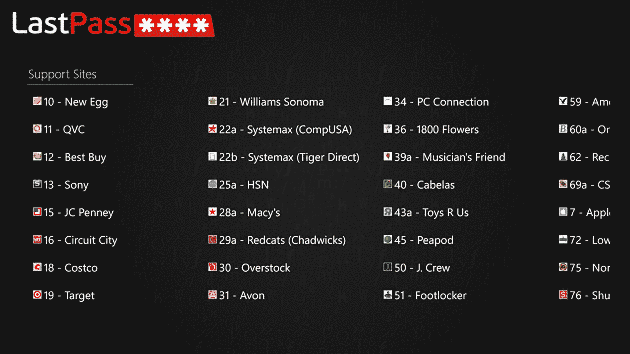
After installing the LastPass app from the Windows Store and logging in, you will notice that it consists of a control panel, where you can view your saved websites and all the information you have stored on your LastPass account.

What information can you add to your account? Well, apart from usernames and passwords for any site, you can add the following information for increased productivity and ease of use all over the Internet:

  • Bank Account
  • Credit Card
  • Database
  • Driver’s License
  • Email Account
  • Instant Messenger
  • Membership
  • Passport
  • Server
  • Social Security
  • Software License
  • Wi-Fi Password

All these different forms can be added to your account, and you can auto-fill them for just about any website without needing to type a word. Also, you can rest assured that your information is safe inside the LastPass vault and only accessible via the master password. But the fun doesn’t stop here!

lastpass app review for windows 8

LastPass for Windows 10: notable features

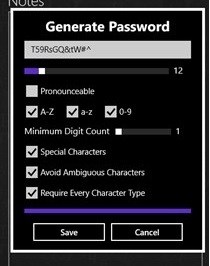
One of the features that I enjoy the most is the password generator. This tool allows you to generate full-proof passwords that no one could ever break. One great thing about this, is that most of the times, you don’t know the password (they are very, very complex), and the LastPass extension will auto-fill your username and password when you go to a saved website.

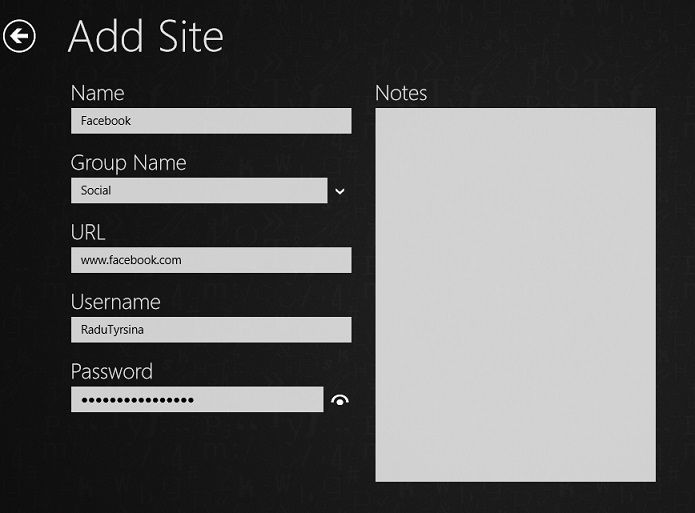
Another interesting feature is that you can create groups to organize your different passwords and create login forms with usernames and passwords directly from the app. When you are done, visit the website with the integrated browser to test your password. Pretty simple, right?

You can also edit saved websites, for instance, if you have changed your password, or, you can copy your username or password to the clipboard and use it somewhere else.

All these tools integrate perfectly with the LastPass extension that can be installed on pretty much any device (computer, smartphone, or tablet), regardless of its operating system, so that you can have complete protection on all devices.

These are all awesome features that each of us must use. To keep our digital lives safe, LastPass is a must-have in our security toolbox. But now, let’s recap the main features that the Windows 10 app provides:

  • Quick access to your saved passwords and formspassword
  • Possibility to add multiple forms with important information
  • Password generator both in-app and directly in the browser
  • Edit and organize saved information
  • integrated Internet browser

Now, look at all those features! One service spanning across all platforms and devices, that can be monitored and managed via a single app from your Windows 10 device!

Isn’t this awesome? Just remember that this app is mostly a control panel, and for you to benefit from all the features that LastPass provides, you will need to install the extension on your Internet browser.

XBMC 12.0 for Windows Beta 1 released

XBMC, a free award winning and open source software media player and entertainment hub designed for digital media, has reached version 12 and a beta is now available for all to download. XBMC is a unique media player that has seen over 50 software developers contributing to its development. Check out the new features in 12.0 Beta 1:

  • HD audio support, including DTS-MA and Dolby True-HD, via the new XBMC AudioEngine
  • Live TV and PVR support
  • h.264 10bit (aka Hi10P) video software decoding for anime
  • 64bit support in OSX to match the 64bit support in Linux
  • Improved image support, allowing the database to accomodate numerous additional image types
  • Support for the Raspberry PI
  • Initial support for the Android platform
  • Improved Airplay support across all platforms
  • Advanced Filtering in the library
  • Advanced UPnP sharing
  • Translations now powered by Transifex

IE10 preview for Windows 7 now available for download

Internet Explorer 10 for Windows 7 is now available to download in preview form, which will enable all the new features that IE10 brings on Windows 7 operating systems. The download is available online, and we expect it to be pushed through Windows Update when IE10 becomes stable enough on Windows 7.

There doesn’t seem to be any huge changes regarding the UI, so expect many changes under the hood. IE10 on Windows 8 is a fantastic browser, in fact it’s so good I use it as my default browser. I suppose it should work just a good on Windows 7 operating systems.

Report suggests Steven Sinofsky left Microsoft because he didnt get Steve Ballmer’s Job (rumor)

We just recently learned that Steven Sinofsky parted ways with Microsoft and that the departure was a “personal and private choice” which did not reflect on the company or leadership. Well, now a new report is suggesting that Sinofsky left the company because he wasnt promised Steven Ballmer’s CEO spot at Microsoft. Could this be true or just a rumor?

Steven Sinofsky

According to Business Insider, Steven Sinofsky felt that he deserved to be Microsoft’s next CEO, and wanted to be designated as Steve Ballmer’s successor after Windows 8 had shipped. If Sinofsky didn’t get the promise, he would quit Microsoft. This information comes from a Microsoft source, according to the report. Current CEO Steve Ballmer has alread y indicated that he would remain on the job until he retired in 2017 or 2018. Sinofsky, who is a well known and hard charging company executive who put Microsoft Office on the map, fixed Windows after the launch of Vista was a train-wreck, and a man who knows the business inside and out. Regardless of his qualifications, could this be true or just a rumor? Just remember, in Sinofsky’s farewell email, he stated that, “one might notice a bit of chatter speculating about this decision or timing. I can assure you that none could be true as this was a personal and private choice that in no way reflects any speculation or theories one might read—about me, opportunity, the company or its leadership.” Any truth to the matter? You be the judge.

Julie Larson-Green to head up Windows enginering and Tami Reller in charge of business, marketing strategy

We just learned about Steven Sinofsky’s abrupt departure from Microsoft, but who are the two new people who were appointed by Microsoft CEO Steve Ballmer to head up the Windows division? Julie Larson-Green is now the Windows software and hardware engineering lead, while Tami Reller will be in charge of business and marketing strategy for Windows. Lets take a look at their profiles, directly from Microsoft.

“Since 1993, Larson-Green has worked on and led some of the most successful products for Microsoft, including the user experiences for early versions of Internet Explorer, and helped drive the thinking behind the refresh of the user experience for Microsoft Office. For Windows 7 and Windows 8 she was responsible for program management, user interface design and research, as well as development of all international releases. She has a master’s degree in software engineering from Seattle University and a bachelor’s degree in business administration from Western Washington University. In her new role she will be responsible for all future Windows product development in addition to future hardware opportunities.”

“Reller joined Windows in 2007 from the Microsoft Dynamics Division where she held a number of leadership positions. She began her career in technology at Great Plains Software in 1984 while still in college, and was the company’s chief financial officer at the time the company was acquired by Microsoft in 2001. She has a bachelor’s degree in mathematics from Minnesota State University Moorhead and an MBA from St. Mary’s College in Moraga, Calif. In her expanded role she will assume the lead in driving business and marketing strategy for Windows devices, including Surface and partner devices, in addition to her current marketing and finance responsibilities.”

Desktop Apps Shouldn’t Belong in the Windows Store

Daily, I spend a LOT of time in the Windows Store, believe me when I say this. Searching and finding worthy Windows 8 applications might seem an easy job to do, but trust me when I say that it is not like that. And while doing this, I encounter on many new happenings that I share with the community. If you don’t see all the apps, then follow the advices in my recent article in order to overcome that.

What are Desktop apps doing in the Windows Store?

For me, the Windows Store was meant to be a place for applications that can be installed only from the Windows Store, both for Windows 8 and Windows RT. So, imagine my surprise when I found quite enough applications that were in the Windows Store only to guide me to a download link in the browser, informing me that it is an application that will work installed only on the destktop user interface.

Then, I found that Microsoft actually helped developers list their desktop apps in the Windows Store. What for? Just to gain some free publicity for their programs or Microsoft is simply interested in increasing the number of their Windows Store apps? Maybe I’m getting this wrong, but why should desktop apps be part of a Marketplace? If Microsoft wants to mimick Apple and Google in their Windows 8 strategy, why are they putting all these apps in the same place?

Imagine the confusion of users one year from now, when they will find in the Windows Store a lot of desktop apps and a lot of Modern UI-optimized apps. I see the good aspect in this, don’t you worry. Microsoft believes that by putting everything together, they’ll help the user discover apps and programs much easier. But I’m just not 100% sure it’s being done right. I don’t want to browse the Windows Store only to find a link to the official app. Or, do I? Opinions are divided here.

Microsoft makes it official, Skype and Windows Live Messenger are now one

Just recently, we learned that Microsoft had plans to retire Windows Live Messenger in favor of Skype. Now, Microsoft has officially announced that Windows Live Messenger and Skype will now be one. Microsoft is now encouraging all Messenger users to update to the latest version of Skype.

“We’ve got good news to share! Skype and Messenger are coming together. Millions of Messenger users will be able to reach their Messenger friends on Skype. By updating to Skype, Messenger users can instant message and video call their Messenger friends,” Microsoft stated in an official Skype blog post. Over at the Windows Blog, Microsoft announced, “Today, we’ve announced on the Skype blog that we are now encouraging all Messenger users to update by downloading the latest version of Skype. In the coming months, we will retire the Messenger apps for all regions worldwide except for mainland China.” Microsoft’s goal is to deliver the best communications experience for everyone and making things simple for users while improving overall experience. With Skype, Messenger users will have broader device support including the iPad and Android tablets, Instant messaging, video calling, and calling landlines and mobiles all in one place, sharing screens, video calling on mobile phones/Facebook friends, and group video calling. So there you have it. It’s been 12 years since the first version of Messenger was released and now it is retiring in favor of Skype.

Watch this! Hotmail so effective in blocking spam, Microsoft has to get spammers a real job (video)

Microsoft, on May 25th, launched a campaign in Sweden consisting of a website and an online video invitation to a “seminar” for spammers. The video of this was just recently released. What exactly is this seminar about? Well, since Microsoft believes that Hotmail is now so effective in blocking spam, Microsoft now feels it is their duty to get these spammers a real job. Microsoft wants to put these spammers to use since they have skills in programming and online marketing.

According to a comprehensive study that was conducted by an independent firm, Cascade Insights, Hotmail is the number one webmail service to protect users against spams ahead of other webmail competitors including Gmail and Yahoo! Mail. “Our mission was to communicate the message that Hotmail now stops 97% of all spam to Swedish tech-influencers. Instead of just boosting out the message we decided to take a somewhat different approach. As the Hotmail spam filter now is so effective it can actually put spammers out of business we decided to try and help them get legal jobs and launched Spammers’ Aid,” the video description reads. Unfortunately, no spammers showed up to the “seminar” but Microsoft broadcasted the event live online where 27 people followed it anonymously. In the video, we get an interview from Hotmail’s Sweden product manager. Take a look below:

Thanks to Marko for the tip!

Kinect Fusion coming soon to Kinect for Windows, allows for 3-D reconstruction

Anyone remember Kinect Fusion? It started off as a Microsoft research project that could reconstruct a model or environment into 3-D, by combining a continuous stream of data from the Kinect for Windows sensor. Now, Microsoft is planning on integrating Kinect Fusion into Kinect for Windows!

“Kinect Fusion reconstructs a 3-D model of an object or environment by combining a continuous stream of data from the Kinect for Windows sensor. It allows you to capture information about the object or environment being scanned that isn’t viewable from any one perspective. This can be accomplished either by moving the sensor around an object or environment or by moving the object being scanned in front of the sensor,” Microsoft stated in an official blog post. The cool thing about Kinect Fusion is that it uses incoming depth data from the Kinect sensor to build a highly detailed 3-D map and then reads over 100,000 frames to achieve more detail than a single scan would. Microsoft has been working on incorporating Kinect Fusion with Kinect for Windows and it will be available soon as a Kinect for Windows tool.

Watch this! Microsoft creates “Live Tile Experiment” in Norway (video)

With the launch of Windows 8, Surface RT, and Windows Phone 8, Microsoft has been on a roll lately in advertising these new products and features that come along with it. Microsoft went as far as creating a “Live Tile Experiment” in Norway to highlight one of the cool features of Windows 8 and Windows Phone 8. “This film was shot downtown Oslo (Norway) to highlight one of the key innovations of Windows 8: Live Tiles. Showing the preview functionality of Live Tiles made for an evening to remember,” the video description reads.

Google’s Gmail barely beats Microsoft’s Hotmail as top email service according to new data

According to new data from ComScore, Microsoft’s Hotmail email service has fallen to second place right under Google’s Gmail service. While Google has been bragging that it’s Gmail service was number one, we now have data from ComScore that proves it.

Based on ComScore’s October 2012 stats, Google’s Gmail barely beats out Microsoft’s Hotmail service as the top email service worldwide. However, in the United States, Yahoo is number one. Yahoo has 7 million more unique visitors compared to Gmail. This pretty much means that 40.8% of online Americans use Yahoo, while 36.7% use Gmail and 18.9% use Hotmail. Microsoft recently rebranded Hotmail into Outlook.com and these stats showcase some interesting data. Did Microsoft’s re-branding of Hotmail really make a difference?

Microsoft helps create Web Platform Docs, will be the central hub of web standards

Microsoft has announced that the company has helped create Web Platform Docs, a new central hub of web standards for web developers who use HTML5, CSS, and other web standards to build websites. Microsoft, along with Mozilla, Google, Opera, Adobe, and Facebook are a part of this creation.

“The site serves as a central repository that provides Web developers with accurate and timely information on the technologies and standards that are crucial to their work. Most importantly, the documentation on Web Platform Docs is comprehensive. It includes information about a browser’s implementation of different Web technologies and best practices on a given feature’s interoperability,” Microsoft stated in an official blog post. The site is powered by MediaWiki and content is derived from a volunteer group of developer contributors. Those who visit the site will find published content from the founding organiations, such as Microsoft, Mozilla, Google, Opera, Adobe, Facebook, HP, Opera, and Nokia. The site will also contain a sample library and tutorials. “With Web Platform Docs, we now have a central place where we can learn what the standard is, when we can use that particular feature, and the right way to use it,” a Windows technical evangelist at Microsoft was quoted saying. Microsoft became a part of this project to ensure that the web development community has the best resources needed for working on Internet Explorer, Windows Azure, Windows Phone, and other Microsoft technologies.

Check out Web Platform Docs here.

The Windows Store surpasses 3,600 apps

According to WinAppUpdate.com, the Windows Store in Windows 8 has today passed the 3000 app mark, not long after it was reported to have passed 2000 apps. The growth of the Windows Store has been very quick over the last few weeks, developers know that now is the time to start publishing apps.

The app growth has been pretty strong over the last few weeks, which if it keeps going, will easily pass 5000 apps before launch. According to the report, the app store is currently sitting at 3010 apps, which is an awesome number, especially since the OS isn’t slated for launch for another 3 weeks.

The report also states that they’ve been seeing around 118 apps added to the store each day, which is great for Microsoft. Using the awesome Windows calculator, this average will total to 2714 more apps being added into the store before launch.

Microsoft’s reputation is about to rocket sky high, or crash real low (editorial)

Windows 8. That’s the product most people are worried about, and it’s the product that decides the reputation of Microsoft. If Windows 8 is a failure, the company’s reputation will fall, just like it did with Vista. If it succeeds, then drinks all round.

While there is no telling on how Windows 8 will be received, we can speculate. From the amount of buzz Windows 8 has produced, it’s easy to pinpoint what people are thinking about the new operating system, and while many people love it, there is a large handful who don’t, and when you have a LARGE amount of people who don’t like a product, others will more or less not like it too, since liking it would be “uncool”.

Never compare Windows 8 to Windows Vista, if 8 fails it will be for an entirely different reason, but we can compare why so many people hated Windows Vista, and how the same could happen for Windows 8.

Windows Vista launched, and wasn’t very popular because OEM PC’s weren’t up for the job of running the OS, drivers were an issue and people found the OS to be slow on existing XP PC’s. While this was all true, the issues didn’t last long. If you were to use Windows Vista today, it would be just like Windows 7, without any of the exclusive Windows 7 features of course.

The hatred of Vista came from the large majority of users who had issues with the OS, unfortunately the hatred didn’t stop there, people who had never even used Vista also started hating because it was “cool” to hate on it. This was proven with the Microsoft Mojave experiment, which was a fake new operating system from Microsoft that was just Windows Vista with a different name. It was shown to a bunch of consumers, and they loved it. When they were told it was really Vista, they were shocked.

So, if there is a large majority of users who hate Windows 8, and then people who haven’t even tried the OS start hating, bad word is going to get around, which will make people not want to buy the product.

We can only hope that this does not happen with Windows 8, since Windows 8 is a fantastic upgrade from Windows 7, as it includes not only a great UI that DOES WORK with a Mouse and Keyboard, but a whole other bunch of improvements under the hood that makes this version of Windows the most secure… Ever.

On a more positive note, Windows 8 could just as easily become as successful as XP or 7. Just think, since the lovers and haters are practically split in half, it’s fifty-fifty either way. If Windows 8 is successful, it opens up not only a new opportunity for Microsoft, but it changes the industry in both tablets and computers.

Take a look at the above video we made back in August, it’s a simple video of Windows 8 apps in action. While the video was made using a touch screen, the actual machine the OS was installed on was a gaming rig. Ever since, I’ve been using Windows 8 on my gaming rig with a mouse and keyboard, and sometimes using the touch screen when leaning on my desk, flicking the screen up and down to scroll. It all comes natural when you have all three pieces of hardware at once.

I guess we’ll find out how well Windows 8 does when it launches in just under a month, along with Windows Phone 8 and the Microsoft Surface.

Microsoft reveals new TypeScript language, is a superset of JavaScript

Microsoft has revealed a new language called TypeScript, which is a super-set of JavaScript. Basically, TypeScript combines combines type checking and static analysis, explicit interfaces, and best practices into a single language and compiler.

“With HTML5, the standards web platform has become significantly more compelling for delivering rich user experiences. At the same time, the reach of JavaScript has continued to expand, going beyond the browser to include native device apps (e.g. Windows Store apps for Windows 8), applications in the cloud (e.g. node.js running on Windows Azure), and more. With these developments, we’re starting to see applications of unprecedented size written with JavaScript, despite the fact that creating large-scale JavaScript applications is hard. TypeScript makes it easier,” Microsoft stated in an official blog post. TypeScript will be perfect for those who wish to write large applications. For example, TypeScript is perfect for writing client-side JavaScript to run on Windows, Internet Explorer, and other browsers and operating systems, or even Windows Azure. Not only is TypeScript open, but also all JavaScript is, in essence, TypeScript. This pretty much means that you can literally copy-and-paste from an existing JavaScript program into a TypeScript file. Head over to the source link for a more in-depth look at TypeScript and to download preview bits of the new language.

Microsoft signs licensing agreement with Research In Motion for exFAT file system

Microsoft has announced a licensing agreement with BlackBerry maker Research In Motion (RIM) for the use of the exFAT (extended File Allocation Table) file system. Of course, this doesn’t come free as RIM will now have to pay Microsoft for using this format.

For those that don’t know, exFAT is a modern file system from Microsoft that facilitates large files for audiovisual media and enables seamless data portability and an easy interchange between desktop PCs and other electronic devices. “exFAT improves on its predecessor, the FAT system, and greatly expands the size of files that flash memory devices can handle by five times over previous FAT technology. It also increases the speed with which those files can be accessed. The exFAT file system not only facilitates large files for use of audiovisual media, it enables seamless data portability and an easy interchange between desktop PCs and a variety of electronic devices,” Microsoft explained in the official blog post. The idea behind this licensing agreement is to give RIM access to the format and allow the company to build devices, applications, and services that work seamlessly with each other. No other details were revealed and one can only wonder what plans RIM has with the exFAT format.

Google’s online apps and services to drop support for Internet Explorer 8

Google is planning on dropping support for Microsoft’s Internet Explorer 8 browser for the company’s online apps and services, starting November 15th of this year. This is a major blow to Windows XP users who are unable to upgrade away from Internet Explorer 8.

“Internet Explorer 10 launches on 10/26/2012, and as a result, we will discontinue support for Internet Explorer 8 shortly afterwards, on 11/15/2012. After this date users accessing Google Apps services using Internet Explorer 8 will see a message recommending that they upgrade their browser,” Google stated in an official blog post. This is a major blow to those who are on Windows XP and are locked into using Internet Explorer 8. Google has already discontinued support for Internet Explorer 6 and Internet Explorer 7, so this move really hurts those who are on Windows XP. Unfortunately, Internet Explorer 9 or 10 will not work on Windows XP. Google Apps and perhaps even Gmail may be affected by this so those on XP should be aware. Google will become the first major online company to drop support for Internet Explorer 8.

Microsoft launches ‘Bing It On’ challenge against Google, says Bing is better

Microsoft has launched a new challenge called “Bing It On” against Google’s search in an attempt to lure users into using Bing rather than Google. According to Microsoft, Bing’s web search results were better than Google’s. This new challenge aims to point that out with users.

“Since we launched Bing we’ve been hard at work to deliver relevant, useful search results that help you go from searching to doing. Awhile ago, we began to notice an interesting trend in our internal testing – for the first time our testing showed that Bing’s web search results were better than Google’s,” Microsoft stated in an official blog post. Microsoft has launched a new website that lets you search for a topic or keyword and the website will display search results from both Bing and Google on the same page, letting the user decide which result was better by voting. The challenge deals with searching for five queries of your choice and comparing Bing/Google results side-by-side. The user chooses a winner or declares the results a “draw.” Once you receive the final score, you can share your results on Facebook, Twitter, or Google+. Microsoft is also launching a nationwide TV and online advertisement for this challenge. Microsoft wants people to see that Bing is better than Google.

Head over to https://www.bingiton.com to participate in the challenge.

Windows 7 finally beats Windows XP in market share, according to Net Applications

For the longest time now, Windows XP has reigned as the top Windows operating system in terms of market share. Well, not anymore. According to data from Net Applications, Windows XP is no longer number one. Instead, Windows 7 is now the top operating system.

According to Net Applications, Windows 7 comes in at 46.60% market share while Windows XP comes in at 46.33% market share. Windows 7 barely beats Windows XP, in data collected up to the month of August. Windows 8 has a 0.25% market share, while Windows Vista has a 6.70% share. Obviously, once Windows 8 is released in October, the market share should climb significantly. This data marks the first time that Windows XP has been overthrown as the number one operating system. Why is it that Windows 7 is barely making it to the top? Could it be that consumers/businesses are still making the jump to Windows 7, with Windows 8 on the horizon? It could be possible. Windows XP has always been “good enough” to use. Those who took the plunge and made the transition to Windows 7 have come to be accustomed to the operating system and now feel that it is good enough in their minds. It will be interesting to see how Windows 8 will change this once it is released.

Microsoft to bring Atari games to HTML5

Earlier this year, we saw Cut the Rope, Microsoft’s featured IE9 HTML5 game which ran efficiently on Microsoft’s latest browser. Since then, Microsoft has decided to team up with Atari to bring more “modern” versions of the games played in the 70s to your touchscreen and web browser according to The Next Web.

According to the report, the games (currently) would be “Pong, Asteroids, Centipede, Combat, Lunar Lander, Missile Command, Super Breakout and Yars’ Revenge” with games that will be added in the future.

“Atari wondered how they could bring some of those classic games to people in 2012, and make them relevant for today,” said a Product Manager, Ian Moulster, who works for the Windows team at Microsoft. “We worked with Atari and a developer called Grant Skinner, which builds Flash and Web-based games. We asked how can we build some of these classic Atari games using HTML5, Javascript, CSS…and do so that they’re optimized for Touch?” It is unknown if the games will become Windows 8 “Modern UI” apps in the future. With this team up, Microsoft could be hinting at it.

The games were designed “with slightly-bigger screens in mind” and work more efficiently on “computers and tablets.” The games produce “no lag” and have a “completely native feel.”

You can try out the games that are currently avaliable at https://arcade.atari.com

Microsoft patents an advanced multi-touch stylus called “ePen”

According to a new report, Microsoft recently patented a new multi-touch stylus called “ePen” which gives it a powerful touch and advanced sensors built into the tablet/smartphone accessory. These sensors give the stylus new functionality that allows for more than just tapping and writing.

Based on the patent, which Microsoft recently was granted approval from the US Patent and Trademark Office, the ePen comes with touch sensors, as well as a gyroscope, compass, accelerometers, and other sensors. The ePen can even let you adjust the ink colors based on how you angle the pen and even turn it into an eraser by using a certain grip. Obviously, this pen would appeal to those who design, but this multi-touch pen also has potential as a game controller, a music instrument, or a cool stylus for your Windows 8 tablet. Microsoft filed the patent application back in 2011 and we have no idea if this ePen would ever come to fruition, but if it did, would you be interested in it?

Happy Birthday to Windows 95 and Windows XP (editorial)

17 years ago today, Windows 95 was released. Since then, many changes have taken place to the Windows operating system, especially since we’ve been waiting the release of Windows 8 to retail stores.

In the first five weeks of being released, Windows 95 sold over 7 million copies. If you think of it, the personal computer wasn’t as popular or as upgradable about 17 years ago so 7 million copies sold in that amount of time is amazing.

Windows 95 had built-in internet support and plug and play. As Microsoft was trying to move over to hybrid 16/32 bit support, they did so successfully. Over 80% of PC’s at the time were running MS-DOS and previous Windows operating systems, so the upgrade was worthwhile. While Internet Explorer wasn’t directly included in Windows 95 when it was released, Internet Explorer 1.0 (only found in Microsoft Plus!) or Netscape Navigator could be used to surf the net. This evolved into an antitrust case between the two companies.

According to a website that provides history and insight of Microsoft, “To run Windows 95, you need a PC with a 386DX or higher processor (486 recommended) and at least 4 MB of RAM (8 MB of RAM recommended). Upgrade versions are available for both floppy disk and CD-ROM formats. It’s available in 12 languages.” Think of the new specs for Windows 8. You need a Pentium 4 or better, with at least 1 GB of RAM (512 MB minimum). You need over 130 times the amount of RAM now then you did then in order to run Windows.

Introducing the start menu and taskbar, Windows 95 drastically changed the user experience forever. Later, all Microsoft did was improve Windows, but keeping everything that Windows 95 but made it easier to use. Microsoft was working on Windows Nashville, dubbed Windows 96, but that plan was later scrapped into Windows Desktop Update which was included in Internet Explorer 4.0 which gave Windows 95 the Web Interface. Instead of Windows Nashville being released, Windows 98 was released. Windows ME was the last release of its kind because the kernel was not as reliable as the emerging NT kernel. As stated by Microsoft, “Windows Me was the last Microsoft operating system to be based on the Windows 95 code base.” For the future, all operating systems will be built on the NT kernel, or the Windows 2000 codebase.

Windows XP bridged the gap between 9x and NT and surpassed Windows 95’s sales. After the lengthy development of Vista, it was released but was not as popular as XP, so when Windows 7 came out, it sold more copies than any version ever released, and “by the fall of 2010, Windows 7 is selling seven copies a second—the fastest-selling operating system in history.”

Windows 8 has neared its completion marking the end of an era. The start menu is no more, but it introduces a new line of ways to use the computer. The start screen has replaced it, but we still have the taskbar, and the maximize and minimize buttons that were included for the first time in Windows 95.

Windows 95 support ended on December 31, 2001, as did all older versions of Windows from 1.0 to NT 3.51.

Enough with that. Happy Birthday Windows 95. Your legacy will be known forever.

It wasn’t only the birthday of Windows 95, but it’s also the same day as Windows XP RTM’d back in 2001.

11 years ago today, a star was completed. That star, was Windows XP. Over the next 11 years…including the present, Windows XP was and still is the most widely used operating system in the world. Even after the releases of Windows Vista and Windows 7, it continues to rank highest (for now at least.)

Last month according to BGR, Windows XP had a market share of 42.86% while Windows 7 had a market share of 42.21% which means that Windows 7 is closing in.

Windows XP was released to the manufacturing on August 24, 2001 and was then released to retail and was being sold starting October 25, 2001. Windows XP bridged the gap between the NT and 9x brand of operating systems, to push consumers and business users to using the NT codebase (from Windows 2000) instead of the old, unstable, and outdated 9x codebase used with MS-DOS.

Supporting tons of hardware and games, Windows XP had it all. Connecting to the internet was a breeze with built in wireless support. In all, there are three service packs and it is currently in extended support. Complete support for those who continue to use it with service pack 3 will terminate on April 8, 2014. Microsoft

While Windows XP was the most widely used operating system, it was prone to viruses, malware, and trojans. The releases of Windows Vista and Windows 7 fixed those security flaws.

Happy Birthday to you too, Windows XP!

Microsoft announces new mice colors and new limited edition Artist Series mice

Microsoft’s Hardware team have announced a new set of limited edition Artist Series mice as well as two new colors for the Wireless Mobile Mouse 3500 and three new colors for the Wireless Mobile Mouse 1000. So what are you waiting for?

The Wireless Mobile Mouse 3500 now come in Cyan Blue and Magenta Pink while the Wireless Mobile Mouse 1000 will now be available in Cyan Blue, Magenta Pink, and Flame Red. The Artist Series mice come with 5 new colors. “These 5 new exclusive designs are available on the Wireless Mobile Mouse 3500. And because these mice are great for someone on the go with their PC, it’s a great way to express yourself when you are out-and-about like at a coffee shop,” Microsoft adds.

Outlook.com reaches 10 million users, has grown ever so fast

The Microsoft SkyDrive team earlier today launched a brand new modern user interface, which was designed to match Outlook.com and Windows 8. Along with this information, Microsoft announced that Outlook.com has surpassed 10 million users within the first few weeks of being online. An amazing achievement indeed.

Has Microsoft finally designed the email service we’ve been waiting for? Gmail is currently pretty popular when it comes to email, and it seems outlook.com is “out” to change that… See what I did there?

Of course, Gmail has a super large user database, and with Google integrating Gmail into every new Google Account, the Gmail service will keep on growing. Outlook.com has it’s chance, as it integrated into Windows 8, and a user is asked to login or create an account at launch.

Amazingly, if you think Outlook.com and it’s 10 million users is big, then wait until you see Gmails, which has over 400 million users. So Outlook.com has a way to come before it over takes Gmail.

If Outlook continues to grow at this speed, it could reach 100 million users sometime next year (or even this year).

Microsoft goes over the development of Windows RT, shows off early Windows RT PC

In a new Building Windows 8 blog post, Microsoft goes over its Windows RT operating system and how this operating system will “push the envelope with powerful computing and innovative design.” Microsoft also shows off an early design for a Windows RT PC.

“Our engineering collaboration on these Windows RT PCs has been strong, collaborating with the PC manufacturers, Silicon partners, and Operators to focus on hardware, software and services integration. Each respective partner was committed to sharing early iterations of their products, whether it was a SoC bring-up board, early builds of Windows RT, firmware and drivers, or hundreds of pre-release PC hardware samples,” Microsoft stated in an official blog post. As you can see from the screenshot above, Windows RT PC has evolved from an early engineering prototype to its current form. Windows RT PCs are designed to be thin and light in design and have a long battery life. Since Windows RT shares significant code with Windows 8, it will be sold and supported by Microsoft as a part of the largest ecosystem in the world. Head over to the source link for a more in-depth look at the Windows RT platform.

How to create a Windows 8 bootable USB

For those who have an ISO of Windows 8 and wish to create a bootable USB rather than buring the ISO to DVD, this guide is for you. Using a Windows 7 bootable USB tool, you can create your bootable USB on a 4GB minimum USB drive.

First, download the Windows 7 bootable USB tool here. After you have downloaded the ISO from Microsoft (or wherever else you may have obtained Windows 8), run the tool, select the ISO, and then select the USB drive. The process is very simple. After it has completed, you will have a bootable Windows 8 USB.

Microsoft to have started development on Windows 9, codenamed Windows Blue?

It seems Microsoft is already thinking about the next-next generation of Windows, as new rumours have surfaced claiming that on the 9th of August, Microsoft began development on the next version of Windows, Windows 9. According to the source, it’s also codenamed Windows Blue.

It’s currently unclear whether this information is true, but the source seems to claim that Microsoft began development on Windows 9 on August 9. Details are still pretty scarce at this time, but they do have a codename.

Windows Blue is the suspected codename for Windows 9, it’s currently unclear why or even if it’s true. As stated above, this is a rumour, and could be false.

Windows Essentials 2012 released, comes with new Movie Maker and Photo Gallery

Microsoft has released Windows Essentials 2012, which comes with Movie Maker and Photo Gallery for both Windows 7 and Windows 8. Movie Maker and Photo Gallery for Windows 8 comes with numerous enhancements tailored to the Windows 8 experience.

“Today we’re happy to announce new versions of Movie Maker and Photo Gallery for Windows 7 and Windows 8. We’ve added a few new capabilities while also taking advantage of some advances in Windows 8. Movie Maker and Photo Gallery are two essential Windows applications hundreds of millions of people have come to rely on for making the most of your photos and videos,” Microsoft stated. Movie Maker comes with video stabilization features as well as the option to use your own music or add music from three music sources. Movie Maker also has some cool new text effects and utilizes the H.264 format by default. Photo Gallery comes with the ability to share your videos straight to Vimeo.

Also, on a side note, Microsoft SkyDrive will be installed in place of Windows Live Mesh, when you install the new Windows Essentials 2012. The suite comes with SkyDrive for Windows, Windows Live Mail, Windows Live Family Safety, Windows Live Writer, Windows Live Messenger, Outlook Connector Pack, as well as Windows Photo Gallery and Windows Movie Maker.

Microsoft details Read Mode in Word 2013, turns your docs into interactive digital magazines

In a new Office Next blog post, Microsoft details a new feature that is seen in the upcoming Office 2013 suite. More specifically, this new feature is called Read Mode and is available in Word 2013. Read Mode turns your Word documents into an interactive digital magazine.

“When you open a document in Read Mode, you’ll immediately notice that we’ve minimized the application UI as much as possible. When you read, the UI can be a distraction. Our goal was to eliminate distractions so the content had your full attention,” Microsoft explained in an official blog post. Microsoft created this new layout to allow users to work optimally, even when the window is resized or viewed on a different device. Navigating through a document in Read Mode is simple, just pan right or left or use your keyboard up/down or left/right buttons. Microsoft included several tools to assist users without having to leave Word. Word 2013 now allows you to quickly look up words in the dictionary, quickly translate text into the language of your choice, and search on Bing. Microsoft is also including a simplified view of revisions called Simple Markup, which pretty much uses hints to show you where comments are placed in your Word document. “We designed Read Mode from the ground up with the unique aspects of reading in mind. Just as Word already helps people create and share information, the new Word makes consuming those documents on any screen a great experience,” Microsoft adds. If you haven’t already, grab the Office 2013 Customer Preview and try out this feature!

Microsoft Flight canceled, all 35 staff members laid off

Microsoft Flight, which was the company’s flight simulation game that brought enhanced scenery, beautiful terrain, new aircrafts, and integrated content marketplace as well as being a highly anticipated PC title, has been cancelled. All 35 staff members have been laid off as well.

“Microsoft Flight” was a new PC game from Microsoft Game Studios that brought a new perspective to the long-standing “Flight Simulator” franchise. Unfortunately, due to cuts, all 35 staff members have been laid off and the game is no longer in development, however, it is still being supported for the time being. “Microsoft Studios has decided to end development on Microsoft Flight and Project Columbia. As a result of this action, some positions within the development teams have been eliminated. Microsoft human resources is working with the affected individuals to find new roles within the company. Microsoft Studios is always evaluating its portfolio of products to determine what is best for gamers, families and the company, and this decision was the result of the natural ebb and flow of our portfolio management. Many factors were considered in the difficult decision to stop development on Microsoft Flight and Project Columbia, but we feel it will help us better align with our long-term goals and development plans. For Microsoft Flight, we will continue to support the community that has embraced the title and the game will still be available to download for free at https://www.microsoft.com/games/flight/.”

Paid apps coming to Windows Store over the next few days, preparing for RTM in August

New screenshots and information about the RTM version of the Windows Store have leaked onto the web today, revealing that the RTM version of the Windows Store is expected to launch in the next few days. This means paid apps, even if your running the Release Preview.

Microsoft is ready to launch paid apps into the Windows Store, which means app developers better get ready to make some money. New reports are suggesting that the company has completed the Windows Store on the RTM version of Windows 8, and plans to launch it early on the Release Preview.

“We expect the RTM version of Windows Store to become available to everyone in as soon as a few days.” Said WithinWindows.

Say goodbye to free apps, because they won’t be around for much longer.

The Windows Store will play a huge part in the success of the Surface RT (editorial)

The Surface RT is a brand new tablet from Microsoft which is expected to launch alongside Windows 8 later this year. It will run Windows RT, a modified version of Windows 8 that is designed to run on ARM architectures. Since it runs on ARM, it isn’t open to “normal” Windows programs, so its success depends heavily on the Windows Store.

Let me emphasize on the word “normal”, the RT will not be able to run the millions of programs your Windows PC can run today. No, it is locked down only to apps in the Windows Store. You won’t be able to download programs like WinRAR or Sony Vegas, as they will not be compatible with the Surface RT.

Look at the Surface RT like an iPad, it is locked down to apps from the App Store, therefore it is unable to run applications developed for Mac. The same stands for Surface RT, although the desktop will be there, it will only serve as a home to Office and your control panel. That’s about it.

So, what would the Surface RT be without a Store, it would just be a tablet with a few stock apps, think about the iPhone when it launched in 2007, it didn’t have an App Store, and therefore it couldn’t run third party apps. The Surface RT will be just like that if the Windows Store didn’t exist, this is why the Surface RT depends heavily on the success of the Windows Store.

If the Windows Store doesn’t succeed, then we can surely expect the Surface RT to fail miserably, much like the HP TouchPad did. Currently, the HP TouchPad stands as absolutely useless when it comes to apps from the App Store, there isn’t anything there.

Let’s be honest, taking a look at the Windows Store today isn’t very interesting, there are very few apps, and most aren’t very practical. If this doesn’t change soon, the Surface RT will defiantly follow in the footsteps of the HP TouchPad.

The Surface Pro doesn’t need to worry about this as much as the RT does, as the Pro can run the millions of Windows programs already around the web. It will just have one useless app, the Store.

If you looking to buy a Surface RT just for surfing the web and checking email, then it will serve you greatly, even if the Windows Store is a failure.

So the Surface RT depends heavily on the Windows Store, this is a very good reason why you shouldn’t purchase one at launch, give it a few weeks to see what people say, and see how the Windows Store develops. Sure, Microsoft probably have a good line of apps waiting for the official launch of Windows 8 and RT, but can we expect an explosion of new, interesting apps at launch?

Microsoft to hold an event like BUILD this year?

Microsoft may be planning to hold an event similar to that of the BUILD conference which was held in Anaheim, California in September of 2011. The event focused on Windows 8 developers, and how Metro was the way forward. This year, rumours are suggesting a similar even in October, right when Windows 8 launches.

Microsoft are still to make any official announcements on the event, but new reports are suggesting that the company could hold an event just like BUILD. It will happen sometime in October, and with Windows 8 launching in October, we can probably assume the event will land around the end of October.

We hope Microsoft hold on to the BUILD name, as it’s unique for a tech event to be named BUILD. Building metro apps has become quite a thing between developers, so throwing the word BUILD away now would be a waste of time.

Microsoft offers tips in keeping your Microsoft account more secure

How many times have you read about a security issue that exposed sensitive customer account information such as passwords and credit card information? Microsoft recommends several tips and safety suggestions to ensure your information doesn’t get to the wrong hands.

Since most people reuse passwords between different websites, Microsoft suggests that we use unique passwords, “as criminals have become increasingly sophisticated about taking a list of usernames and passwords from one service and then “replaying” that list against other major account systems.”

Microsoft would also remind you that they will never ask you for your password or other security information via an email. “Any email asking for this information is always a phishing scam designed to lure you into disclosing your password or other account information,” the company explains.

Microsoft recommends following the following steps to better protect yourself from cyber criminals:

  • Always choose strong, unique passwords.
  • Add security proofs to your account, and check them regularly to ensure they are up to date. You can add a phone, email address, or trusted PC as a proof, and these are used to recover your account if you ever lose access.
  • Be careful using your account in public places, and especially on shared PCs. Shared PCs like those in hotels and Internet cafes are notoriously insecure, and often have malicious software installed that will steal your password. If you have to use one, sign in with a single-use code instead of your normal password.
  • Be careful sharing personal information – passwords, email addresses, physical addresses, credit card info – these pieces of info can all be used to attempt to access your account.
  • Install protection against viruses, spyware, and malware on your computer, and keep it up to date. There are many excellent choices available, including Microsoft Security Essentials, which is free.
  • Make sure your browser phishing filters are active. For IE, click the Tools icon on the toolbar, point to Safety, and then click Turn on SmartScreen Filter. For other browsers, check your help files for instructions.
  • Ensure you are on the correct site before entering personal info. Beware of websites that seem too good to be true (offering amazing deals) and always check the address bar to ensure it’s the right URL.