
PowerPoint Live in Teams Gets Copilot Explain & Instant Refresh


 2 min. read
  Published on
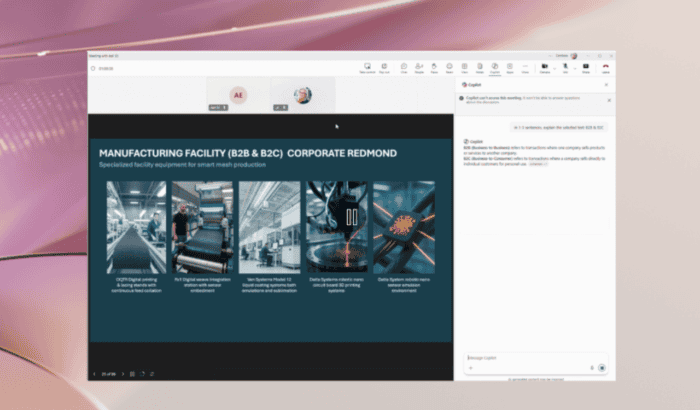
Microsoft has announced two new features for PowerPoint Live in Microsoft Teams called Explain and Refresh. While neither change how presentations are created, both are designed to make live meetings feel smoother for presenters and far less confusing for attendees.
Microsoft wants meetings to stay on track
One of the biggest additions is Refresh. Rather than ending a presentation or resharing an updated PowerPoint deck, presenters can now reload the newest version of their file with a single click while remaining on the same slide.

Microsoft says the feature helps in situations where a presentation changes moments before or even during a meeting. Updated figures, corrected information, or last-minute edits can now appear instantly without disrupting the session or forcing participants to reconnect to a new presentation.
Once the refresh is complete, presenters will also see a confirmation message indicating they’re already presenting the latest version of the deck.
Copilot can explain slides without interrupting anyone
For attendees, Microsoft is introducing Explain, an AI-powered feature built into PowerPoint Live using Copilot. Rather than asking the presenter to clarify an unfamiliar term, users can simply highlight text directly on a slide and ask Copilot to explain it.

The generated explanation appears inside the Copilot pane, which allows attendees to understand unfamiliar words, acronyms, or concepts without interrupting the meeting.
There are a few limitations, though. Microsoft notes that Explain currently works best with text-based content, while complex visuals such as charts and diagrams may not always be interpreted accurately.
The Explain feature requires both a Microsoft 365 subscription and a Microsoft 365 Copilot license, while Refresh only requires a Microsoft 365 subscription. Both feature are now available for PowerPoint on Windows and Mac.

Read our disclosure page to find out how can you help Windows Report sustain the editorial team. Read more



Improve this guide




User forum
0 messages