
Windows 11 backup prompt can disrupt your workflow
Is it really a helpful alert?


 2 min. read
  Updated on
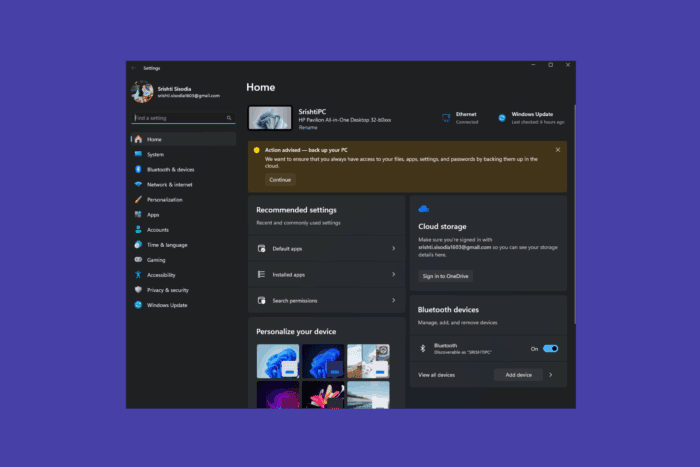
Microsoft has added a yellow banner to the Settings app on Windows 11, advising you to take a backup of your PC. This banner is drawing criticism as it’s disruptive, difficult to dismiss, and in some cases, blocks access to their PCs.
The persistent yellow banner in Windows 11 Settings prompts you to back up your system frequently using OneDrive. If you want, you can click Continue to create a backup.
This may seem like a minor reminder, which seems harmless. Still, many users have complained that the notification can’t be dismissed permanently, as it reappears after a few days, which is annoying. Many users referred to it as an advertisement for OneDrive’s paid storage plan rather than a recommendation or alert.
What’s more alarmingly frustrating is that after rebooting, this backup prompt escalates into a full-screen message that blocks system access, preventing you from logging in until you interact with the message.
Brien Posey, an IT professional, shared an example where his remote PC was running AI models, which became inaccessible due to a post-reboot alert covering the screen. And to regain access, he had to intervene manually, which stopped important tasks and demonstrated how these interruptions could slow him down and disrupt his workflow. Posey said:
This kind of interruption isn’t just annoying—it can stop automated tasks and force downtime. There’s currently no reliable way to permanently disable these prompts.
Users and experts, especially using Windows 11 Pro, are urging for a clearer opt-out option so that they can have better control over such notifications. So far, Microsoft has not addressed this concern and has not mentioned whether a group policy setting exists to suppress these messages.
Do you also find this Windows 11 backup prompt annoying? Tell us in the comments section below.

Read our disclosure page to find out how can you help Windows Report sustain the editorial team. Read more



Improve this guide
User forum
2 messages