
Windows 11 Finally Makes It Easier to Disable Sticky Keys Pop-Ups


 2 min. read
 Published on
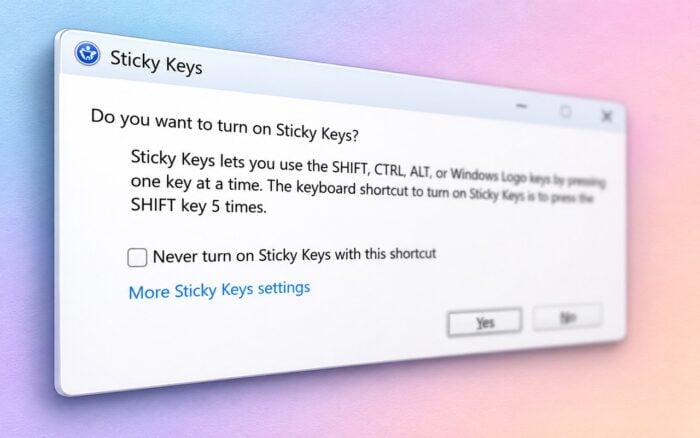
Microsoft is making it easier to disable unwanted Sticky Keys and Filter Keys pop-ups in Windows 11. New activation dialogs let users turn off the keyboard shortcuts directly from the pop-up without opening Settings.
The change is appearing in recent Windows 11 Insider builds, including Beta Build 26320.9876.
Windows 11 gets a simpler way to disable Sticky Keys
Pressing the Shift key five times triggers the Sticky Keys activation dialog. This often happens accidentally, especially while gaming or repeatedly pressing keyboard shortcuts.
Until now, users had to open the Settings app to disable the shortcut and prevent the dialog from appearing again.
Microsoft is simplifying the process by adding a checkbox labeled “Never turn on Sticky Keys with this shortcut” directly to the activation dialog.
Users can select the option to disable the shortcut and prevent future interruptions without navigating through Windows settings.
Microsoft is also introducing a similar option for Filter Keys, which can activate when users hold down the right Shift key for eight seconds.
Sticky Keys and Filter Keys have been around for decades
Both accessibility features date back to Windows 95 and help users who have difficulty pressing multiple keys or controlling repeated keystrokes.
Sticky Keys allows users to press modifier keys such as Ctrl, Alt, and Shift one at a time instead of simultaneously.
Filter Keys helps Windows ignore brief or repeated keystrokes, making typing easier for people with certain motor difficulties.
However, their activation shortcuts can interrupt gaming, typing, and other everyday activities when users trigger them accidentally.
The new dialogs give users a quicker way to prevent these interruptions while keeping the accessibility features available through Settings.
When will the new dialogs arrive?
Microsoft has not announced when the updated Sticky Keys and Filter Keys dialogs will become available to all Windows 11 users.
For now, the changes are appearing in Insider builds, and Microsoft could roll them out more broadly in a future Windows 11 update.
In other news, Microsoft is testing a modern Windows 11 Registry Editor, while AMD has confirmed a Radeon driver bug that may shorten SSD lifespan.
Via Neowin

Read our disclosure page to find out how can you help Windows Report sustain the editorial team. Read more


Improve this guide




User forum
0 messages