
Microsoft 365 Copilot in Word Online Now Fixes Grammar in One Click
AI can now help clean up your writing with ease


 1 min. read
  Updated on

Microsoft has added a time-saving proofreading feature to Word for the web, allowing users to fix all spelling and grammar mistakes at once. The company today announced the update via Tech Community blogpost.
Instead of manually reviewing each suggestion, the new tool lets you apply corrections instantly. No wonder, it’s an ease for those who require editing long documents, reports, or academic writing.
How to use Copilot’s one-click grammar fix in Word online?
- First, open Word for the web and load a document.
- Then, highlight text (or select the entire document).
- In the left margin, click the pen with stars icon.
- From the quick actions, choose Fix spelling and grammar.

- Review the changes:
- Click Keep all to accept corrections.
- Click Undo all to revert to your draft.
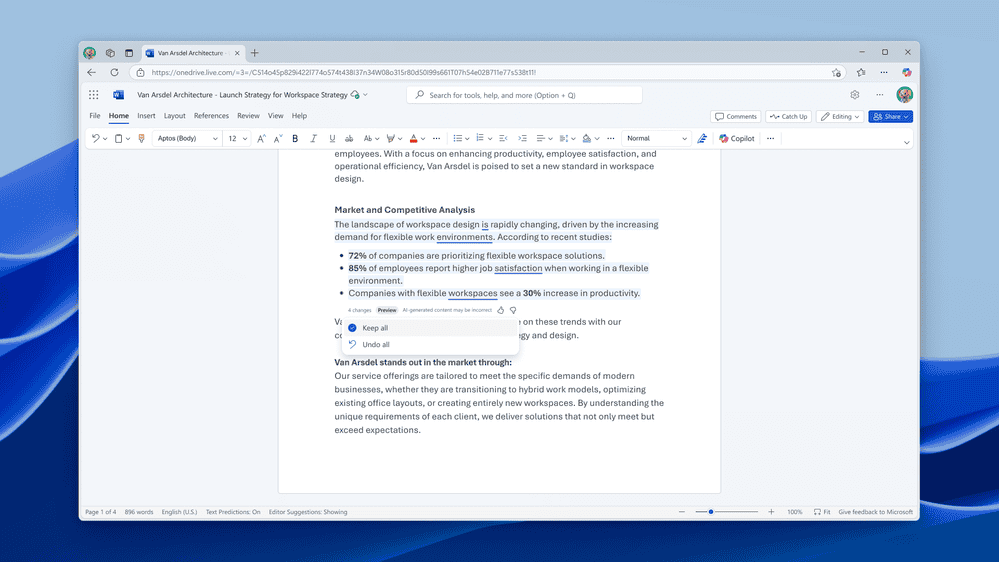
Quick Tip: To undo a single change, hover over it and select the Undo icon.
Requirements and availability
You can use this feature only if you’ve Microsoft 365 Copilot license (consumer or business). Besides, it only works only in Word for the web. Moreover, Microsoft says that the feature is currently limited to English documents.

Read our disclosure page to find out how can you help Windows Report sustain the editorial team. Read more



Improve this guide



User forum
0 messages