
KB5079492 (Dev) & KB5079491 (Beta) Bring Administrator Protection Toggle & Better Touchpad Controls


 2 min. read
  Published on

Microsoft has kicked off this week with four new Windows 11 builds, with Insiders in the Dev and Beta channels getting one each, Build 26300.8142 (KB5079492) and Build 26220.8138 (KB5079491), respectively. Both the builds come with almost identical improvements and changes.
One of the notable changes introduced by both the builds is the expansion of Administrator Protection. Microsoft now allows users to toggle this feature directly from Settings under Privacy and Security. It was previously limited to IT-managed environments, but it’s now becoming more accessible. However, a system restart is required after enabling it.
Besides that, Microsoft has also introduced a small but useful setting for touchpad users. After installing KB5079492 and KB5079491, Insiders will also find a new setting that lets you adjust the size of the right-click zone on supported touchpads. You can choose between default, small, medium, or large, depending on how sensitive or precise you want the input area to be.
That being said, the feature won’t appear on all devices. It’s limited to touchpads with a pressable surface, and some manufacturers may still override this with their own customization tools. In those cases, a “Custom” option will show up to preserve existing settings.
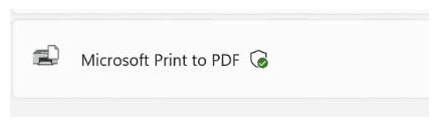
Moving on, Microsoft has also addressed an issue an issue resulting in Windows displaying in English for some Beta channel Insiders rather than their preferred language. Moreover, Dev channel Insiders will see a new icon for Windows Protected Print Mode.
Speaking of other changes, Dev and Beta channel insiders are also getting few improvements related to Task Manager. You can read nore about it in our separate coverage here. Notably, both channels are also getting fixes for an issue that previously impacted the use of Braille in the “last few flights.”

Read our disclosure page to find out how can you help Windows Report sustain the editorial team. Read more



Improve this guide


User forum
0 messages