
Google Expands Connect Room Feature for Meet Hardware Users
Uses ultrasound to enable seamless, code-free meeting room connections


 2 min. read
  Published on
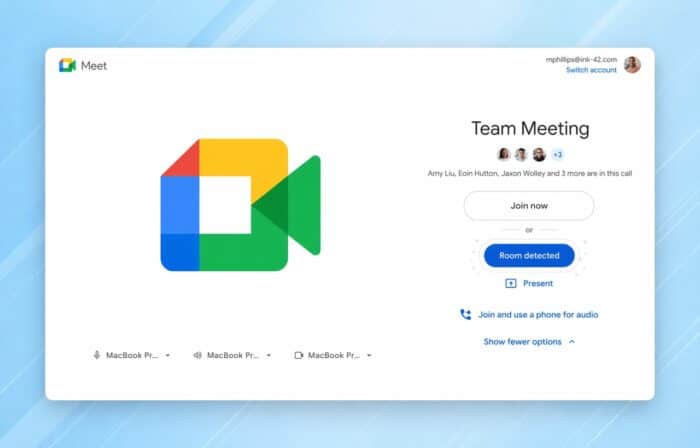
Google has expanded the availability of its “Connect Room” feature, bringing it to all Google Workspace customers using Google Meet hardware. The update focuses on faster, more seamless meeting access in physical rooms without manual setup.
No Codes Needed: How Connect Room Works
The Connect Room feature removes the need to enter meeting codes when joining from a laptop. Instead, users can connect directly from the pre-join “green room” screen in Google Meet.
It relies on ultrasound proximity detection. Your laptop microphone picks up a high-frequency signal emitted by nearby meeting room hardware. Once detected, the usual “Use Companion mode” option changes into a “Connect room” button.
Clicking it instantly starts the meeting on the room device while placing your laptop into Companion mode, letting you interact without duplicating audio or video.
Improvements for Multi-Room Environments
Google has added smarter handling for offices with multiple meeting rooms nearby. If more than one room is detected, users now receive a prompt to select the correct one.
There’s also new on-screen guidance. Meeting room displays now show instructions for users who still try to join meetings manually with codes, helping reduce confusion.
Limitations and Controls
The feature uses continuous ultrasound signals, which may raise concerns. While most users won’t notice it, people with sensitive hearing or nearby animals could detect the sound.
Admins and users can disable the feature directly from the Google Meet touch controller if needed.
Practical Benefits for Offices
Connect Room enables quicker access to meeting spaces, especially for unplanned or ad-hoc sessions. Users can walk into an available room, connect instantly, and even take over reserved but unused spaces.
This reduces friction in shared office environments while improving overall meeting efficiency.
Google’s expanded rollout of Connect Room focuses on speed and convenience. The feature streamlines how users interact with meeting room hardware and reduces common friction points in hybrid work setups.
In other news, Google is working to stop back button hijacking on websites. Chrome is also testing a new “Skills” feature to save and reuse prompts, while the Google Desktop app for Windows is now rolling out globally.
Via Neowin

Read our disclosure page to find out how can you help Windows Report sustain the editorial team. Read more



Improve this guide


User forum
0 messages