
Google Chrome Gets “Skills” to Let You Save & Reuse AI Prompts Instantly
The new feature is gradually rolling out users


 2 min. read
  Published on
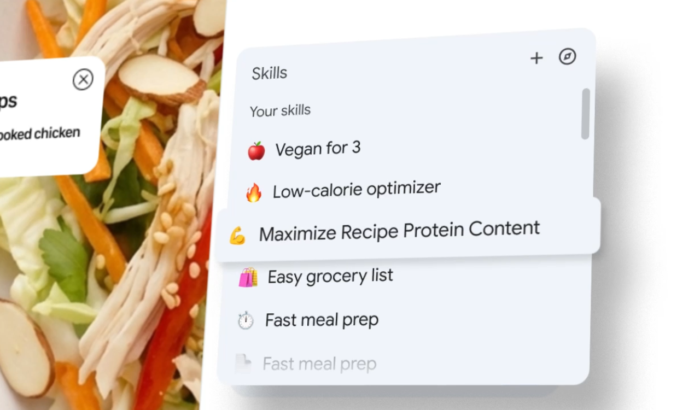
These days you’d find bunch of AI features inside Google Chrome, and if you use them, you probably find yourself repeating the same prompts again and again. Whether it’s comparing products or summarizing pages, the process usually involves typing the same thing multiple times. Now, Google appears to be working on fixing that.
Chrome introduces “Skills” to reuse AI prompts instantly
Google has started rolling out a new feature called “Skills” for Gemini in Chrome. Rather than re-entering prompts, you can now save them and reuse them with a single click across different tabs. Once a prompt is saved as a Skill, it can be triggered directly while browsing.
You can access it by typing a slash command or using the add button inside Gemini. The saved prompt then runs on the current page or even across multiple selected tabs. As Google notes in the announcement blogpost, this feature could be useful for tasks like comparing specs, scanning long documents, or even analyzing product details. You can further edit saved Skills anytime, so workflows can be adjusted based on needs.
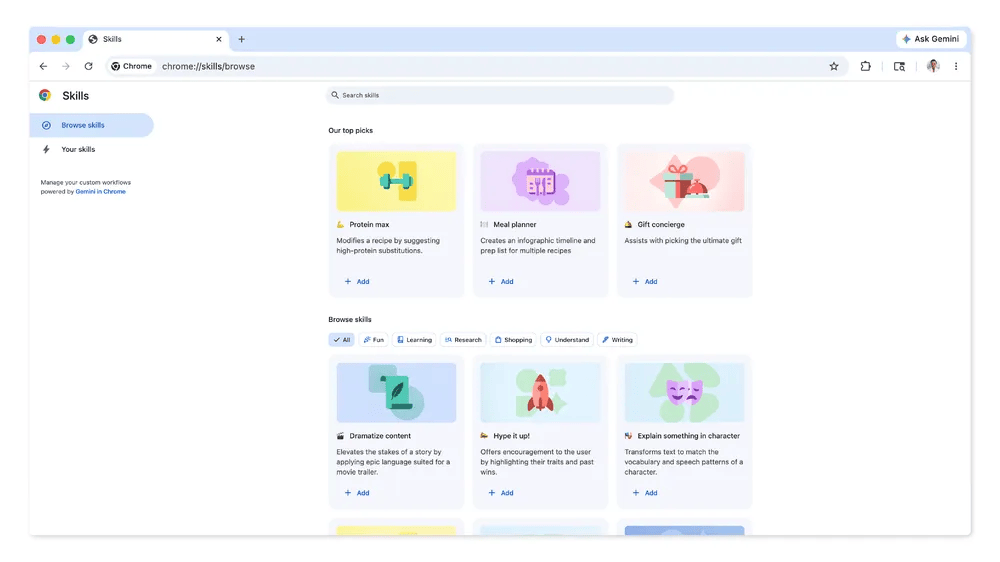
Built-in library and control features included
Besides custom Skills, Google is also introducing a library of ready-made options. These are designed for common use cases like shopping comparisons or breaking down product information. If a prebuilt Skill fits your use case, you can add it and modify it later. That means you don’t have to start from scratch every time.
On the control side, Google says Skills follow the same privacy and security rules as Gemini prompts. That means some actions will still require confirmation from your side, especially if they involve things like sending emails or adding calendar events. Google says that the feature is rolling out gradually, so not everyone will see this feature yet.
Speaking of Chrome, let’s not forget that over 100 Web Store extensions are reportedly attempting to steal sensitive user data, including Google OAuth2 bearer tokens, which can allow attackers to access accounts without needing login credentials.

Read our disclosure page to find out how can you help Windows Report sustain the editorial team. Read more



Improve this guide



User forum
0 messages