
Where is AOL Mail stored on my computer?


 6 min. read
  Published on
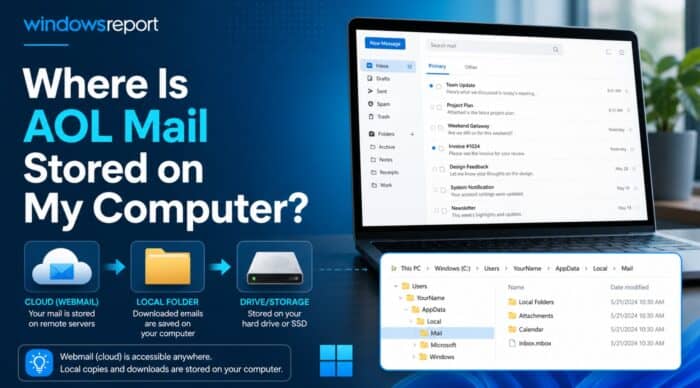
AOL Mail is not usually stored in one obvious “AOL Mail” folder on your Windows PC. If you use AOL Mail in a browser, your messages remain in your AOL mailbox online, while your computer may only keep temporary browser cache files. Local mail storage appears when you use AOL Desktop Gold, Outlook, Thunderbird, Windows Mail, or another mail client configured with POP or IMAP. AOL explains that POP downloads a copy of messages to the app, while IMAP keeps the app and AOL mailbox synchronized.
Where AOL Mail may be stored on Windows
| AOL Mail setup | Where to look |
|---|---|
| AOL Mail in a browser | Not stored as readable email files on your PC; only temporary browser cache may exist |
| AOL Desktop Gold | %LOCALAPPDATA%\AOLDesktopData\db or use Desktop Gold’s My Data export option |
| Older AOL Desktop versions | C:\ProgramData\AOL\... folders, often organize or backup, depending on the AOL version |
| Outlook with AOL account | .pst files in C:\Users\<username>\Documents\Outlook Files; .ost files in C:\Users\<username>\AppData\Local\Microsoft\Outlook |
| Thunderbird with AOL account | %APPDATA%\Thunderbird\Profiles\ |
| Windows Mail / Mail and Calendar | Local items may exist, but Microsoft ended support for Windows Mail and Calendar on December 31, 2024 |
1. If you use AOL Mail in a browser
If you open AOL Mail from mail.aol.com, your inbox is not saved as a normal local folder on your computer. Your PC may store cookies, cached pages, and temporary web files, but these are not a reliable AOL Mail backup.
To save a real local copy, connect AOL Mail to a desktop mail app such as Outlook or Thunderbird using IMAP or POP. AOL’s IMAP guide also notes that large mailboxes can take days or longer to download and that backup users should make sure the app downloads full email content, not just previews.
2. Find AOL Desktop Gold mail data
For AOL Desktop Gold, press Windows + R, paste the following path, and press Enter:
%LOCALAPPDATA%\AOLDesktopData\dbAOL’s own feedback page previously identified this as the local database folder for the Personal Filing Cabinet in AOL Gold. Do not edit or delete files inside this folder unless you already made a backup.
The safer method is to use AOL Desktop Gold’s built-in export tool:
- Open AOL Desktop Gold.
- Click Settings.
- Go to General settings.
- Open the My Data tab.
- Click Export.
- Choose where to save the file.
AOL says the export file is saved by default in My Documents and named AOL Desktop Backup plus the backup date.
3. Find older AOL Desktop “Saved on My PC” mail
Older AOL Desktop versions used the AOL Personal Filing Cabinet, or PFC. The Library of Congress describes PFC as a proprietary local database format used by AOL Desktop for offline data, including stored AOL email messages, and notes that each AOL username can have its own PFC file in an Organize folder.
Common older locations include:
C:\ProgramData\AOL\
C:\ProgramData\AOL\C_AOL Desktop 9.x\organize
C:\ProgramData\AOL\C_AOL Desktop 9.x\backup
For older AOL Desktop versions, AOL’s feedback page also points users to a ProgramData AOL version folder and says the file may be named after the AOL screen name with no extension.
A quick way to search is:
- Open File Explorer.
- Select This PC.
- Search for:
*.pfcAlso search for your old AOL screen name if you remember it. If you find old AOL data, copy it to another folder before trying to import it into AOL Desktop Gold.
4. Find AOL Mail stored in Outlook
If you added AOL Mail to classic Outlook, your mail may be stored in an Outlook data file.
Check these locations:
C:\Users\<username>\Documents\Outlook Files
C:\Users\<username>\AppData\Local\Microsoft\Outlook
Microsoft says POP account data is stored in a .pst file and lists Documents\Outlook Files as the Windows 10 and Windows 11 location. For IMAP, Outlook.com, and Exchange-style accounts, Microsoft says Outlook uses an offline .ost file in AppData\Local\Microsoft\Outlook; this is a synchronized server copy, not the best backup file to rely on.
To find the exact Outlook file:
- Open Outlook.
- Go to File.
- Select Account Settings > Account Settings.
- Open the Data Files tab.
- Select the AOL account file.
- Click Open File Location.
5. Find AOL Mail stored in Thunderbird
If you use AOL Mail in Thunderbird, open the Thunderbird profile folder:
%APPDATA%\Thunderbird\Profiles\Mozilla says Thunderbird stores Windows profiles by default in C:\Users\<your Windows login username>\AppData\Roaming\Thunderbird\Profiles\, and you can open it quickly with Windows + R and %APPDATA%\Thunderbird\Profiles\.
Inside the profile, look for folders such as:
ImapMail
Mail
Local Folders
The exact folder depends on whether AOL was configured as IMAP, POP, or moved into Thunderbird’s Local Folders.
6. What about Windows Mail or the new Outlook?
If you used the old Windows Mail and Calendar apps, do not treat their local files as a long-term AOL Mail backup. Microsoft says support for Windows Mail, Calendar, and People ended on December 31, 2024, and recommends moving to the new Outlook or Outlook.com. Local emails, calendar events, and contacts remain exportable through Microsoft’s migration steps.
How to create a proper AOL Mail backup
The most reliable approach is to export from the app that actually stores the mail locally.
For AOL Desktop Gold, use Settings > General settings > My Data > Export. AOL says this export includes personal data such as Mail, Favorites, Address Book, and settings.
For Outlook, export to a .pst file or copy the existing .pst after closing Outlook.
For Thunderbird, copy the entire profile folder from:
%APPDATA%\Thunderbird\Profiles\For a new third-party mail app, AOL provides POP and IMAP settings, including imap.aol.com on port 993 with SSL and smtp.aol.com on port 465 with SSL. Older apps may also require an AOL app password instead of the normal account password.
Final answer
AOL Mail is stored online unless you used a desktop app to download or archive it. Check AOL Desktop Gold’s local database or export tool, Outlook’s .pst or .ost files, Thunderbird’s profile folder, or older AOL Desktop PFC folders. If you only used AOL Mail in a browser, you probably do not have readable AOL emails stored locally on the computer.

Read our disclosure page to find out how can you help Windows Report sustain the editorial team. Read more



Improve this guide




User forum
1 messages