
Windows 11 Insider Experimental 26H1 Adds Movable Taskbar Support


 3 min. read
  Published on
Windows 11 Insider Experimental Preview Build 28120.2387 is now available for Insiders in the Experimental 26H1 channel, and the main change is a feature many users have requested for years: taskbar repositioning.
Windows 11 Taskbar Can Now Move to the Top, Left, or Right
Microsoft is adding support for moving the Windows 11 taskbar to different sides of the screen. Insiders can now choose bottom, top, left, or right from the Taskbar behaviors section in the Settings app.
Microsoft says tooltips, flyouts, and animations will still appear from the taskbar when users move it to alternate positions. Most existing taskbar customization options will also continue to work.
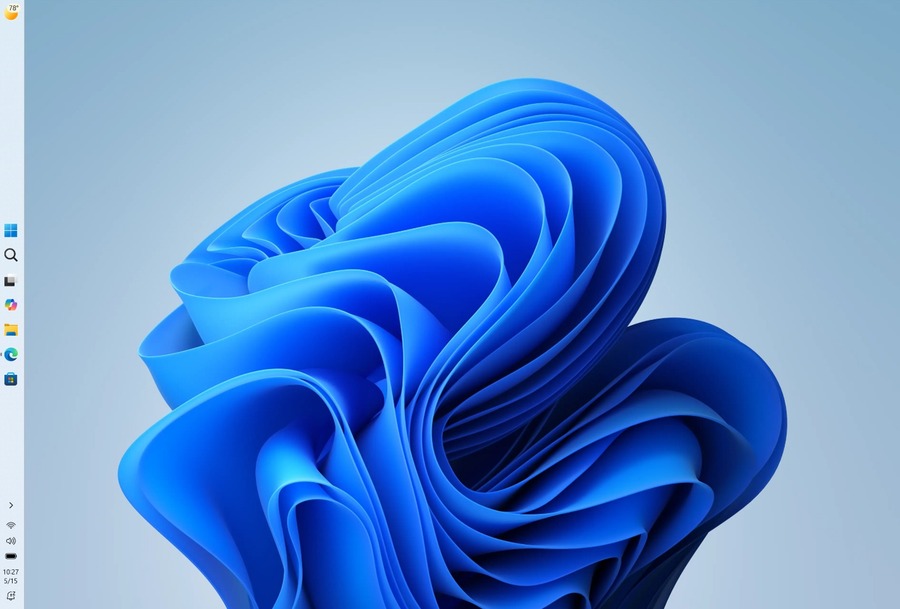
That includes small taskbar support and the option to never combine taskbar icons. However, not every taskbar feature works across all positions yet.
Support for touch gestures, the Search box, and Ask Copilot in alternate taskbar positions remains in development. Auto-hidden taskbar and the touch-optimized taskbar also do not support the new placement options at this stage.
Smaller Taskbar Option Arrives in Windows 11 Preview
Microsoft is also introducing a smaller taskbar option for users who want more space on the desktop.
The default taskbar size remains unchanged, but users can enable smaller taskbar buttons from Settings. The option appears under Taskbar > Taskbar behaviors > Show smaller taskbar buttons.
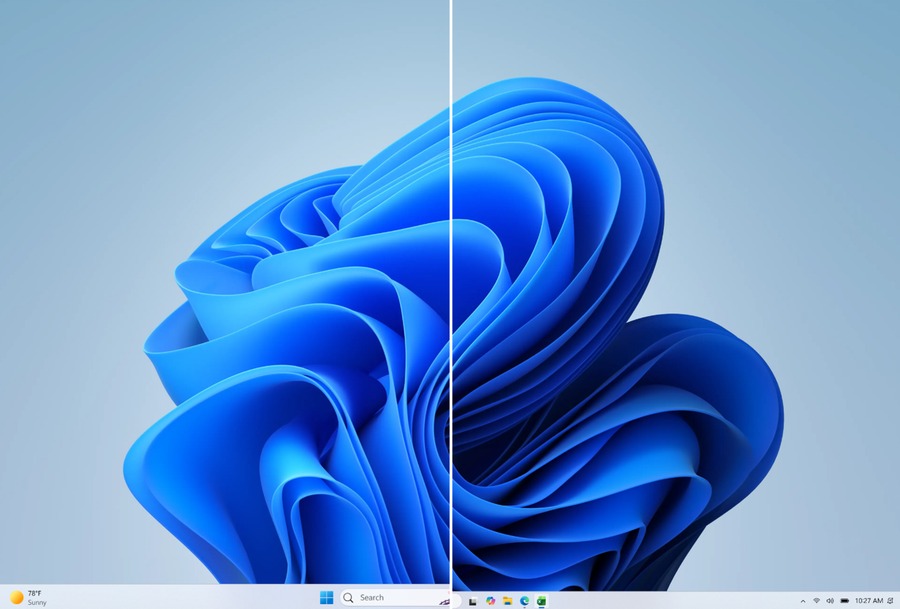
When users set the option to Always, Windows 11 reduces both the taskbar icon size and the overall taskbar height. Microsoft says core elements such as Start, Search, and the system tray scale properly so the layout stays aligned.
The company is also working on improved taskbar settings to make resizing easier in future builds.
Windows 11 Home Gets Pro Education Upgrade Path for K-12 Schools
Build 28120.2387 also adds a new upgrade path for K-12 education environments.
Schools can now buy Windows 11 Home devices and upgrade them to Windows 11 Pro Education at no extra cost, as long as they meet eligibility requirements. This allows schools to bring lower-cost devices under education management policies.
To start the upgrade, users need to sign in with a local account, run Clipupgrade.exe from an elevated Command Prompt, and then sign in with a K-12 organization account to validate eligibility.
The device completes the upgrade after a restart.
Microsoft notes that this is a one-way upgrade. Schools that need to return a device to Windows 11 Home must perform a clean OS reinstall.
File Explorer and Outlook Fixes
Microsoft also fixed an issue where the OneDrive shortcut in File Explorer stopped working when File Explorer ran in administrative mode.
The company says last week’s issue where Outlook did not respond to the close button should now be fixed as well.
A Bigger Week for Windows 11 Insider Builds
This is not the only Windows 11 Insider release this week. Microsoft also released Windows 11 Insider Beta Preview Build 26220.8764 and Windows 11 Insider Experimental Preview Build 26300.8772.
Those builds focus on other improvements, but Build 28120.2387 stands out because it brings back one of the most requested taskbar customization features in Windows 11.

Read our disclosure page to find out how can you help Windows Report sustain the editorial team. Read more



Improve this guide


User forum
0 messages