
Microsoft Is Updating Windows 11’s Outdated Local Account Dialog


 3 min. read
  Published on
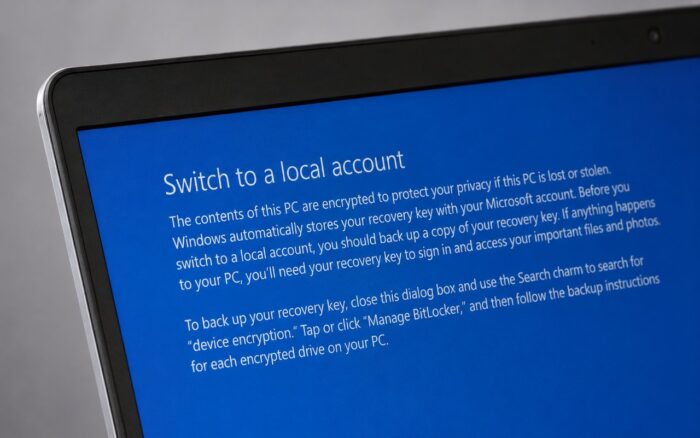
Microsoft is working on an update for one of Windows 11’s most outdated account dialogs, after users spotted a local account prompt that still references a Windows 8 feature.
The old “Switch to a local account” dialog was found in Windows 11 25H2 build 26200.8655. Marcus Ash, who leads Design and Research for Windows and Devices at Microsoft, confirmed that the dialog is now on Microsoft’s rejuvenation list.
Windows 11 still references the Windows 8 Search charm
The outdated dialog appears when users switch from a Microsoft account to a local account on a device with BitLocker or device encryption enabled.
The prompt tells users to back up their recovery key by using the Search charm to search for device encryption. That instruction no longer makes sense in Windows 11.
The Search charm was part of the Windows 8 Charms Bar. Microsoft removed it in 2015 when Windows 10 replaced the Windows 8 interface.
This means Windows 11 still contains a local account dialog that points users to a feature that disappeared more than a decade ago.
Microsoft says the dialog is on its rejuvenation list
Ash confirmed that Microsoft plans to update this dialog and other classic Windows surfaces.
The outdated local account prompt likely remained untouched because Microsoft has not focused much on local account workflows in recent Windows 11 releases. The company has pushed Microsoft account sign-ins more aggressively, which may explain why this specific dialog went unnoticed for so long.
Its addition to the rejuvenation list shows that Microsoft still plans to clean up older parts of Windows 11 that do not match the current design language.
Run, File Explorer, and Properties dialogs are also changing
Microsoft has already updated several UI elements across Windows 11 as part of its ongoing rejuvenation effort, bringing more consistency and modern design to legacy components.
The Run dialog stands out as one of the most visible examples of Microsoft’s UI modernization work.
Microsoft has also worked on File Explorer improvements, including the newer Split Context Menu. References found in File Explorer suggest the old Properties dialog may also get rebuilt in WinUI 3.
These changes point to a broader cleanup effort rather than a one-off fix.
More legacy Windows UI still needs work
Microsoft has also acknowledged the outdated UI on the Windows 11 login screen.
Other areas, including Windows Recovery Environment and the old “Please wait” screen, still look dated compared to the rest of Windows 11. These areas remain likely candidates for future updates as Microsoft continues modernizing the operating system.
The local account dialog is a small part of Windows, but its outdated Windows 8 reference highlights a bigger issue. Windows 11 still carries design debt from older versions, and Microsoft now appears to be working through those leftovers more actively.
Via Windows Latest

Read our disclosure page to find out how can you help Windows Report sustain the editorial team. Read more



Improve this guide




User forum
0 messages