
Microsoft Admits Windows 11 Still Has Outdated UI Elements, Fixes Coming
Windows 11 UI is still stuck in the Windows 8 era


 2 min. read
  Published on
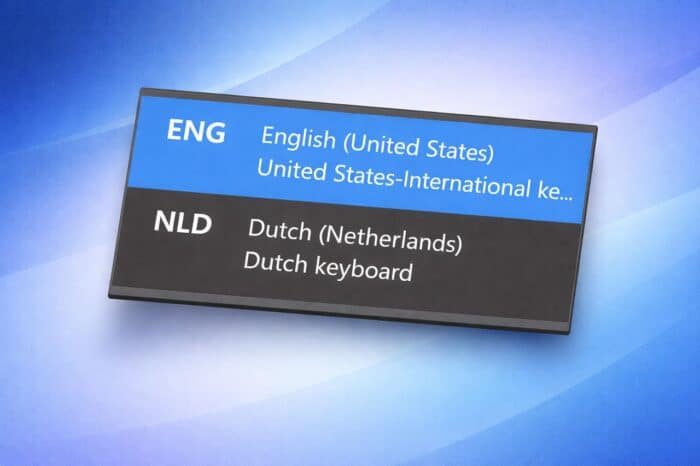
Microsoft has acknowledged that parts of Windows 11 still rely on outdated design elements, with fixes now actively in development, as Windows Latest writes.
The issue gained attention on X, where users highlighted inconsistencies across the operating system. Microsoft design leadership responded, confirming that improvements are underway.
Legacy UI Still Present Across Windows 11
One of the most visible examples is the input method switcher, which still uses a Windows 8-style design. It appears on the login screen before sign-in and does not match Windows 11’s Fluent Design with rounded visuals.
Other outdated elements remain scattered across the system. The Windows Recovery Environment continues to use older UI frameworks, while the familiar “Please wait” screen with rotating dots has remained largely unchanged since Windows 8.
Users also encounter legacy tools like Registry Editor and Device Manager, alongside the classic context menu that appears under “Show more options.” These elements create a mixed experience that blends Windows 11, Windows 10, and even older design styles.
A System Split Between Old and New
Windows 11 still shows a clear divide between modern and legacy interfaces. The newer Settings app follows Microsoft’s Fluent Design principles, while the Control Panel remains rooted in older UI concepts.
This split highlights one of Microsoft’s biggest challenges. Fully replacing legacy components proves difficult due to deep system dependencies and long-standing user workflows.
Why Microsoft Hasn’t Removed Old UI Yet
Backward compatibility remains a key priority for Windows. The system must support older drivers, enterprise tools, and legacy workflows that many businesses still rely on.
Low-level components such as boot, recovery, and login environments also require careful handling. Redesigning them without breaking compatibility takes time and extensive testing.
Microsoft Signals a Push for UI Consistency
Microsoft has now placed the input method switcher on its internal “craft list,” meaning active work has started to modernize it.
The company has also shown a stronger willingness to act on user feedback, suggesting a broader effort to unify the Windows experience.
Recent Insider builds already reflect this direction, with improvements like faster navigation in Storage settings. More visual and performance updates are expected as Microsoft continues refining Windows 11.

Read our disclosure page to find out how can you help Windows Report sustain the editorial team. Read more



Improve this guide

User forum
0 messages