
Beware: Chrome may soon hide your bookmarks bar if you don't use it
Chrome Stable can hide the bookmarks bar after inactivity, with an Undo button that lets you bring it back.


 2 min. read
  Published on
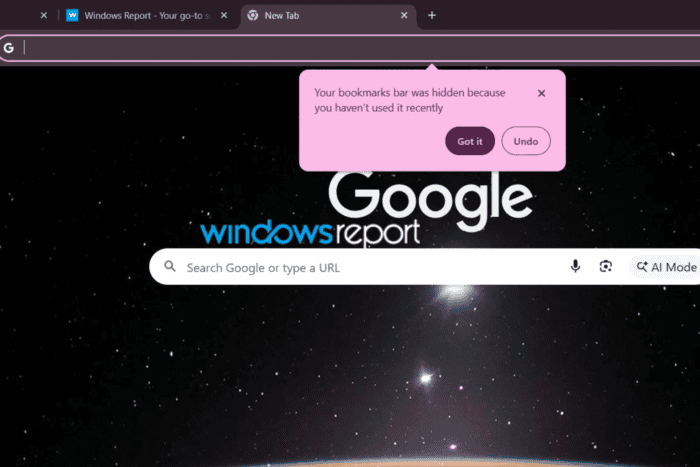
Chrome is testing a change that can hide your bookmarks bar after it detects that you haven’t used it recently.
The change is part of Chrome’s NTP Simplification Bookmark Bar feature which we reported before. Chromium describes it as a feature that can automatically remove the bookmark bar and change its visibility setting.
We tested the feature in Chrome Stable after enabling the flag and found that Chrome can hide the bookmarks bar after a period of inactivity. When that happens, the browser shows a notification explaining the change: “Your bookmarks bar was hidden because you haven’t used it recently,” with two buttons, “Got it” and “Undo”.
Clicking Undo brings the bookmarks bar back.
The feature also changes the bookmarks bar option under Settings > Appearance. With the flag enabled, Chrome replaces the old Show bookmarks bar toggle with three choices: “Always show”, “Only show on New Tab page”, and “Always hide”.
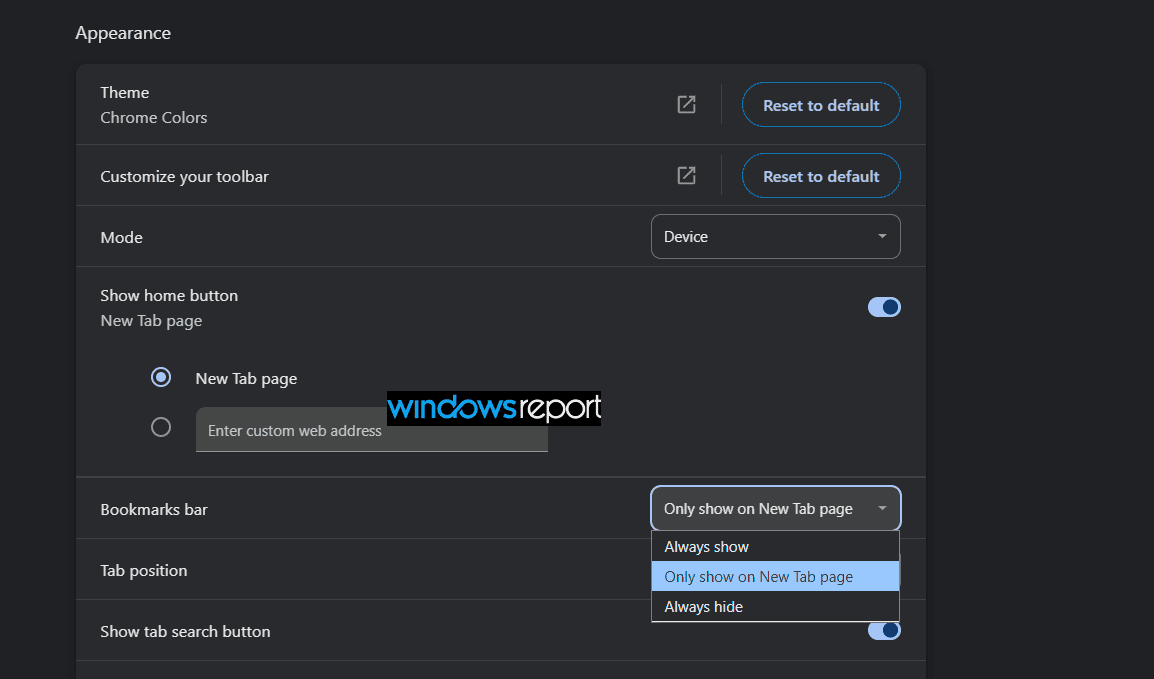
These three choices are not the new part of this story. The important change is that Chrome can switch the bookmarks bar to Always hide after it detects that you haven’t used it.
The default option is Only show on New Tab page. With this setting, the bookmarks bar appears on a new tab but stays hidden when you visit websites. Chromium’s tests confirm that this is the default visibility state when the feature is enabled.
Chromium’s tests also show that Chrome tracks repeated appearances of the bookmarks bar. If it appears repeatedly without interaction, Chrome can switch its visibility state to Always hide after detecting that the bar has gone unused.
This means Chrome can change the bookmarks bar setting on its own. You don’t have to select Always hide yourself.
The behavior could catch users off guard. Someone who normally sees the bookmarks bar could open a new tab and find it gone even though they never changed the setting. Chrome does explain the change through its notification, and Undo lets users bring the bar back.
For now, this behavior is not enabled by default in Chrome Stable. You need to enable the NTP Simplification Bookmark Bar flag in chrome://flags to test it. And you can always controls bookmarks bar visibility by going to appearance settings.


Read our disclosure page to find out how can you help Windows Report sustain the editorial team. Read more



Improve this guide

User forum
0 messages