
How to Login to Federal Student Aid (FAFSA) Account


 4 min. read
  Published on
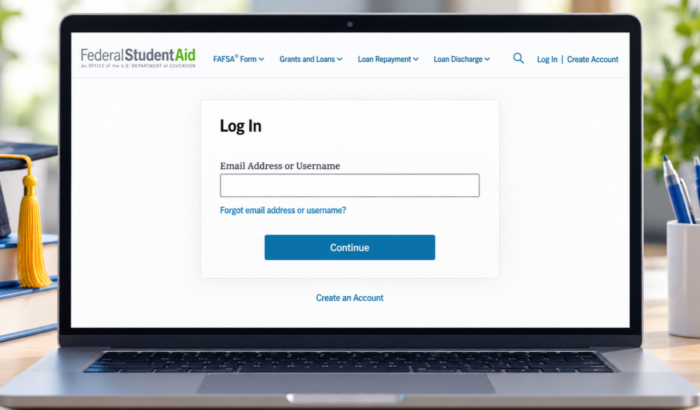
Are you trying to access your FAFSA application but unsure where to start? Well, logging into your StudentAid.gov account is the key to completing the Free Application for Federal Student Aid, checking your application status, and managing your federal student aid information. You can sign in through the official website using your email address or username. In this guide, we’ll walk you through each and every step to login into Federal Student Aid (FAFSA) portal.
How to Log In to FAFSA on the Website
The official Federal Student Aid website offers you a login page where you can enter your account details. Follow the given steps to access your account:
- Open your web browser and visit the official StudentAid.gov login page.
- Find the Email Address or Username field.
- Enter the email address or username associated with your StudentAid.gov account.
- Click Continue.
- Follow the prompts to enter your password and complete any required security verification.
- Once authentication is complete, open your FAFSA form or account dashboard.
If you do not have an account yet, select Create an Account on the official website. You will need to complete the account registration process before accessing services that require a StudentAid.gov login.
How to Log In to FAFSA on a Phone
You do not need a dedicated mobile app to access your FAFSA account. The official website works on your phone’s browser, including Chrome on Android and Safari on iPhone.
- Open your phone’s browser.
- Visit StudentAid.gov.
- Tap Log In in the navigation menu.
- Enter your email address or username and tap Continue.
- Enter your password and complete any requested security checks.
- Open your dashboard to find your FAFSA application.
For a new application, visit FAFSA.gov and select Start New Form. Choose the correct academic year and identify whether you are starting the form as a student or parent.
How to Fix FAFSA Login Issues
If the login page rejects your details, try these fixes before creating another account. Most account access problems can be addressed through the official recovery options.
- Recover your email address or username: On the login page, select Forgot email address or username? Follow the prompts to verify your identity and recover your login details.
- Reset your password: Return to the login page and select the password recovery option when it appears. Complete the verification process and follow the instructions to set a new password.
- Check your verification code: If you do not receive a security code, check your email’s spam folder and confirm your registered contact details. You can also use another verification method if one is available in your account.
- Wait if your identity is still being verified: Newly created accounts may have limited functionality while identity information is checked. Follow any instructions sent by Federal Student Aid before attempting to create another account.
- Try another browser: Clear your browser’s cookies and cache, disable extensions that might interfere with sign-in, or open the website in a private window.
If none of these steps works, visit the official Federal Student Aid Help Center for account recovery assistance.
Summing Up
FAFSA login gives you access to your financial aid application, submission status, and other federal student aid services. Keep your account credentials secure, and use the official recovery options if you can’t sign in. If you’re still having trouble, our guides on fixing StudentAid.gov and FAFSA website issues and troubleshooting FAFSA login issues cover additional fixes for browser errors, identity verification, and session issues.
FAQs related to FAFSA login
1. Is FAFSA login the same as StudentAid.gov login?
Yes. Your StudentAid.gov account gives you access to the online FAFSA form and other federal student aid services.
2. Can I log in to FAFSA without a username?
You may be able to sign in using your registered email address instead of your username. If you cannot remember either, use the account recovery option on the login page.
3. Why can’t I see my FAFSA application after logging in?
Open your account dashboard and check the My Activity section. Your application may appear as a draft, in progress, in review, or processed, depending on its status.
4. Can parents use the student’s FAFSA login?
No. Parents who must contribute information need their own StudentAid.gov accounts. Each account belongs to one individual and must not be shared.
5. Is FAFSA login free?
Yes. Creating a StudentAid.gov account and submitting the FAFSA form are free. Use the official government website and avoid third-party services that charge unnecessary application fees.

Read our disclosure page to find out how can you help Windows Report sustain the editorial team. Read more



Improve this guide


User forum
0 messages