
Airbnb Login Guide: How to Access Account on PC or Mobile App


 4 min. read
  Published on
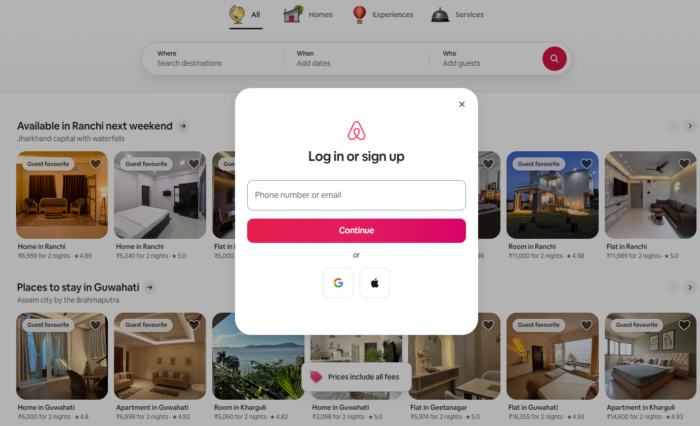
Logging in to your Airbnb account gives you instant access to your trip bookings, host dashboard, messages, and profile settings. Whether you are using a web browser or the mobile app, Airbnb uses a unified login system for both guests and hosts. In this guide, you’ll learn how to log into your Airbnb account and fix any issues that you might encounter during the sign in process.
How to Log In to Airbnb on a PC via Web Browser
The easiest way to access your Airbnb account is through its official website. You do not need to install an application or download additional software.
- Open your preferred browser, such as Chrome, Edge, or Firefox.
- Visit the official Airbnb website.
- Click Menu in the top-right corner.
- Select Log in or sign up.
- Choose an available sign-in method.
- Enter your registered email address or phone number.
- Follow the on-screen instructions and enter your verification code if requested.
Airbnb may send a confirmation code through text, a phone call, or email. You may also be able to enter your password manually, depending on the available login options. Once verification is complete, Airbnb should open your account. You can then view reservations, contact hosts, and manage your profile.
How to Log In to Airbnb on Android or iPhone
You can also access Airbnb through its official mobile application. This option is convenient when you need to check booking details or communicate with a host while travelling.
- Open the Airbnb app on your Android phone or iPhone.
- Tap Log in or sign up.
- Select your preferred sign-in method.
- Enter your registered email address or phone number.
- Enter the verification code Airbnb sends you, if prompted.
- Follow any remaining instructions to access your account.
If you do not have the app, download it from the Google Play Store or Apple App Store. Make sure the publisher is Airbnb before installing it.
What to Do If Airbnb Login Is Not Working
Airbnb login problems can occur because of incorrect account details, missing verification codes, or temporary connection issues. Try the following fixes before creating another account:
- Check your email address or phone number. Make sure you enter the details associated with your existing Airbnb account. If you have multiple email addresses, search your inbox for older Airbnb booking confirmations.
- Request another verification code. If the code does not arrive, check your spam folder and confirm that your phone number includes the correct country code. Airbnb recommends trying again after about a minute.
- Use another sign-in method. Select Try another way when the option appears. This may help you access your account through another supported verification method.
- Update the Airbnb app. Open your device’s app store and install any available updates. You can also try signing in through a browser to check whether the problem is limited to the app.
- Reset your password. If you cannot remember your password, follow Airbnb’s official password recovery guidance. Complete the verification process and create a new password if prompted.
Airbnb Login and Account Security
At a time when fake booking websites and phishing messages remain a concern, checking the website address matters. Always start at airbnb.com rather than following unfamiliar login links. Airbnb no longer supports Facebook login. If you previously used Facebook to access your account, try your registered email address or phone number instead.
FAQs related to Airbnb login
1. Can I log in to Airbnb without a password?
Yes, depending on your account and available verification options. Airbnb may let you sign in using a confirmation code sent to your registered email address or phone number.
2. Why am I not receiving my Airbnb verification code?
Check your contact details, network connection, and spam folder. Wait briefly before requesting another code. If the issue continues, visit the official Airbnb Help Center.
3. Can I log in to Airbnb using Google?
Airbnb supports Google sign-in for eligible accounts. Choose Google when it appears among the available options and follow the instructions.
4. What if I no longer have access to my registered phone number?
Try another available sign-in method, such as your registered email address. If you still cannot access your account, contact Airbnb Support.
Summing Up
Logging in to Airbnb is straightforward once you have your registered contact details and access to the required verification method. If sign-in fails, check your account information, request another code, or reset your password through Airbnb’s official website.

Read our disclosure page to find out how can you help Windows Report sustain the editorial team. Read more



Improve this guide
User forum
0 messages